Question: How to force to reload data for sever side Datagrid #118


-
|
Sample here: https://github.com/mschnecke/demo-blazority Detail: await Datagrid.RefreshViewItems(true); <= seems not to work |
Beta Was this translation helpful? Give feedback.
Replies: 4 comments

-
|
This should be working, you can see the "Reload" button implementation on Blazority site: |
Beta Was this translation helpful? Give feedback.
-
|
I will try this with your github example as well, thanks for creating the sample project. |
Beta Was this translation helpful? Give feedback.
-
|
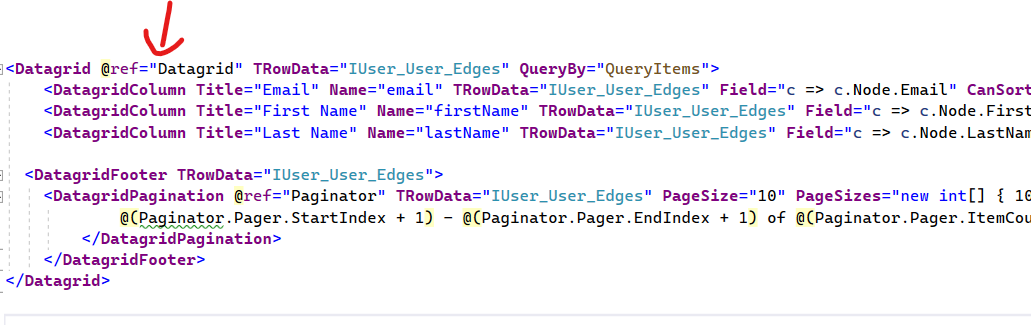
@mschnecke In your example code, you forgot to set the @ref object to Datagrid in the Index.razor template file.
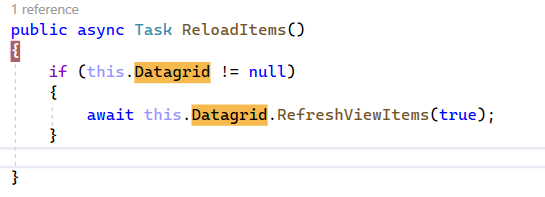
In the Index.razor.cs file, set the Datagrid property as following instead of using new() keyword Once this change was made, the Reload method worked properly since now it is pointing to correct Datagrid reference. I see new items getting added to the server and reload of data items: please feel free to reopen if you need additional help |

Beta Was this translation helpful? Give feedback.
-
|
It works. Thank you. Btw. the Datagrid documentation for server side has no @ref attribute. |
Beta Was this translation helpful? Give feedback.


@mschnecke In your example code, you forgot to set the @ref object to Datagrid in the Index.razor template file.
In the Index.razor.cs file, set the Datagrid property as following instead of using new() keyword
Once this change was made, the Reload method worked properly since now it is pointing to correct Datagrid reference. I see new items getting added to the server and reload of data items:
please feel free to reopen if you need additional help