
Replies: 2 comments 2 replies

-
|
Today I tried to resolve it for some time but till now, I was only able to find one problm and that is insert the line given below just after the find_sheet_end_point function. def find_sheet_end_point(window): I am still trying to get it, will update you asap. |
Beta Was this translation helpful? Give feedback.

-
|
Thank you, sir, and sorry for the inconvenience. |
Beta Was this translation helpful? Give feedback.
-
|
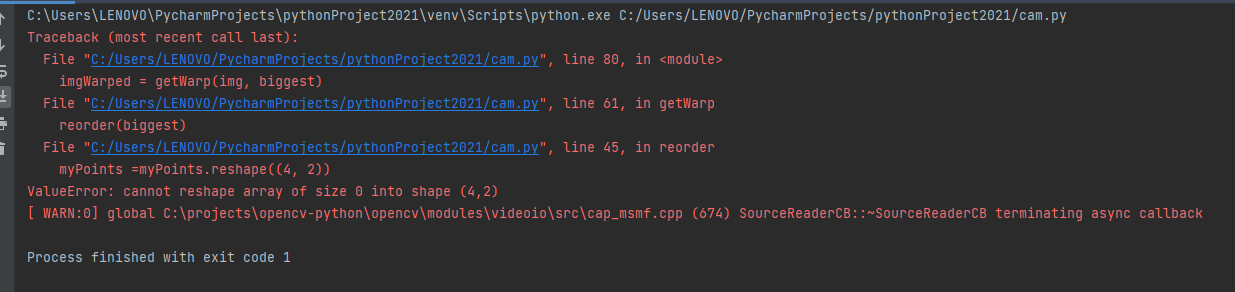
on the principal i used this code but he give me an erreur when i added : reorder(biggest) in function : def get wrap import cv2 #################### cap = cv2.VideoCapture(0) def preProcessing(img): def getContours(img): def reorder(myPoints): def getWarp(img, biggest): while True: |
Beta Was this translation helpful? Give feedback.
-
|
def getContours(img):
You can also contact me on Instagram: |
Beta Was this translation helpful? Give feedback.


Uh oh!
There was an error while loading. Please reload this page.
-
can you help me please
import cv2
import numpy as np
widthImg = 480
heightImg = 640
cap = cv2.VideoCapture(0)
cap.set(3, widthImg)
cap.set(4, heightImg)
cap.set(10, 150)
kernel = np.ones((5, 5))
def find_sheet_end_point(window):
def preProcessing(img):
imgGray = cv2.cvtColor(img, cv2.COLOR_BGR2GRAY)
imgBlur = cv2.GaussianBlur(imgGray, (9, 9), 0)
imgCanny = cv2.Canny(imgBlur, 28, 48)
imgDialte = cv2.dilate(imgCanny, kernel, iterations=2) #deux fois dialation
imgerrod = cv2.erode(imgDialte, kernel, iterations=1)
while True:
veri, img = cap.read()
img = cv2.resize(img, (widthImg, heightImg))
imgContour = img.copy()
imgThres = preProcessing(img)
cv2.imshow("Resultat", imgThres)
if cv2.waitKey(1) & 0xFF == ord('q'):
break
Beta Was this translation helpful? Give feedback.
All reactions