Gnome HIGy Design #7

Description

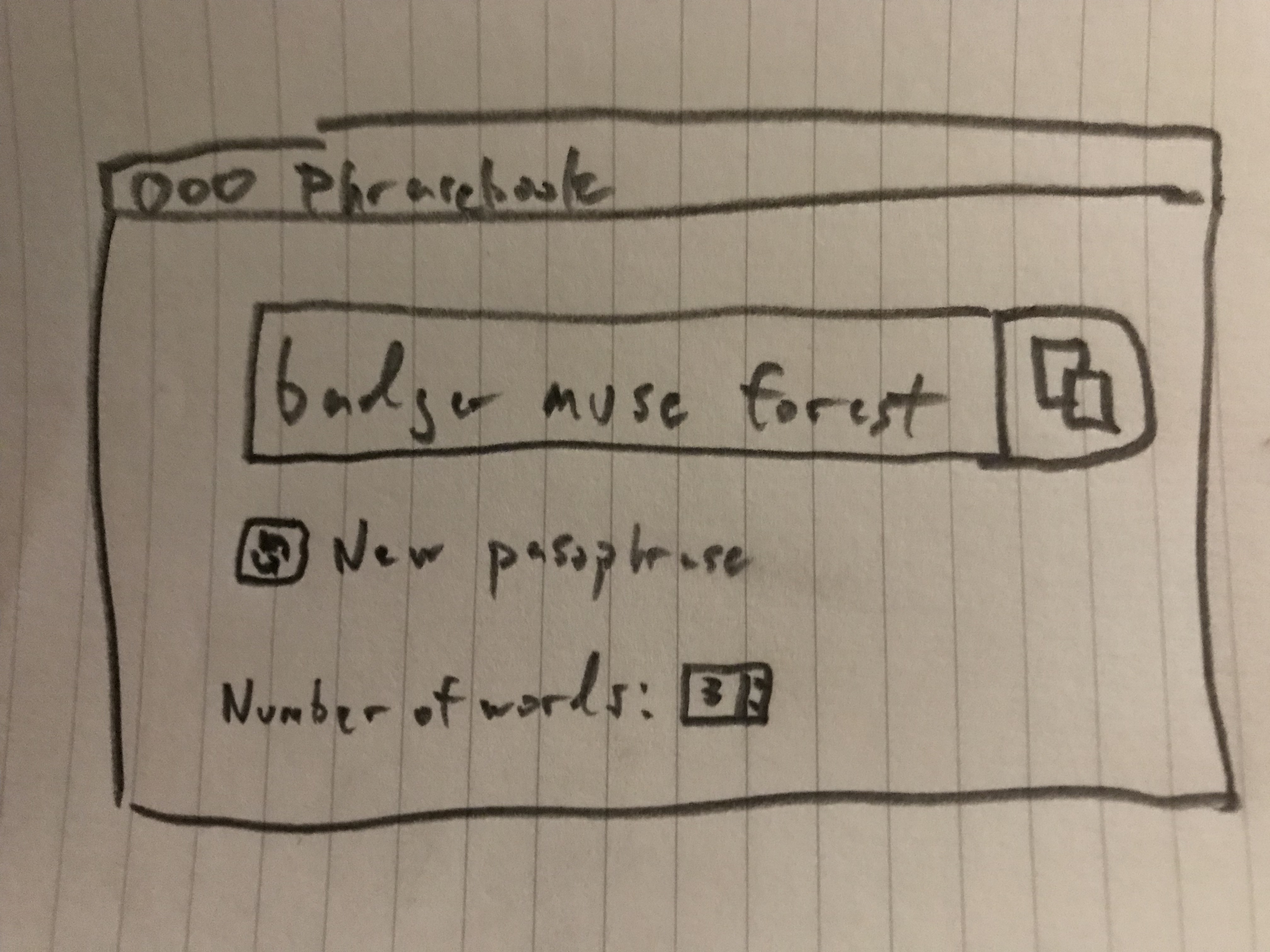
The current design is p close to what I have in mind. Some changes I recommend:
- Using a textbox UI element to hold the phrase in; Lets people know they can edit it and then copy it if they want to.
- Having a copy button next to the textbox which will highlight and copy the text when that button is clicked on. It should be a button UI element though to make sure folks know right away that it is meant to be clicked on. A "Copied!" confirmation message (The Gnome HIG is a little ambiguous on how to do this for non-system-wide notifications) should appear... wondering if a simple bit of hover text would work for this.
- The new passphrase button is a kind of destructive action (current passphrase goes away) and should be far enough away from the copy button that it won't be accidentally clicked on while copying the current passphrase. Like the copy button, it should be a button in the UI to make sure people know it is clickable.
- Added a colon to
Number of words:since I noticed some Ubuntu/Gnome apps did similar, but it's not necessitated by the Gnome HIG writing style (https://developer.gnome.org/hig/stable/writing-style.html.en). - I figure the wordlist selection should live in its own dialog available in a menu system, was thinking: Phrasebook -> Word Lists or Phrasebook -> Preferences if we have other options we think we need to add.