
The Simple LDAP Honeypot Server is a low-interaction honeypot designed to observe and analyze LDAP-based network interactions. Written in Python with the Twisted framework, it emulates key LDAP behaviors (Bind, Search, RootDSE, and common Extended Requests) and logs authentication attempts and raw request bytes for incident analysis and threat research.
- Low-Interaction Honeypot: Emulates core LDAP operations without exposing a real directory service.
- Improved Protocol Handling: BER/LDAPMessage-aware parsing for Bind, Search, Unbind, and ExtendedRequest (including StartTLS OID).
- Configurable RootDSE Metadata: Customize
vendorName,vendorVersion,namingContexts, anddefaultNamingContextvia CLI arguments. - Comprehensive Logging:
- Logs connection metadata and extracted credentials (when present).
- Logs raw request bytes in hexadecimal for anomaly/zero-day detection.
- Safety Controls: Idle timeout and maximum buffer size to reduce resource abuse.
- Python 3.x
- Twisted
git clone https://github.com/0xNslabs/ldap-honeypot.git
cd ldap-honeypot
pip install twistedStart the server with optional parameters for host and port. By default, it binds to all interfaces (0.0.0.0) on port 389.
python3 ldap.py --host 0.0.0.0 --port 389Many scanners and LDAP clients query RootDSE via a base-scope search with an empty base DN (base="", scope=0). This honeypot can emulate common directory metadata, and you can override key fields using CLI arguments.
python3 ldap.py --host 0.0.0.0 --port 389 \
  --vendor-name "Microsoft Corporation" \
--vendor-version "Windows Server"python3 ldap.py --host 0.0.0.0 --port 389 \
--naming-context "DC=corp,DC=local" \
--naming-context "CN=Configuration,DC=corp,DC=local" \
--naming-context "CN=Schema,CN=Configuration,DC=corp,DC=local"If omitted, defaultNamingContext defaults to the first --naming-context.
python3 ldap.py --host 0.0.0.0 --port 389 \
  --naming-context "DC=corp,DC=local" \
--default-naming-context "DC=corp,DC=local"All LDAP interactions are logged to ldap_honeypot.log.
In addition to normal event lines, the server logs:
RAW BYTES HEX:for each received TCP chunkRAW LDAPMessage HEX:for each fully parsed LDAPMessage
These raw-hex logs are useful for detecting malformed BER, fuzzing activity, and potential zero-day probing.
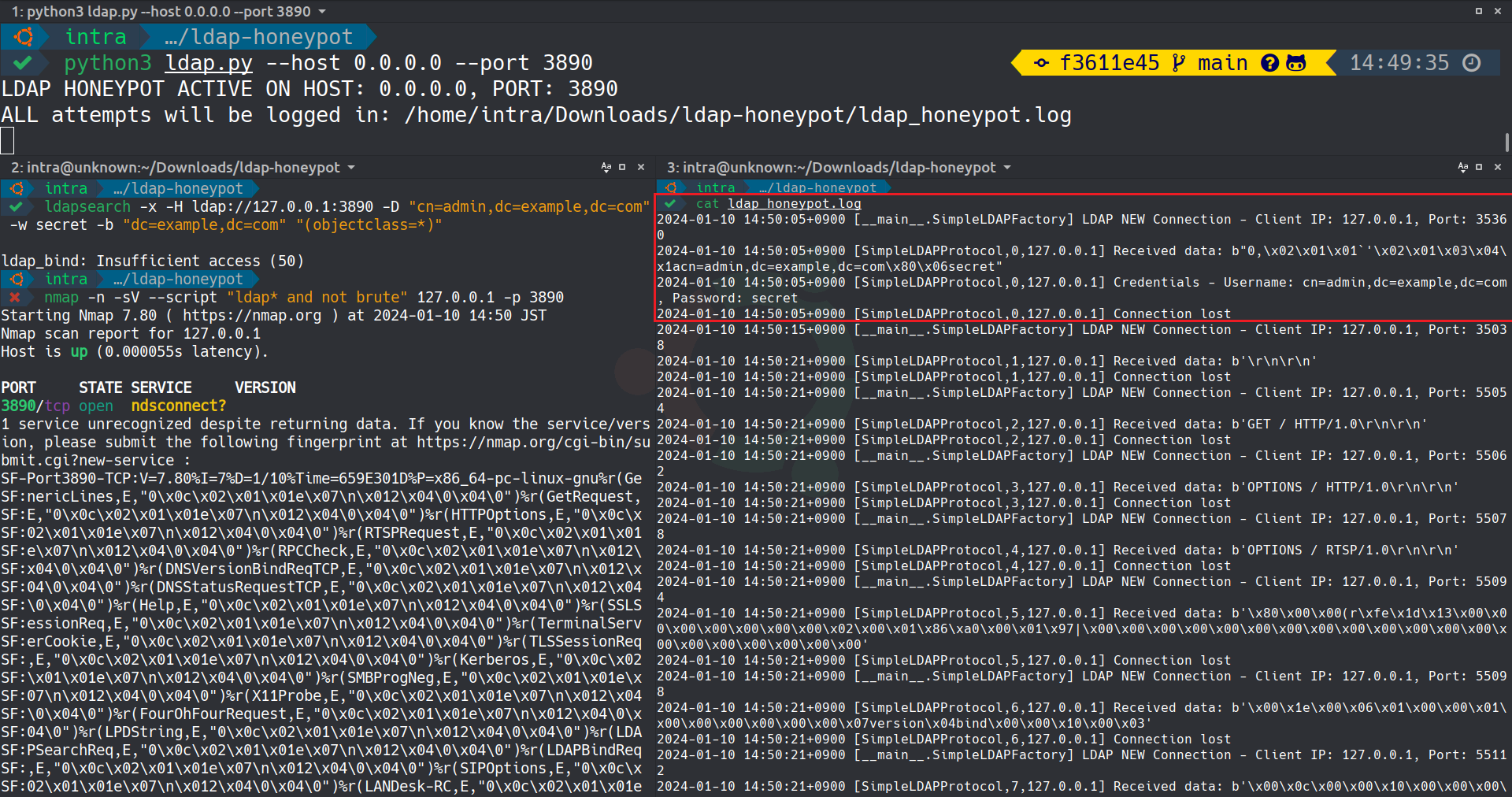 The above image showcases the Simple LDAP Honeypot Server in action, capturing real-time LDAP queries and credentials.
- DNS Honeypot - Monitors DNS interactions.
- FTP Honeypot - Simulates an FTP server.
- HTTP Honeypot - Monitors HTTP interactions.
- HTTPS Honeypot - Monitors HTTPS interactions.
- MongoDB Honeypot - Simulates a MongoDB database server.
- NTP Honeypot - Monitors Network Time Protocol interactions.
- PostgreSQL Honeypot - Simulates a PostgreSQL database server.
- SIP Honeypot - Monitors SIP (Session Initiation Protocol) interactions.
- SSH Honeypot - Emulates an SSH server.
- TELNET Honeypot - Simulates a TELNET server.
- Caution: Use this honeypot in secure, controlled environments for research and educational purposes.
- Compliance: Ensure deployment is in line with local and international legal requirements.
This project is licensed under the MIT License. See the LICENSE file for more details.