Intermediate Notes
The information and examples in this section primarily concerns Project64 v2.4 and later, but it should be adaptable to any emulator with these capabilities.
If you want to find a value and don't know where it's at, you'll need to search for it.
First, you'll want to enable the debugger via Options → Settings → Advanced → Enable Debugger. This enables the Debugger menu, which contains the Memory Search, among other things.
Once the debugger is enabled, you can access the memory search via Debugger → Memory → Search...
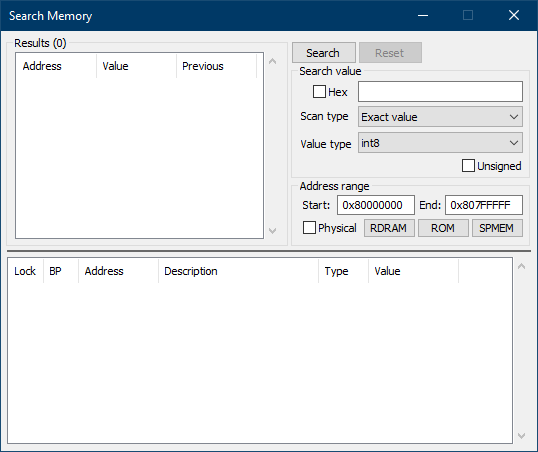
This may look confusing, but you only need to focus on the top right portion of the dialog to begin.
Unless you have a good reason to search in decimal, it is recommended to check the "Hex" box. This allows for hex value display, which is normally what you want when hacking.
The text box next to the "Hex" box is the value search. If you already know the value you want, you can place it in here. However, if you don't know the value, leave it blank.
"Scan type" is the next option, containing the following settings on an initial search:
- Exact value – If you know the value you're searching for, use this option.
- Unknown initial value – If you don't know the value you're searching for, use this option.
- Greater than... – The value you're looking for is greater than a certain known value.
- Less than... – The value you're looking for is less than a certain known value.
- JAL to... – Search for a
jalcommand to the specified location.
After a search has started, more options can appear based on the Value type:
- Changed value – The value has changed since the last search.
- Unchanged value – The value has not changed since the last search. Useful for getting rid of addresses you don't need.
- Increased value – The value has increased since the last search.
- Decreased value – The value has decreased since the last search.
"Value type" can be confusing for non-programmers, so here's a quick explanation of each setting:
-
int8– 1 byte -
int16– 2 bytes -
int32– 4 bytes -
int64– 8 bytes -
float– floating point value (4 bytes) -
double– double-precision value (8 bytes) -
string– text
The "Unsigned" checkbox is useful if you know the value has no reason to go into the negatives.
Ignore the Address Range area unless you have a good reason to modify it.
Once you've keyed in your settings, press the Search button to start the search. Results will appear to the left of the settings, though you'll want to find a way to cull the entries once you've begun. The "Unchanged value" setting is good for this.
From there, it's just a matter of honing in on what you want.
A breakpoint stops code execution upon certain events. There are three main breakpoint types:
- Read – Program breaks on reading a memory location.
- Write – Program breaks on writing a memory location.
- Execute – Program breaks when a code location is about to run.
(more todo)