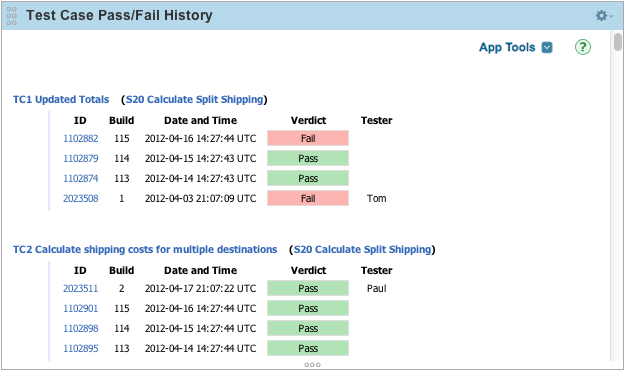
The Test Case Pass/Fail History app provides a means of displaying test cases associated with a workspace along with the test case results.
If you want to start using the app immediately, create an Custom HTML app on your Rally dashboard. Then copy App.html from the deploy folder into the HTML text area. That's it, it should be ready to use. See this help link if you don't know how to create a dashboard page for Custom HTML apps.
Or you can just click here to find the file and copy it into the custom HTML app.
You can easily observe the state of each test case and the tester for each test case result. The test case, the associated story, and each test case result item has a link to the detail page of the work item, enabling easy access to supplementary information.
You're free to customize this app to your liking (see the License section for details). If you need to add any new Javascript or CSS files, make sure to update config.json so it will be included the next time you build the app.
This app uses the Rally SDK 1.32. The documentation can be found here.
Available Rakefile tasks are:
rake build                      # Build a deployable app which includes all JavaScript and CSS resources inline
rake clean                      # Clean all generated output
rake debug                      # Build a debug version of the app, useful for local development
rake deploy                     # Deploy an app to a Rally server
rake deploy:debug               # Deploy a debug app to a Rally server
rake deploy:info                # Display deploy information
rake jslint                     # Run jslint on all JavaScript files used by this app, can be enabled by setting ENABLE_JSLINT=true.
TestCasePassFailHistory is released under the MIT license. See the file LICENSE for the full text.