This repository contains the basic requirements to make a Raspberry Pi hardware and software compatible with the community firmware for the fischertechnik TXT.
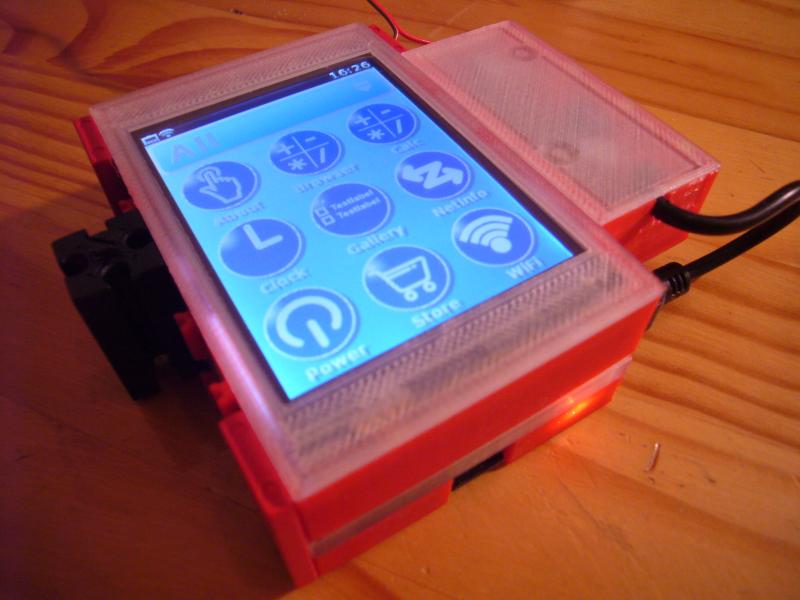
You'll need:
- a Raspberry Pi 2 or 3
- a Waveshare 3.2" LCD touchscreen (either V3 or V4)
- a micro SD card with at least 8GB space
Optionally build the PiPower to supply the Pi from fischertechnik power sources.
The case consists of four parts. A bottom and top part for each the Pi itself and the display. Both parts can be connected to each other using ordinary fischertechnik parts.
3D print the four case parts. The connector height of the display differs between V3 and V4. The required screws are M2.5 * 12mm countersunk.
Get the latest Raspbian Jessie Lite and install it onto SD card. Boot your PI with it and do a few things using raspi-config:
- Enable networking so the Pi can access the internet
- If you need to use WiFi, see this article on how to set up
- Set the hostname to tx-pi
- Expand the file system (under advanced options)
- Disable "wait for network" boot option
- You might also want to enable ssh for easier acces to your tx-pi later
Now download the setup script onto your PI (at this point, you might be happy to have ssh, or more precise, scp available) and run it as sudo. It will download and install the display drivers as well as major parts of the community firmware.
During display driver installation the pi will reboot and you'll have to start the script a second time to allow it to finish the setup.
The script then runs some time, but building of opencv2 for python3 is no longer necessary. Pre-built packages for opencv2 and bluez will be downloaded from this repository.
libroboint for C and Python will be built during the install process. Libroboint Python3 support is experimental. Anyway TX-PI now can control ft Robo Interface and Robo I/O Extention, especially in combination with TouchUI under Python3.
This is a work in progress. Some parts aren't working by now.