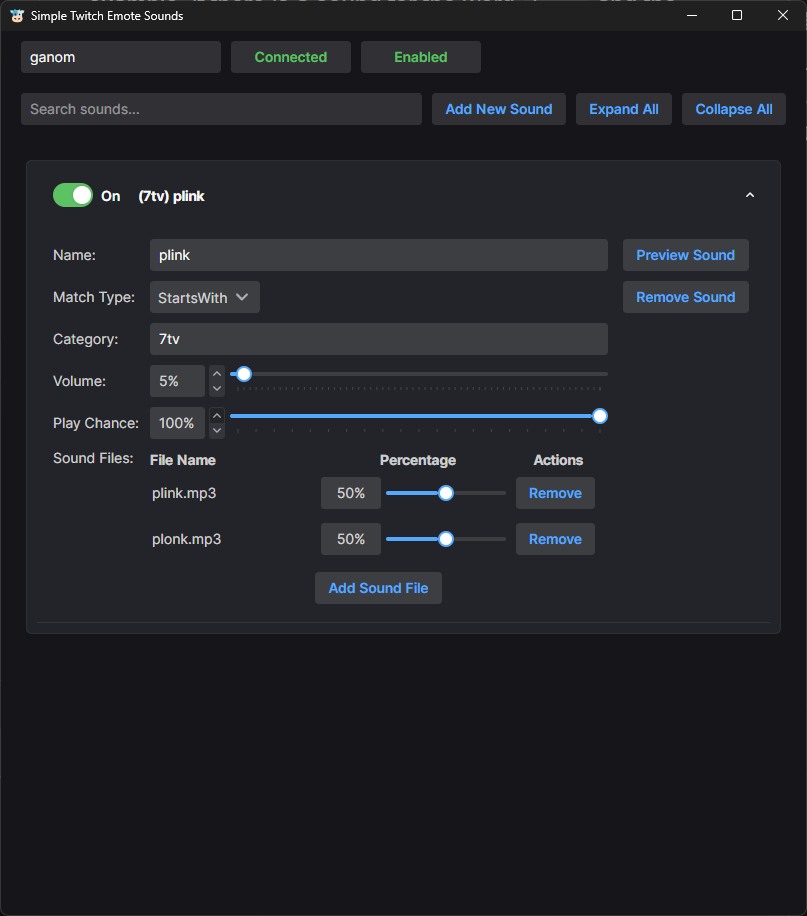
This application was created as a simple, easy-to-use, quick to set up, sound trigger. The goal is to reduce the barrier of entry and enable creators to add an Emote Sound within seconds, instead of the minute(s)-long process with current mainstream options like MixItUp and Streamer.bot.
Emote sounds are triggered when a user types a certain phrase into Twitch chat, playing a sound effect. For example, if
there is a sound for the word hiii and the user types hiii hello streamer, it will trigger the sound set for hiii.
It is a fun way for chatters to directly interact with the stream. The emotes/phrases are typically associated with an
emotion or response. For example, no or yes sounds, or xdx being a trolling/gremlin response.
Categories exist solely for organization currently, in the future they may be expanded to have toggle hotkeys or exclusive hotkeys.
The app allows you to upload as many sounds to a single phrase as you want. You can set the volume for each phrase, but not for specific sounds. There is an option to change the play rate; say you want to only have a 20% chance for a sound to trigger because you have a very active chat, this will allow you to throttle it. You can also have multiple sounds in that trigger with different chances. Think sub alerts: you may want a special unique sound that has a 1% chance.
A feature not prominently shown is that you can split the name of the trigger with a comma for multiple valid phrases.
For example, name:hi,hii,hiii would be a valid phrase for each of those words.
Sure! We'll do a plink multi-sound trigger using these sounds:
For the name, we'll set it to plink, then we press ok followed by ctrl-clicking both files plink and plonk. Once it's
created, we'll set the percentage to 50% and 50%. See the image below for how it should look.