

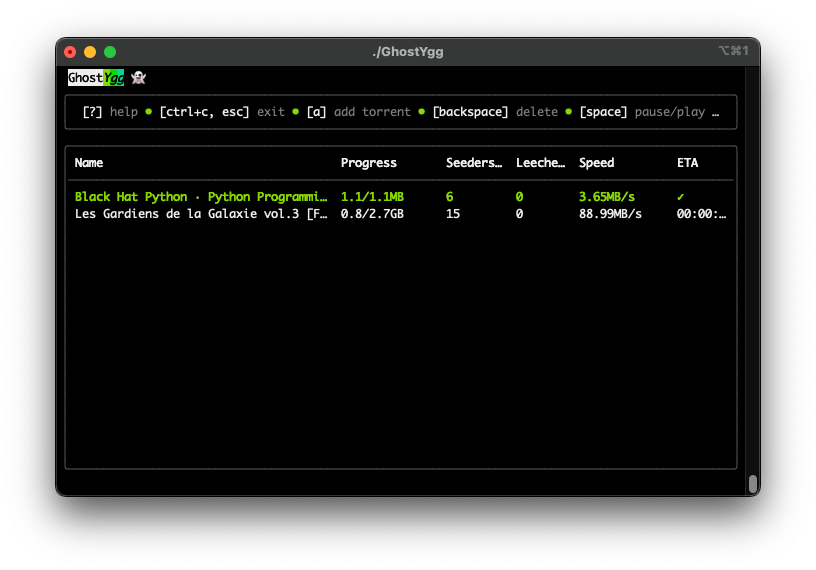
Made with ☕ for fun. GhostYgg is a simple command-line tool for downloading torrents without seeding & increasing download rate.
You can download the pre-built binaries for your platform from
the releases page.
After downloading the binary, make it executable if necessary, and put it into your $PATH or %PATH%.
If you using Go1.20 or higher, you can install GhostYgg using the following command:
go install -v github.com/GuillaumeMCK/GhostYgg@latestTo get started with GhostYgg, follow these steps:
git clone https://github.com/GuillaumeMCK/GhostYgg.git
cd GhostYgg
go build GhostYgg.go
./GhostYggCaution
You are responsible for the torrents you download with GhostYgg.
You can specify the torrent files to download as arguments:
$ GhostYgg file1.torrent file2.torrent ... [options]-o: Specifies the download directory.-help: Displays the help message.
If no download directory is specified using the -o flag, the tool will use the default download folder of your
operating system.
- On Linux & macOS:
/home/<YourUsername>/Downloads - On Windows:
C:\Users\<YourUsername>\Downloads
| Key | Action | Description |
|---|---|---|
| o | Open Folder | Open the download folder |
| a | Add Torrent | Show the input prompt to add a torrent |
| enter | Select | Validate the path in the input prompt |
| space | Pause/Play | Pause or play the selected torrent |
| backspace | Delete | Delete the selected torrent |
| ↑ | Move Up | Cursor moves up |
| ↓ | Move Down | Cursor moves down |
| ? | Help | Expand the help menu |
| ctrl+c esc | Exit | Exit the program or input prompt |