A modern, full-stack Library Management System featuring role-based access control, secure authentication, and cloud-based file storage.





- Overview
- Key Features
- Tech Stack
- Architecture
- Getting Started
- API Reference
- Role-Based Access Control
- File Upload Pipeline
- Database Schema
- Deployment
- Contributing
- License
The Library Management System (LMS) is a comprehensive solution designed to streamline library operations. Built with modern web technologies, it provides separate interfaces for members, librarians, and administrators, ensuring secure and efficient management of books, users, and borrowing activities.
| Feature | Description |
|---|---|
| Multi-Role Authentication | Secure JWT-based authentication with role-specific access levels |
| Book Management | Full CRUD operations for books with image upload support |
| Borrowing System | Track book loans, returns, and borrowing history |
| User Management | Profile management with avatar uploads |
| Admin Dashboard | Comprehensive analytics and system management tools |
| Cloud Storage | Seamless image uploads via Cloudinary integration |
| Responsive Design | Mobile-first UI built with TailwindCSS |
| Technology | Purpose |
|---|---|
| React 19 | UI Framework |
| TypeScript | Type Safety |
| Vite | Build Tool |
| TailwindCSS | Styling |
| Axios | HTTP Client |
| React Router | Navigation |
| Technology | Purpose |
|---|---|
| Node.js | Runtime Environment |
| Express.js | Web Framework |
| TypeScript | Type Safety |
| MongoDB | Database |
| Mongoose | ODM |
| JWT | Authentication |
| Bcrypt | Password Hashing |
| Multer | File Handling |
| Cloudinary | Cloud Storage |
library-management-system/
├── frontend/                 # Member-facing application
│   ├── src/
│   │   ├── assets/          # Static resources
│   │   ├── components/      # Reusable UI components
│   │   ├── pages/           # Route components
│   │   ├── services/        # API integration layer
│   │   ├── models/          # TypeScript interfaces
│   │   ├── constants/       # Application constants
│   │   ├── context/         # React Context providers
│   │   └── App.tsx          # Application entry point
│   └── package.json
│
├── admin/                    # Admin & Librarian dashboard
│   ├── src/
│   │   ├── assets/
│   │   ├── components/
│   │   ├── pages/
│   │   ├── services/
│   │   ├── models/
│   │   ├── constants/
│   │   ├── context/
│   │   └── App.tsx
│   └── package.json
│
└── backend/                  # REST API server
    ├── src/
    │   ├── config/          # Environment & database configuration
    │   ├── controllers/     # Request handlers
    │   ├── models/          # MongoDB schemas
    │   ├── routes/          # API route definitions
    │   ├── middlewares/     # Auth, RBAC, file upload middleware
    │   ├── services/        # Business logic & external services
    │   └── server.ts        # Server entry point
    ├── uploads/             # Temporary file storage
    └── package.json
Ensure you have the following installed:
- Node.js (v18 or higher)
- npm or yarn
- MongoDB (local instance or Atlas connection)
- Cloudinary account (for image storage)
-
Clone the repository
git clone https://github.com/Haritha0705/library_management_system.git cd library-management-system -
Install backend dependencies
cd backend npm install -
Install frontend dependencies
cd ../frontend npm install -
Install admin dashboard dependencies
cd ../admin
npm install
Create .env files in each directory with the following configurations:
Backend (.env)
PORT=3000
MONGO_URI=mongodb+srv://<username>:<password>@<cluster>.mongodb.net/<database>
JWT_SECRET=your-secure-secret-key
CLOUDINARY_CLOUD_NAME=your-cloud-name
CLOUDINARY_API_KEY=your-api-key
CLOUDINARY_API_SECRET=your-api-secret
Frontend (.env)
VITE_API_URL=http://localhost:3000Admin Dashboard (.env)
VITE_BACKEND_URL=http://localhost:3000Start each service in separate terminal windows:
# Terminal 1 - Backend
cd backend && npm run dev

# Terminal 2 - Frontend
cd frontend && npm run dev

# Terminal 3 - Admin Dashboard
cd admin && npm run devBase URL: https://library-management-system-alez.onrender.com/api/v1
| Method | Endpoint | Description |
|---|---|---|
POST |
/auth/register |
Register a new user |
POST |
/auth/login |
Authenticate user and receive JWT |
| Method | Endpoint | Description | Access |
|---|---|---|---|
GET |
/user/:id |
Get user profile | Authenticated |
PUT |
/user/:id |
Update user profile | Owner |
DELETE |
/user/:id |
Delete user account | Owner/Admin |
| Method | Endpoint | Description | Access |
|---|---|---|---|
GET |
/books |
List all books | Public |
GET |
/books/:bookId |
Get book details | Public |
GET |
/books/search?title= |
Search books by title | Public |
POST |
/books |
Add new book | Librarian |
PUT |
/books/:id |
Update book | Librarian |
DELETE |
/books/:id |
Delete book | Librarian |
POST |
/books/borrow/:bookId/:memberId |
Borrow a book | Member |
POST |
/books/return/:bookId/:memberId |
Return a book | Member |
POST |
/books/check-borrow |
Check borrow status | Member |
POST |
/books/borrow-history |
Get borrow history | Member |
| Method | Endpoint | Description | Access |
|---|---|---|---|
GET |
/dashboard/counts |
Get system statistics | Admin/Librarian |
GET |
/dashboard/members |
List all members | Admin/Librarian |
GET |
/dashboard/librarians |
List all librarians | Admin |
POST |
/dashboard/librarians |
Add new librarian | Admin |
DELETE |
/dashboard/librarians/:id |
Remove librarian | Admin |
GET |
/dashboard/borrowed-books |
List borrowed books | Admin/Librarian |
📖 Full API Documentation: View on Postman
The system implements three distinct user roles with specific permissions:
| Role | Permissions |
|---|---|
| Member | Browse catalog, borrow/return books, manage personal profile, view borrowing history |
| Librarian | All Member permissions + manage book inventory, view member records |
| Admin | Full system access including librarian management, system configuration, and analytics |
The application uses a two-stage upload process for optimal performance and reliability:
┌──────────────┐     ┌──────────────┐     ┌──────────────┐     ┌──────────────┐
│    Client    │────▶│    Multer    │────▶│  Cloudinary  │────▶│   MongoDB    │
│  (File Form) │     │ (Temp Store) │     │   (Cloud)    │     │  (URL Ref)   │
└──────────────┘     └──────────────┘     └──────────────┘     └──────────────┘
- Client submits file via multipart form
- Multer temporarily stores file on server
- Cloudinary receives and hosts the optimized image
- MongoDB stores the secure CDN URL
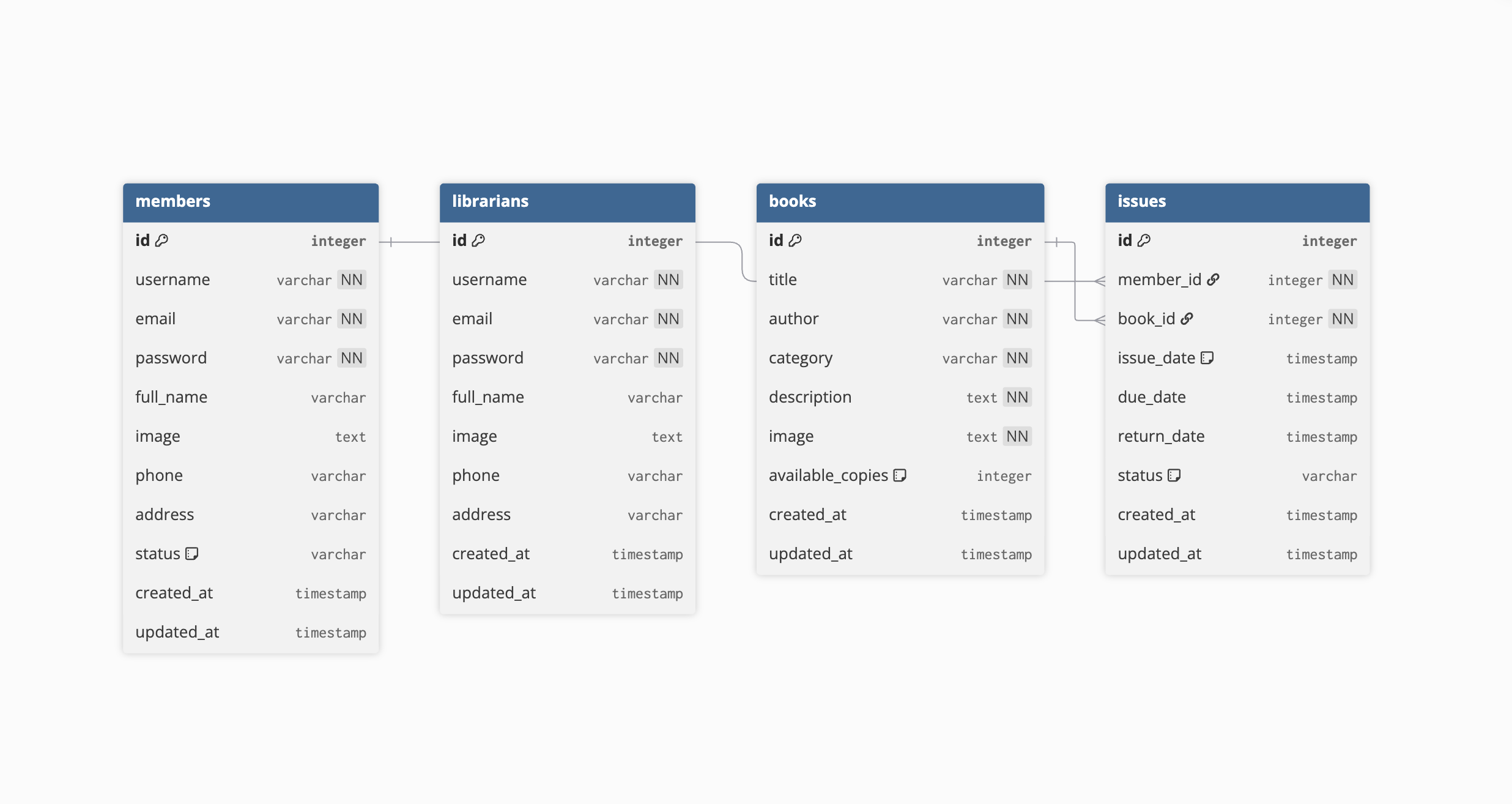
The application is deployed across multiple platforms for optimal performance:
| Service | Platform | URL |
|---|---|---|
| User Portal | Vercel | library-management-system-eight-peach.vercel.app |
| Admin Dashboard | Vercel | library-management-system-kgjl.vercel.app |
| Backend API | Render | library-management-system-alez.onrender.com |
Contributions are welcome! Please follow these steps:
- Fork the repository
- Create a feature branch (
git checkout -b feature/amazing-feature) - Commit your changes (
git commit -m 'Add amazing feature') - Push to the branch (
git push origin feature/amazing-feature) - Open a Pull Request
Please ensure your code follows the existing style conventions and includes appropriate tests.
This project is licensed under the MIT License. See the LICENSE file for details.
Made with ❤️ by Haritha