Netpad allows to easily visualise a network, useful after enumeration
Note that after running the requirements.txt, it should run out of the box. The installation is pretty simple, just copy and paste the command/s below, you may wish to run it in a virtual envinronment, see here
pip3 install -r requirements.txt
- First you will have to create a JSON file. Mine is as follows.
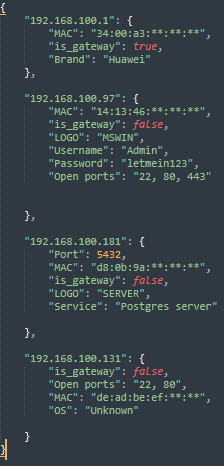
- Note that is_gateway is mandatory while the rest are optional
- Now run this command
python3 netpad.py -f [Filename]
Netpad.mp4
- Note that this has been tested on windows only, other platforms may experience compatibility issues