crScarlet is a tool which will allow stores to sign Scarlet securely. There are many changes that will be made to allow for ad-revanue on those who will host Scarlet.
An example of what the crscarlet request file looks like is on the root of the project. This file is self-explanatory ; move it to the root directory of the Scarlet app and change the values if needed.
-
Generate dcrscarlet file(using your mobileprovision, p12, and password) ; A simple open-sourced macOS app is available to create these(later today)
-
Create new folder for the cert ; the name being the id you'll put inside the crscarlet file. Then inside put your cert.dcrscarlet file
-
Replace information in crscarlet file with relevent ones gathered from steps 2
-
Sign Scarlet IPA(https://usescarlet.com/ScarletAlpha.ipa)
-
Create base64 encoding of JSON containing two keys(certURL, ipaURL)
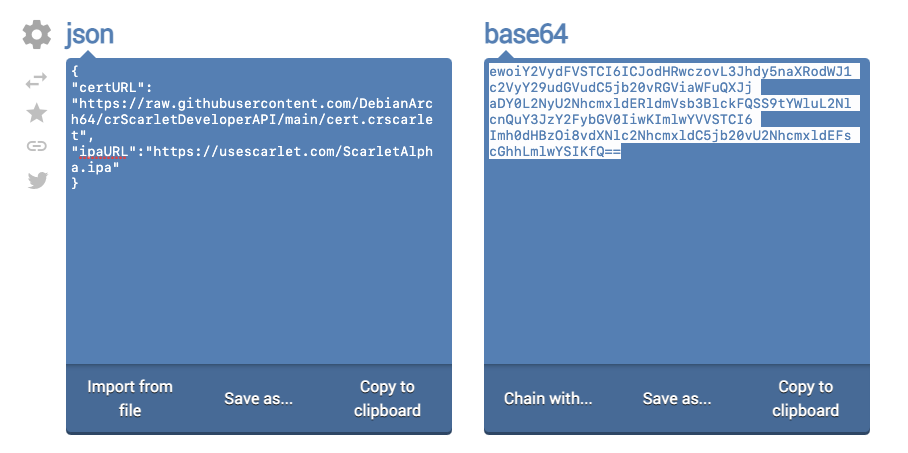
-
Use the Scarlet domain to share and install your signed Scarlet app on other devices! https://vip.usescarlet.com/?cert=*output of step 5*
Although this code can be used and modified by ANYBODY this doesn't mean hosting Scarlet out of the usescarlet.com domain is allowed. During the full release of crscarlet stores are required to install Scarlet using a special link which will setup and install crscarlet. Any occurences of Scarlet installed outside of this will fail(when the cryptography system is put in place). You will be contacted if the use is being exploited or mis-used ; this will result in a DMCA notice and can be further escalated.
Those interested in hosting prior to official release or outside our domain must contact @DebianArch on Twitter for written permission.
We are open to any suggestions or changes on the API and how things are processed. If you have any concerns contact me on Twitter: @DebianArch