Janrain's OAuth registration and authentication API endpoints have picked up the nickname "Native API" since they were designed for use within native desktop and mobile appliactions.
Using the Native API for web applications can offer a greater degree of control over the user registration and authentication flows at the cost of the convenience and simplicity of the Registration Javascript "widget" .
All examples are written in PHP.
- Janrain Social Login (aka Engage) application
- Janrain Registration (aka Capture) application
- PHP web server or local environment (eg. LAMP, MAMP, WAMP, etc.)
-
Create a new Janrain Login API client using the
/clients/addAPI call:curl -X POST \ -d client_id=APPLICATION_OWNER_CLIENT_ID \ -d client_secret=APPLICATION_OWNER_CLIENT_SECRET \ -d description='Native API examples login client' \ -d features='["login_client"]' \ https://YOUR_APP.janraincapture.com/clients/add -
Add the
default_flow_namesetting to the login client you created in step 1 (The flow name is usually "standard" but check with your Janrain representative if in doubt):curl -X POST \ -d client_id=APPLICATION_OWNER_CLIENT_ID \ -d client_secret=APPLICATION_OWNER_CLIENT_SECRET \ -d for_client_id=LOGIN_CLIENT_ID_FROM_STEP_1 \ -d key=default_flow_name \ -d value=standard \ https://YOUR_APP.janraincapture.com/settings/set -
Add the
default_flow_versionsetting to the login client you created in in step 1 (The flow version must be provided by your Janrain representative):curl -X POST \ -d client_id=APPLICATION_OWNER_CLIENT_ID \ -d client_secret=APPLICATION_OWNER_CLIENT_SECRET \ -d for_client_id=LOGIN_CLIENT_ID_FROM_STEP_1 \ -d key=default_flow_version \ -d value=497f2277-a8ca-418e-a6dd-e7d30fabe7df \ https://YOUR_APP.janraincapture.com/settings/set -
Download the source code or fork and clone this repository.
-
Unzip the files into your web server root. For example:
unzip janrain-native-api-examples-master.zip -d /var/www -
Rename
config.example.phptoconfig.php. -
Add the client ID and secret for login client you created in step 1 to the
config.phpfile:define('JANRAIN_LOGIN_CLIENT_ID', 'Your client ID goes here'); define('JANRAIN_LOGIN_CLIENT_SECRET', 'Your client secret goes here'); -
Navigate to the examples folder in your web browser. Eg.
http://localhost/janrain-native-api-examples-master/
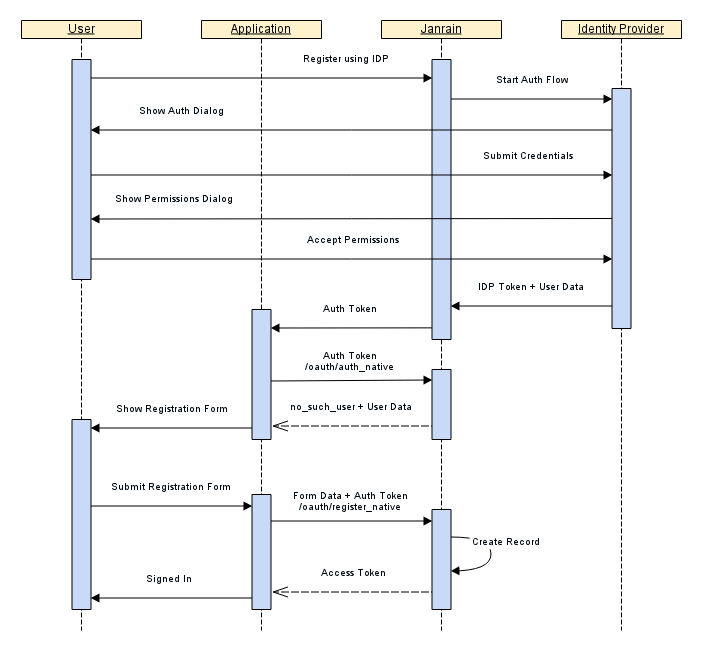
Social Registration consists of a new user authenticating with an identity provider (Facebook, Google, etc.) as the first step in a 2-step process to register a new account. Janrain handles the interaction between the end-user and the identity provider using the appropriate protocol (OAuth 2.0/OpenID/SAML 2.0) to authenticate the user and obtain user data.
The second step is a registration form which ensures required data fields are collected from the user. The User Data can be used to pre-populate the registration form.
Reference Documentation