
Handwave transforms your hand movements into intuitive commands, enabling you to navigate your computer, control presentations, and interact with applications without the need for traditional input devices. Leveraging MediaPipe's robust hand and face recognition capabilities, Handwave integrates gesture recognition with mouse control, presentation recording, and facial detection, making it a versatile tool for enhancing accessibility and productivity.
- Front-end: React, TypeScript, Vite, Google Mediapipe
- Back-end: Electron, Sequelize, SQLite3, nut-js
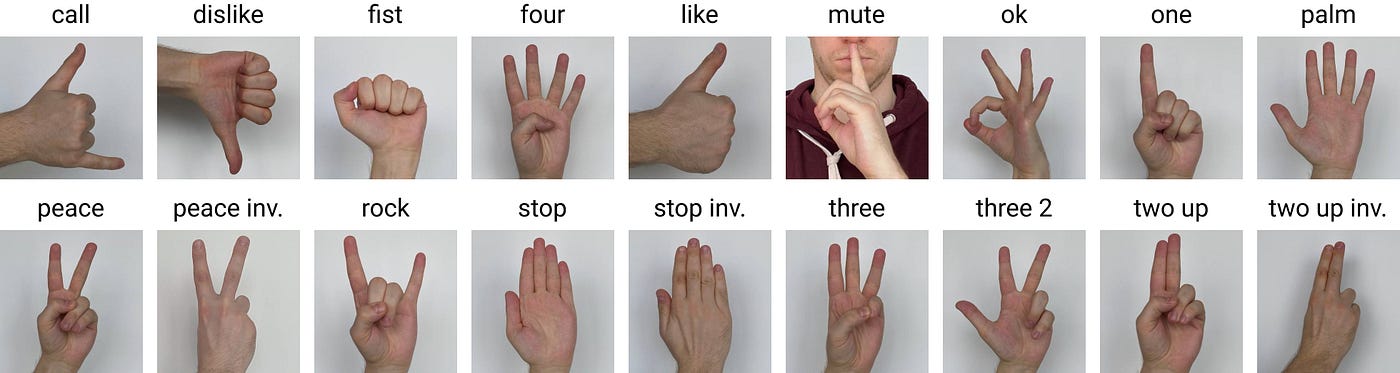
Handwave utilizes HaGRID Dataset, a valuable resource for developing hand gesture recognition systems. It contains a variety of gestures, including common symbols, numbers, and commands, as well as a wide range of subjects and lighting conditions. Key enhancements to the dataset include:
- An expansion to 18 gestures
- An augmentation to 18,000 images
- Achieving a test accuracy of 0.86
- Seamlessly recognize hand gestures using MediaPipe Hands
- Map gestures to custom-defined actions for intuitive input
- Receive visual feedback for gesture recognition
- Control the mouse pointer using the "L" gesture ("three" 2 in HaGRID dataset)
- Perform left-click selections using thumbs
- Use macro maker to map gestures to keyboard keys or or key combinations
- Control, click and drag mouse with gestures
- Track facial landmarks using MediaPipe Face Mesh
- Prevent unintentional keystrokes by maintaining face detection
- Select window or applications for interacting and recording
- Save recordings to your local drive once finished
- Electron enables deployment on various operating systems (Windows, macOS, Linux)
Follow these steps for a regular installation of the presentation tool with hand gestures:
-
Go to our releases page.
-
Select the version you want to install (latest suggested).
-
Download the installer that fits your operating system:
- For Windows, download the
.exefile. - For macOS, not released. For testing, use the development environment (instructions below).
- For Linux, not released. For testing, use the development environment (instructions below).
- For Windows, download the
-
Start the installer and follow the on-screen steps to complete the installation.
Once the installation is complete, you can start using the presentation tool with hand gestures on your system. Before getting started, we recommend checking our Quick Start Guide for an overview of how the application works and its key features. This guide will help you make the most out of the presentation tool.
To set up the development environment for the presentation tool with hand gestures, follow these steps:
Clone the repository using the following command to get the latest version from the master branch:
git clone https://github.com/JumppanenTomi/presentation-tool-with-hand-gestures.gitNavigate to the project's directory in your terminal and run the following command to install all necessary dependencies:
npm install --legacy-peer-deps #since better-docs is still relying to React 17 and some packages on our application needs React 18 we must use --legacy-peer-deps here to bypass errorsOnce the dependencies are installed, initiate the development environment for testing the application using the following command:
npm run devWhen you are satisfied with your work, you can build the application. Start the build process by typing one of the following commands:
npm build # Builds the application for the current operating system and architectureOr
npm build-all # Builds the application for all supported operating systems (mac-only command)For more details on multi-platform builds, refer to the official documentation of electron builder.
- Tomi Jumppanen
- Roope Laine
- Anton Tugushi
- Dat Pham