GitSense is a VS Code extension that automates the process of summarizing your coding activity and committing it to a GitHub repository. It monitors your coding activity in one-hour intervals, generates a summary of your changes, and commits and pushes these summaries to your GitHub repository named GitSense-commits. This tool streamlines tracking your progress and maintaining a log of your work.
In many professional workflows, developers often work on feature branches and make commits. However, when these branches are merged, the commit history becomes condensed, and the individual contributions are not reflected. Additionally, many developers use separate email accounts for professional work, leaving little time to enhance their personal GitHub profiles.
GitSense addresses this gap by ensuring your personal GitHub profile stays active and well-maintained. It automatically updates your GitHub commit chart with regular commits, helping you showcase consistent activity and growth as a developer.
- Automated Monitoring: GitSense monitors the codes you save and generates summaries of your code every hour.
- Hourly Commits: After continous hour of work, GitSense commits and pushes a summary of your changes to the
GitSense-commitsrepository.- For example, if you work for 2 hours continously, there will be 2 commits and pushes.
- GitHub Integration:
- Login via VS Code to authenticate with your GitHub account.
- Alternatively, you can manually enter your GitHub Personal Access Token (PAT) for authentication.
- Enhance Your GitHub Profile: Maintain a consistent and active commit chart on your personal GitHub profile, even when working on professional projects.
- Commands:
- Update your PAT manually with the
Update Tokencommand.
- Update your PAT manually with the
Install GitSense from the VS Code marketplace. Link to the extension.
GitSense requires access to your GitHub account to push commits. You can authenticate in one of the following ways:
- If you are already logged in VS Code through Github, GitSense will start working immediately.
- If not, you will be prompted to login via GitHub.
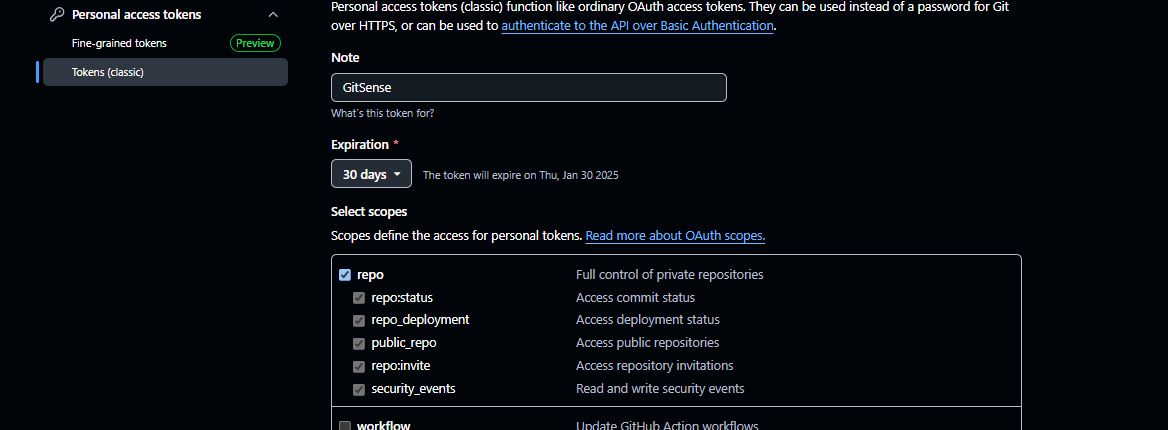
- Generate a Personal Access Token by following this guide.
- Ensure the token has
repoaccess.
- Ensure the token has

- Update your Personal Access Token (PAT) for GitHub authentication.
- Command:
Update Token for GitSense - Shortcut:
Ctrl + Shift + PorCmd + Shift + P, then typeUpdate Token.
- VS Code: Make sure you have VS Code installed.
- GitHub Account: Required for authentication.
- Personal Access Token (Optional): If not using the login feature.
GitSense is created and maintained by KAMAL-02. Feel free to reach out.
GitSense is licensed under the MIT License. See the LICENSE file for details.