If you have questions or comment, please see discussions
If you have noticed a bug please check for any existing open issue and add to that or open a new issue
PRs are most welcome, if you see something that could be improved please consider making a pull request, including improvements to the readme, adding examples or other guidance.
Home Assistant (https://www.home-assistant.io/) component for controlling Lightwave (https://lightwaverf.com) devices with use of a Lightwave Link Plus hub.
Controls both Connect Series (generation 1) and Smart Series (generation 2) devices. Does not work with Connect Series hubs (aka Lightwave Link / WiFi Link).
Note: Entities are created differently from the original version of this integration - Lightwave2, in that regard this version is a breaking change
There are two ways to set up:
This component is available through the Home Assistant Community Store HACS (https://www.hacs.xyz/).
Using this method makes it simple to update your component to the latest version.
Once HACS is installed, search HACS for "Lightwave Smart" (update HACS if necessary).
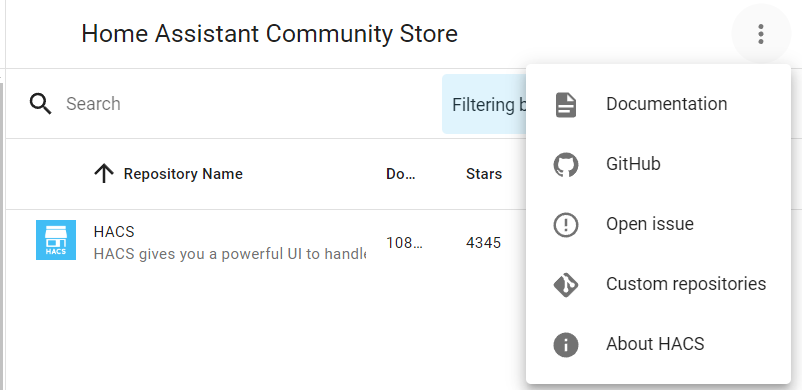
It can also be installed manually using HACS via "Custom repositories" using the repository url (https://github.com/LightwaveSmartHome/homeassistant-lightwave-smart), setting Category "Integration" - see:
Copy all files and folders from custom_components/lightwave_smart to a <ha_config_dir>/custom_components/lightwave_smart directory. (i.e. you should have <ha_config_dir>/custom_components/lightwave_smart/__init__.py, <ha_config_dir>/custom_components/lightwave_smart/switch.py, <ha_config_dir>/custom_components/lightwave_smart/translations/en.json etc)
The latest version is at https://github.com/LightwaveSmartHome/homeassistant-lightwave-smart/releases/latest
If you use this method then you'll need to keep an eye on this repository to check for updates.
In Home Assistant:
- Enter configuration menu
- Select "Integrations"
- Click the "+" in the bottom right
- Choose "Lightwave Smart"
- Select authentication method
- Enter username and password
Entities for all your devices will be created in Home Assistant.
Note: initially only the hub may show as the entities are created in the background, if you navigate back to the overview all your devices should appear there within a few seconds.
Once configured all switches, lights, thermostats, TRVs, blinds/covers, sensors, wirefrees ("Wire-Free Scene Selectors"), energy monitors etc that are configured in your Lightwave app will be added to Home Assistant.
If you add a new device you can reload the integration (Configuration -> Integrations -> Lightwave Smart -> Options -> Reload) or Restart Home Assistant to see the new devices, alternatively remove and re-add the integration.
Various sensor entities (including power consumption) and controls for the button lock and status LED are exposed within the corresponding entities.
All other attributes reported by the Lightwave devices are exposed with the names lwrf_*. These are all read-only.
For gen2 devices, the brightness can be set without turning the light on using lightwave_smart.set_brightness.
Switches generate events when pressed which are independent of any other default or mapped behaviour.
For example pressing the down button twice on a dimmer or wirefree will generate the event "Down.Short.2" Whereas pressing a button once on a socket (eg L42) will generate a "Short.1" event as there is no up/down element to these buttons.
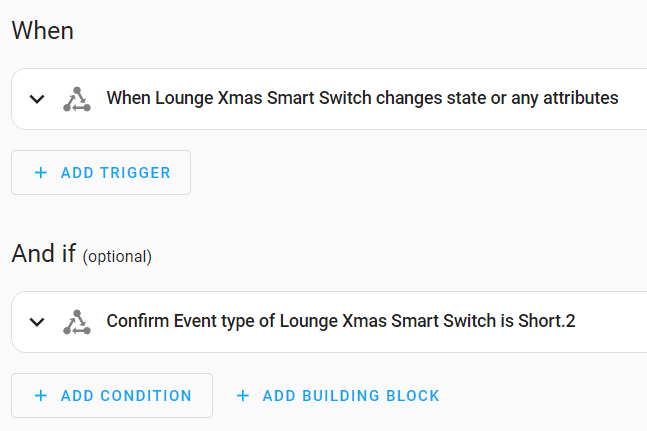
Example of how this can be used in an Entity automation:
A gang of an L42 named "Lounge Xmas", will appear as an entity called "Lounge Xmas Smart Switch", which is then used with the condition that the Event type is "Short.2" (the action can be anything)
This is legacy - kept for backward compatibility, will be removed in a future release. Please use UI Button Events instead.
Devices generate lightwave_smart.click events when the buttons are pressed. The "code" returned is the type of click:
| Code | Hex | Meaning |
|---|---|---|
| 257 | 101 | Up button single press |
| 258 | 102 | Up button double press |
| 259 | 103 | Up button triple press |
| 260 | 104 | Up button quad press |
| 261+ | (and so on - I believe up to 20x click is supported) | |
| 512 | 200 | Up button press and hold |
| 768 | 300 | Up button release after long press |
| 4353 | 1101 | Down button single press |
| 4354 | 1102 | Down button double press |
| 4355 | 1103 | Down button triple press |
| 4356 | 1104 | Down button quad press |
| 4357+ | (and so on) | |
| 4608 | 1200 | Down button press and hold |
| 4864 | 1300 | Down button release after long press |
For sockets the codes are the "up button" versions.
lightwave_smart.reset_enabled_status_to_defaults: Resets all device/entity enabled statuses to defaults
Improved connection and state management means the following services should no longer be required. If you experience problems with connectivity or device states please open an issue here.
lightwave_smart.reconnect: Force a reconnect to the Lightwave backend
lightwave_smart.update_states: Force a read of all device states
Credit to Bryan Blunt for the original version https://github.com/bigbadblunt/homeassistant-lightwave2
Original credit to Warren Ashcroft for code used as a base https://github.com/washcroft/LightwaveRF-LinkPlus