


A modern Android Weather Application built with Kotlin, Jetpack Compose, and MVVM Clean Architecture.
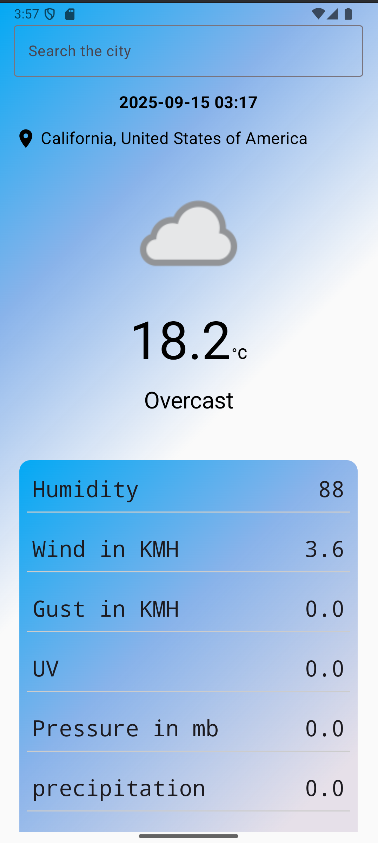
The app fetches real-time weather data using the WeatherAPI and displays it with dynamic UI backgrounds that change based on temperature.
- ✅ Real-time weather data (Current temperature, humidity, wind, UV, pressure, visibility, etc.)
- ✅ City search with auto-suggestions (powered by WeatherAPI search endpoint)
- ✅ GPS-based weather detection (uses device location services)
- ✅ Dynamic gradient backgrounds based on temperature (hot, warm, cold, freezing)
- ✅ MVVM + Clean Architecture for scalability and testability
- ✅ Dependency Injection with Hilt
- ✅ Retrofit + Coroutines for smooth API calls
- ✅ Jetpack Compose UI for a modern, declarative UI experience


- Language: Kotlin
- UI: Jetpack Compose
- Architecture: MVVM + Clean Architecture
- Networking: Retrofit, Coroutines
- Dependency Injection: Hilt
- API: WeatherAPI
- Other: LiveData, Coil (AsyncImage for icons)
@GET("v1/current.json?")
suspend fun getWeather(
    @Query("key") apiKey: String,
    @Query("q") cityName: String
): Response<Model>

@GET("v1/search.json")
suspend fun getCitySuggestions(
    @Query("key") apiKey: String,
    @Query("q") query: String
): Response<List<CitySuggestion>>
- WeatherRepositoryImpl handles API calls
- Converts raw API responses into domain models
- Uses viewModelScope.launch for coroutines
- Exposes LiveData for UI state (weather, suggestions)
- WeatherContent() → Displays data (temperature, humidity, etc.)
- WeatherBackground1(temp: Double) → Changes gradient based on temperature
-
🌡️ Above 40°C → 🔥 Red gradient (extreme heat)
-
🌡️ 30–40°C → 🟡 Yellow (hot)
-
🌡️ 20–30°C → 🌤️ Yellow + Blue (warm)
-
🌡️ 10–20°C → 🌊 Light Blue (cool)
-
🌡️ 0–10°C → ❄️ Dark Blue (cold)
-
🌡️ Below 0°C → 🌫️ Gray (freezing)
- Add your WeatherAPI key in Keys.kt:
object Keys {
    const val apiKey = "YOUR_API_KEY"
}-
Add 7-day forecast
-
Add offline caching with Room
-
Add dark mode support
-Add unit tests (JUnit, Mockito, Hilt Testing)