📺 Watch the Architectural Walkthrough featuring core functionalities.


SentinelFlow is a hybrid governance engine that bridges the gap between Low-Code velocity and Pro-Code security standards. It allows Citizen Developers to audit their Power Apps code in real-time against enterprise security policies (GDPR, Credential Leaks, Performance) using a serverless Azure backend.
The solution implements a Hybrid Fusion Development architecture:
graph TD
    subgraph "Power Platform (Client)"
        User[Developer] -->|Pastes Code| Canvas[SentinelFlow Dashboard]
        Canvas -->|HTTPS Request| Connector[Custom Connector]
    end

    subgraph "Azure Cloud (Backend)"
        Connector -->|API Call| Func["Azure Function (Python 3.11)"]
        Func -->|Validates| Logic["Governance Engine (Regex/Pydantic)"]
        Logic -- Returns Score --> Func
        Func -- JSON Response --> Canvas
    end

    subgraph "Infrastructure"
        Func -->|Logs| AppInsights[Application Insights]
        Func -->|Storage| Storage[Azure Storage]
    end
- Real-Time Static Analysis: Scans PowerFx code for hardcoded secrets (API keys, passwords) and PII (Social Security Numbers).
- Performance Auditing: Detects heavy operations like unfiltered
ClearCollect. - Hybrid Integration: Seamlessly connects a Canvas App UI to a Python backend via OpenAPI (Swagger).
- Infrastructure as Code: Fully deployable via Azure Bicep for reproducible environments.
- Strict Typing: Powered by Pydantic to ensure a rigid API contract.
SentinelFlow/
├── backend/                  # Azure Function (Python 3.11)
│   ├── governance_engine/    # Core Logic (Rules & Models)
│   ├── function_app.py       # API Entry Point
│   └── requirements.txt      # Python Dependencies
├── infra/                    # Infrastructure as Code
│   └── main.bicep            # Azure Resource Definitions
├── integration/              # API Contract
│   └── sentinel_openapi.json # Swagger Definition for Power Platform
├── docs/                     # Documentation & Diagrams
├── tests/                    # Unit Tests (Pytest)
├── Makefile                  # Automation Scripts
└── README.md                 # Project Documentation
This project uses a Makefile to automate the entire lifecycle.
- Azure CLI (
az loginmust be run beforehand) - Python 3.11+
- Azure Functions Core Tools (for local debugging)
- Power Apps Developer Plan
Creates a virtual environment and installs Python dependencies.
make setup
Deploys the Azure Resources (Function App, Storage, App Insights) using Bicep.
make infra-create
Publishes the Python logic to the newly created Azure Function.
make deploy-code
(Optional) To deploy both infrastructure and code in one go:
make deploy-all
Once the backend is live, you must connect the UI:
-
Get the API URL: Run
make get-urlto retrieve your deployed endpoint. -
Update OpenAPI Definition: Open
integration/sentinel_openapi.jsonand replace the"host"value with your Azure Function domain. -
Import Custom Connector:
- Go to make.powerapps.com
- Custom Connectors > New > Import from OpenAPI file.
- Select
integration/sentinel_openapi.json.
-
Create Canvas App:
- Create a new Blank Canvas App.
- Add the
SentinelFlowConnectoras a data source. - Build the UI to accept text input and call
SentinelFlowConnector.AuditApp().
We treat the UI as code, using global variables for theming and relative formulas for responsive layout.
Define a corporate color palette and design system variables to ensure consistency.
// App.OnStart Property
Set(varTheme, {
    Primary: ColorValue("#0072C6"),     // Metso Blue
    Background: ColorValue("#F3F4F6"),  // Light Gray (Tailwind gray-100)
    Surface: ColorValue("#FFFFFF"),     // White
    Critical: ColorValue("#DC2626"),    // Red
    Safe: ColorValue("#16A34A")         // Green
});
-
Main Screen: Set
FilltovarTheme.Background. -
Header:
- Control: Label
- Width:
Parent.Width(Full Span) - Fill:
varTheme.Primary - Text: "SentinelFlow Governance Engine"
-
Input Area (Left Split):
- Control: Text Input (
txtCodeInput) - Mode:
Multiline - X/Y: Anchored to left (
40,120) - Width:
(Parent.Width / 2) - 60 - Height:
Parent.Height - 160
- Control: Text Input (
-
Results Area (Right Split):
- Control: HTML Text (Background Card)
- HtmlText:
<div style='background: white; border-radius: 12px; box-shadow: 0 4px 15px rgba(0,0,0,0.1); width: 98%; height: 98%;'></div>- Logic: Place the Gallery and Score Labels on top of this card for an elevated UI effect.
The button triggers the Azure Function and stores the result in a context variable.
// OnSelect Property
UpdateContext({ locIsLoading: true });

// Call Azure Function (Pass arguments as raw strings)
UpdateContext({
    locScanResult: SentinelFlowGovernanceAPI.AuditApp(
        "UserScan",
        txtCodeInput.Text
    )
});

UpdateContext({ locIsLoading: false });
- Score Label:
"Governance Score: " & locScanResult.governance_score & "/100"
- Color Logic:
If(locScanResult.governance_score < 70, varTheme.Critical, varTheme.Safe)
Use these code snippets to demonstrate the engine's capabilities during a live demo.
Goal: Prove the engine recognizes good code patterns. Input:
// A perfectly compliant app
Set(varCurrentUser, User().FullName);
Set(locIsVisible, true);
Set(colMenu, ["Home", "Settings"]);
Expected Result:
- Score: 100/100 (Green)
- Findings: None (Empty Gallery)
Goal: Trigger a Critical Privacy Rule (PRIV-001).
Input:
// Asking for sensitive info
Set(varEmployeeSSN, "123-45-6789");
Label1.Text = "Please enter your Social Security Number";
Expected Result:
- Score: < 80/100 (Red)
- Findings:
PRIV-001 | Critical(Red) - "Potential PII exposure..."
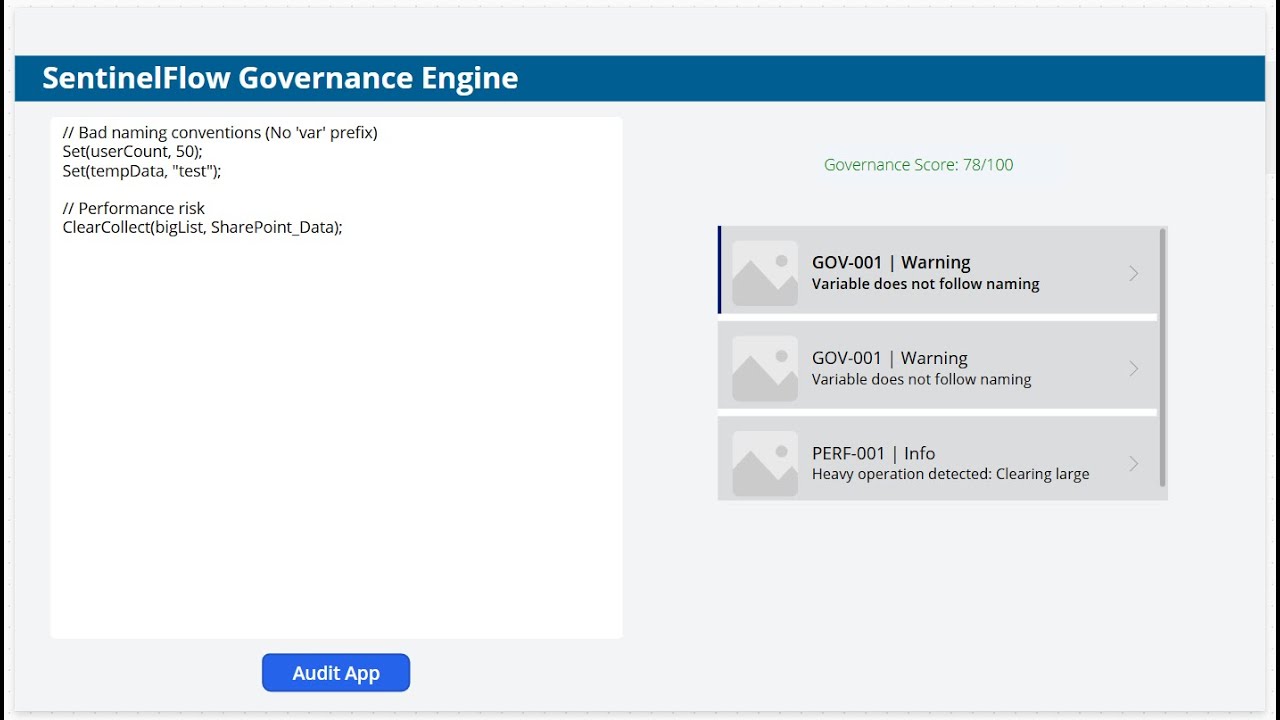
Goal: Trigger Warnings (GOV-001) and Info (PERF-001) without failing security checks.
Input:
// Bad naming conventions (No 'var' prefix)
Set(userCount, 50);
Set(tempData, "test");

// Performance risk
ClearCollect(bigList, SharePoint_Data);
Expected Result:
- Score: ~88/100 (Yellow/Orange)
- Findings:
GOV-001 | Warning(Orange) - "Variable does not follow naming..."PERF-001 | Info(Black) - "Heavy operation detected..."
To avoid incurring cloud costs, destroy all resources when finished.
make destroy
Warning: This permanently deletes the 'SentinelFlow-RG' resource group.