[Excel/Word] (keyboard shortcuts) Create a unified manifest for the sample #958
Conversation


 samantharamon
added
the
Do Not Merge
samantharamon
added
the
Do Not Merge

 ElizabethSamuel-MSFT
left a comment
ElizabethSamuel-MSFT
left a comment
ElizabethSamuel-MSFT
left a comment
There was a problem hiding this comment.
also be sure to update the assets/sample.json (updateDateTime; the thumbnails url gives me a 404 so consider using this link instead: https://raw.githubusercontent.com/OfficeDev/Office-Add-in-samples/main/Samples/office-keyboard-shortcuts/assets/office-keyboard-shortcuts-overview.png)
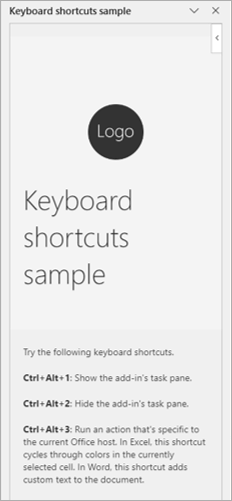
| - <kbd>Ctrl</kbd>+<kbd>Alt</kbd>+<kbd>Q</kbd>: Performs an action that's specific to the current Office host. | ||
| - **Excel**: Cycles through colors in the currently selected cell. | ||
| - **Word**: Adds text to the document. | ||
| | Action | Windows | Mac | Web | |
There was a problem hiding this comment.
Consider reordering so web is first...
| | Action | Windows | Mac | Web | | |
| | Action | Web | Windows | Mac | |
| | Open the add-in's task pane | <kbd>Ctrl</kbd>+<kbd>Alt</kbd>+<kbd>Up arrow key</kbd> | <kbd>Command</kbd>+<kbd>Shift</kbd>+<kbd>Up arrow key</kbd> | <kbd>Ctrl</kbd>+<kbd>Alt</kbd>+<kbd>1</kbd> | | ||
| | Hide the add-in's task pane | <kbd>Ctrl</kbd>+<kbd>Alt</kbd>+<kbd>Down arrow key</kbd> | <kbd>Command</kbd>+<kbd>Shift</kbd>+<kbd>Down arrow key</kbd> | <kbd>Ctrl</kbd>+<kbd>Alt</kbd>+<kbd>2</kbd> | | ||
| | Perform an action that's specific to the current Office host<br>- **Excel**: Cycle through colors in the currently selected cell<br>- **Word**: Add text to the document | <kbd>Ctrl</kbd>+<kbd>Alt</kbd>+<kbd>Q</kbd> | <kbd>Command</kbd>+<kbd>Shift</kbd>+<kbd>Q</kbd> | <kbd>Ctrl</kbd>+<kbd>Alt</kbd>+<kbd>3</kbd> | |
There was a problem hiding this comment.
| | Open the add-in's task pane | <kbd>Ctrl</kbd>+<kbd>Alt</kbd>+<kbd>Up arrow key</kbd> | <kbd>Command</kbd>+<kbd>Shift</kbd>+<kbd>Up arrow key</kbd> | <kbd>Ctrl</kbd>+<kbd>Alt</kbd>+<kbd>1</kbd> | | |
| | Hide the add-in's task pane | <kbd>Ctrl</kbd>+<kbd>Alt</kbd>+<kbd>Down arrow key</kbd> | <kbd>Command</kbd>+<kbd>Shift</kbd>+<kbd>Down arrow key</kbd> | <kbd>Ctrl</kbd>+<kbd>Alt</kbd>+<kbd>2</kbd> | | |
| | Perform an action that's specific to the current Office host<br>- **Excel**: Cycle through colors in the currently selected cell<br>- **Word**: Add text to the document | <kbd>Ctrl</kbd>+<kbd>Alt</kbd>+<kbd>Q</kbd> | <kbd>Command</kbd>+<kbd>Shift</kbd>+<kbd>Q</kbd> | <kbd>Ctrl</kbd>+<kbd>Alt</kbd>+<kbd>3</kbd> | | |
| | Open the add-in's task pane | <kbd>Ctrl</kbd>+<kbd>Alt</kbd>+<kbd>1</kbd> | <kbd>Ctrl</kbd>+<kbd>Alt</kbd>+<kbd>Up arrow key</kbd> | <kbd>Command</kbd>+<kbd>Shift</kbd>+<kbd>Up arrow key</kbd> | | |
| | Hide the add-in's task pane | <kbd>Ctrl</kbd>+<kbd>Alt</kbd>+<kbd>2</kbd> | <kbd>Ctrl</kbd>+<kbd>Alt</kbd>+<kbd>Down arrow key</kbd> | <kbd>Command</kbd>+<kbd>Shift</kbd>+<kbd>Down arrow key</kbd> | | |
| | Perform an action that's specific to the current Office host<ul><li>**Excel**: Cycle through colors in the currently selected cell</li><li>**Word**: Add text to the document</li></ul> | <kbd>Ctrl</kbd>+<kbd>Alt</kbd>+<kbd>3</kbd> | <kbd>Ctrl</kbd>+<kbd>Alt</kbd>+<kbd>Q</kbd> | <kbd>Command</kbd>+<kbd>Shift</kbd>+<kbd>Q</kbd> | |
| - **Excel**: `npm run start:desktop:excel` | ||
| - **Word**: `npm run start:desktop:word` |
There was a problem hiding this comment.
I don't think this is indented enough... The rest of the list shouldn't restart numbering
| - **Excel**: `npm run start:desktop:excel` | |
| - **Word**: `npm run start:desktop:word` | |
| - **Excel**: `npm run start:desktop:excel` | |
| - **Word**: `npm run start:desktop:word` |
| - **Excel**: `npm run start:desktop:excel` | ||
| - **Word**: `npm run start:desktop:word` |
There was a problem hiding this comment.
I don't think this is indented enough...
| - **Excel**: `npm run start:desktop:excel` | |
| - **Word**: `npm run start:desktop:word` | |
| - **Excel**: `npm run start:desktop:excel` | |
| - **Word**: `npm run start:desktop:word` |
| > [!NOTE] | ||
| > If the keyboard shortcut is already in use in Excel or Word, a dialog will be shown so that you can select which action you'd like to map to the shortcut. Once you select an action, you can change your preference by invoking the **Reset Office Add-in Shortcut Preferences** command from the search field. |
There was a problem hiding this comment.
I don't think this is indented enough... you should also indent the rest of the note lines (i.e., >)
| > [!NOTE] | |
| > If the keyboard shortcut is already in use in Excel or Word, a dialog will be shown so that you can select which action you'd like to map to the shortcut. Once you select an action, you can change your preference by invoking the **Reset Office Add-in Shortcut Preferences** command from the search field. | |
| > [!NOTE] | |
| > If the keyboard shortcut is already in use in Excel or Word, a dialog will be shown so that you can select which action you'd like to map to the shortcut. Once you select an action, you can change your preference by invoking the **Reset Office Add-in Shortcut Preferences** command from the search field. |

Thanks for the early review. I'm still working on this sample. :) |
2 participants


What's in this Pull Request?
Adds a unified manifest to the keyboard shortcuts sample.