A customizable camera-based targeting plugin for FFXIV.
Add the following URL to your third-party repository list:
https://raw.githubusercontent.com/Paparogue/PaparogueRepo/refs/heads/main/repo.json

- No key needs to be set - Tabnado overrides the in-game targeting system automatically.
- Target Center X (%): Horizontal position of your targeting center (0-100%)
- Target Center Y (%): Vertical position of your targeting center (0-100%)
- Max Target Distance: Range limit for targeting (1-55 yalms)
- Use Rectangle Selection: Switch between circular and rectangular targeting areas
- When disabled: Uses Camera Search Radius (1-1000) for circular detection
- When enabled: Configure rectangular area with:
- Rectangle Left (%): Extends selection area left from center
- Rectangle Right (%): Extends selection area right from center
- Rectangle Top (%): Extends selection area up from center
- Rectangle Bottom (%): Extends selection area down from center
- Minimum Visibility (%): Required visibility percentage for valid targets
- Raycast Transformation (%): Adjusts raycast points toward camera center
- Raycast Multiplier: Increases raycast density for better detection accuracy (1-16)
-
Camera Lerp: Automatically adjusts target center based on camera zoom
- Targeting shifts upward when zoomed out for better accuracy
- Camera Zoom Lerp: Controls adjustment rate (0.001-0.1)
-
Distance Lerp: Raises object target point when closer
- Makes nearby targets easier to select
- Distance Lerp: Controls adjustment rate (0.01-10.0)
-
Alternative Targeting Mode: First selects closest target to camera center
- After initial selection, cycles through targets based on proximity to current selection
- Resets to nearest target when nothing is selected
- Resets to nearest target when camera moves beyond rotation threshold
- Rotation threshold (% movement): Percentage of movement required to trigger reset (1-100%)
- Can be combined with:
- New Target Reset
- New Closest Target Reset
- Resets when new entities appear or leave targeting range
- Can be combined with:
- Camera Rotation Reset (with adjustable threshold)
- New Closest Target Reset
- Resets when a new closer entity becomes available
- Can be combined with:
- Camera Rotation Reset (with adjustable threshold)
- New Target Reset
- Sticky Target On Reset: Maintains current target after reset if still closest
- When disabled, resets to the second closest enemy
- Target Only Attackable Objects: Only targets attackable entities
- Target Only Visible Objects: Enables visibility checking system using raycasts
- Show Debug Options: Toggles visibility of advanced debugging features
- Show Selection Info: Shows targeting diagnostic information
- Show Raycast Info: Displays visibility raycast information
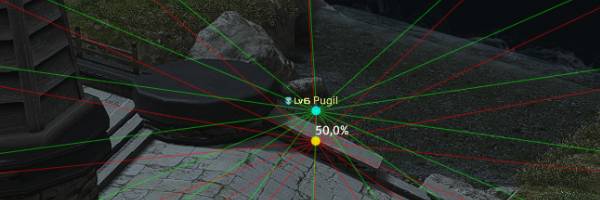
- Camera Depth: Adjusts visibility check depth (1.0-10.0) - Advanced setting


- Debug options may significantly impact performance when enabled
- Higher raycast multiplier values improve accuracy but may affect performance