


This is a real-time computer vision system that combines face detection, 68-point facial landmark detection, and drowsiness detection using the Eye Aspect Ratio (EAR) method.
Built using OpenCV and dlib, this project is applicable in areas such as:
- Driver alertness and fatigue monitoring systems
- Human-computer interaction (HCI)
- Workplace safety and surveillance
- Augmented reality and emotion analysis
The system detects a human face from a video stream, identifies key facial landmarks, calculates the eye aspect ratio, and determines if the person is drowsy based on eye closure duration.
All steps are explained in detail within the Jupyter notebooks to make the project easy to understand and follow.
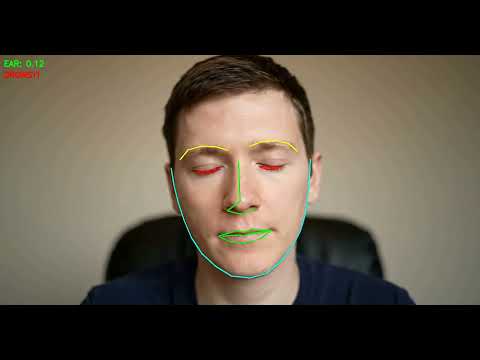
The demo shows real-time facial landmark tracking and drowsiness detection in action.
Facial-Landmark-and-Drowsiness-Detection/
├── 1.Face_Detection/
│   └── Face_Detection_Dlib.ipynb
│
├── 2.Face_Landmark_Detection/
│   ├── 1.Face_Landmark_Detection_Dlib.ipynb
│   ├── 2.Face_Landmark_Detection_Dlib_Class.ipynb
│   └── face_landmark_detector.py
│
├── 3.Drowsiness_Detection/
│   ├── Drowsiness_Detection_with_EAR.ipynb
│   ├── drowsiness_detection.py
│   └── face_landmark_detector.py
│
├── images/
│   └── faces.jpg
│
├── models/
│   ├── mmod_human_face_detector.dat
│   └── shape_predictor_68_face_landmarks.dat
│
├── output_video/
│   └── Drowsiness_Detection.mp4
│
├── requirements.txt
└── README.md
- Two methods:
- HOG + SVM (fast, suitable for real-time)
- CNN-based detection using
mmod_human_face_detector.datfor higher accuracy
- Detects 68 facial landmarks (eyes, nose, jawline, mouth, etc.)
- Implemented in:
- Notebooks for educational purposes
- Reusable Python class (
face_landmark_detector.py)
- Calculates Eye Aspect Ratio (EAR)
- Detects when eyes are closed for a number of consecutive frames
- Triggers a visual alert when drowsiness is detected
- Works in real-time using your webcam
Make sure Python 3.6 or higher is installed.
Install dependencies using:
pip install -r requirements.txtNote: On some systems (especially Windows), you may need to install CMake or Visual Studio Build Tools to compile dlib.
| Model | Description | Download |
|---|---|---|
mmod_human_face_detector.dat |
CNN-based face detector | Download |
shape_predictor_68_face_landmarks.dat |
68-point landmark predictor | Download |
After downloading and extracting, place the .dat files into the models/ directory.
If links do not work, visit the official dlib models page.
Navigate to the folder and open one of the following:
Face_Detection_Dlib.ipynb1.Face_Landmark_Detection_Dlib.ipynb2.Face_Landmark_Detection_Dlib_Class.ipynbDrowsiness_Detection_with_EAR.ipynb
cd 2.Face_Landmark_Detection/
python face_landmark_detector.pycd 3.Drowsiness_Detection/
python drowsiness_detection.pyMake sure your webcam is connected and your face is clearly visible in the frame.
The Eye Aspect Ratio is a simple formula that measures eye openness using distances between six eye landmarks:
EAR = (||p2 − p6|| + ||p3 − p5||) / (2 × ||p1 − p4||)
If EAR falls below a certain threshold (e.g., 0.25) for several consecutive frames, the person is considered drowsy.
- Left Eye Landmarks: points 36:41
- Right Eye Landmarks: points 42:47