



sortedone2many provides a SortedOneToManyField for django Model that establishes a
one-to-many relationship (which can also remember the order of related objects).
Depends on SortedManyToManyField from the great library django-sortedm2m (check it out!).
pip install django-sortedone2many
PyPI repository: https://pypi.python.org/pypi/django-sortedone2many
The OneToMany relationship has been long missing from django ORM.
A similar relationship, ManyToOne, is provided via a ForeignKey,
which is always declared on the "many" side of the relationship.
In the following example (using related_name on a ForeignKey):
class Category(models.Model):
    name = models.CharField(max_length=50)

class Item(models.Model):
    category = ForeignKey(Category, related_name="items")
item.category is a ManyToOne relationship, while
category.items is a OneToMany relationship.
However, it is not easy to
manage the order of the list of items in a category.
To address this need, simply add a SortedOneToManyField (from this package) to
the model on the "one" side of the relationship:
class Category(models.Model):
    name = models.CharField(max_length=50)
    items = SortedOneToManyField(Item, sorted=True, blank=True)
SortedOneToManyField uses an intermediary model with an extra
sort_value field to manage the orders of the related objects.
It is very useful to represent an ordered list of items
(according to their added order or user-specified order).
Also, OneToMany relationship offers better semantics and readability than ForeignKey,
especially for scenarios like master-detail or category-item
(where each item only belongs to one category).
This blog explains it nicely.
Since OneToMany relationship uses an intermediary model,
it can work without altering already-existing models/tables,
thus providing better extensibility than ForeignKey
(which requires adding a ForeignKey field to the model/table).
This is a big advantage when the existing models can't be changed
(e.g., models in a third-party library, or shared among several applications).
This package provides a shortcut function add_sorted_one2many_relation
to inject OneToMany relationship to existing models without editing the
model source code or subclassing the models.
Add the SortedOneToManyField to the model on the "one" side of the
relationship (as opposed to ForeignKey on the "many" side):
from django.db import models
from sortedone2many.fields import SortedOneToManyField

class Item(models.Model):
    name = models.CharField(max_length=50)

class Category(models.Model):
    name = models.CharField(max_length=50)
    items = SortedOneToManyField(Item, sorted=True, blank=True)
Here, category.items is the manager for related Item objects (the same as
the normal ManyToManyField); use it like category.items.add(new_item),
category.items.all(). By default, the list of items (e.g., category.items.all())
is sorted according to the order that each item is added.
On the other side, item.category is an instance (not manager) of Category (similar
to a OneToOneField); use it like item.category.pk, item.category = new_category.
Strictly speaking, item.category is an instance of
sortedone2many.fields.OneToManyRelatedObjectDescriptor
(a type of python descriptor),
which directly exposes the single related object (i.e., the category instance).
This is different from the ManyRelatedObjectsDescriptor (as in the normal ManyToManyField)
which exposes the manager of the potentially multiple related objects
(which is not as convenient to use in the OneToMany relationship).
Similar to SortedManyToManyField,
it uses an intermediary model that holds a ForeignKey field pointed at
the model on the "one" side of the relationship, a OneToOneField field
pointed at the model on the "many" side (to ensure the unique relationship
to the "one" side), and another field storing the
sort value (to remember to orders of the objects on the "many" side).
SortedOneToManyField accepts a boolean sorted attribute which specifies if relationship is
ordered or not. Default is set to True.
Refer to django-sortedm2m for more details.
First, add "sortedm2m" to your INSTALLED_APPS settings,
which provides the static js and css files to render
the related objects in a SortedOneToManyField as a list of
checkboxes that can be sorted by drag'n'drop.
(That is similar to the behavior of a SortedManyToManyField).
By default, a SortedOneToManyField is translated into a form field
sortedone2many.forms.SortedMultipleChoiceWithDisabledField for rendering.
This form field also adds a special function to the widget:
disables those checkboxes that should not be directly selected
in the current admin view (to ensure the unique OneToMany relationship).
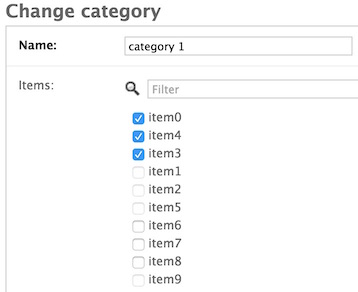
E.g., in the image below, in the admin view for category 1,
item1.category is category 2, so the checkbox for item1 is disabled
because category 2 has to remove item1 from its items list before
category 1 can select item1 in the admin view.
In the admin site, to display a related object on the reverse side of
a SortedOneToManyField (e.g., to display item1.category in the
admin view of item1), simply use sortedone2many.admin.One2ManyModelAdmin
as the admin class to register your model:
from django.contrib import admin
from sortedone2many.admin import One2ManyModelAdmin
admin.site.register(MyItemModel, One2ManyModelAdmin)
Or, use the shortcut function sortedone2many.admin.register:
from sortedone2many.admin import register
register(MyItemModel)
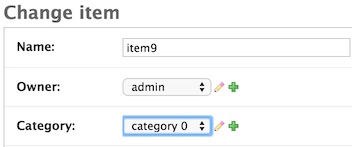
The related object will be rendered as a dropdown <select> list,
through which you can assign it a different value.
Two additional "change" and "add" buttons are also listed after the dropdown list
as the shortcuts to edit the category
(similar to the appearance of a ForeignKey), as shown below:
Internally, One2ManyModelAdmin uses One2ManyModelForm for rendering,
which automatically finds related SortedOneToManyField from the model defined in the
form's Meta class, and add these fields to the form.
Your can subclass One2ManyModelForm to customize it for your own model.
Use the following helper functions in sortedone2many.utils
to inject extra fields to existing models:
inject_extra_field_to_model(from_model, field_name, field)

add_sorted_one2many_relation(model_one, model_many, field_name_on_model_one=None,
related_name_on_model_many=None)SortedOneToManyField (or generally, any extra model field) can be added to an existing model
that can't be edited directly (e.g., in another library/app). For example, add the field to
the User model in django.contrib.auth.models.
It is recommended to use django migrations to do this.
First, add the existing model (
User) into djangomigrationsusing a migrations folder outside the original library/app (e.g., in your own app). This can be achieved by configuring theMIGRATION_MODULESdictionary in your djangosettings:MIGRATION_MODULES = { "auth": "my_app.migrations_auth", }
The key (
"auth") ofMIGRATION_MODULESis the name (app_label) of the library/app, and the value is package/folder to store the migration files for this library/app.Note: this value will supercede/shield the original migrations folder in the library/app (if it already uses django migrations), i.e.,
django.contrib.auth.migrations.Next, run
manage.py makemigrations authandmanage.py migrate authto migrate the existing model as if for the first time (no matter whether the model used migrations before). A new migration file0001_initial.pyshould be generated in the specified folder. If the database table is already created for the model, no actual migrations will be applied.Add a
SortedOneToManyFieldnameditemsto theUsermodel using the helper function:inject_extra_field_to_model(User, 'items', SortedOneToManyField(Item, related_name='owner'))
Run
manage.py makemigrations authandmanage.py migrate authagain to create the intermediary table (auth_user_itemsby default).
That's it! Now user.items and item.owner are available as if you defined the
items field in the User model source code.
Setup database:
python manage.py makemigrations auth tests app2
python manage.py migrate
Run tests:
python manage.py test tests
test_projectcontains the django projectsettings.pytestsfolder contains all the testcases- Tested with django 1.8, 1.9 and Python 2.7, 3.3, 3.4, 3.5