This project is made for just eat takeaway take-home assignment for the role of Early Career Program - Software Engineer.
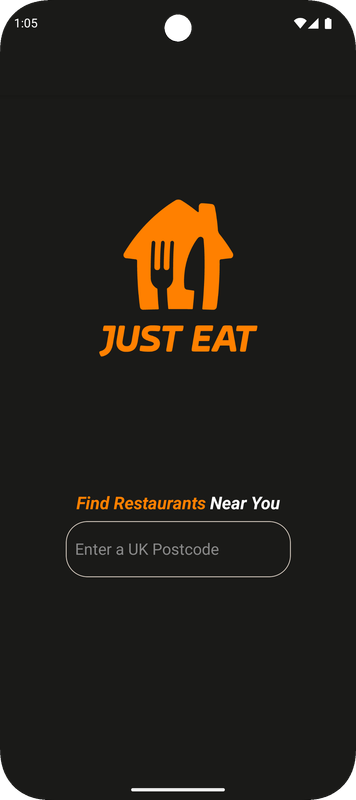
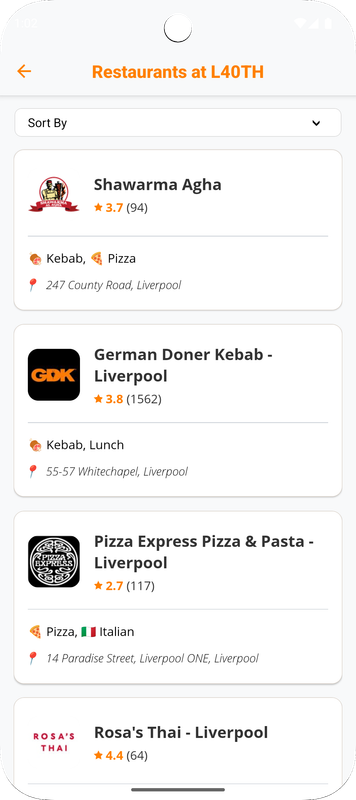
Its purpose is to search the restaurants by given UK postcodes and display the first ten restaurants from the searching result in a user-friendly format.
It is a mobile application for Android system, and potentially for iOS system for that it is built with React Native.
This is a new React Native project, bootstrapped using @react-native-community/cli.
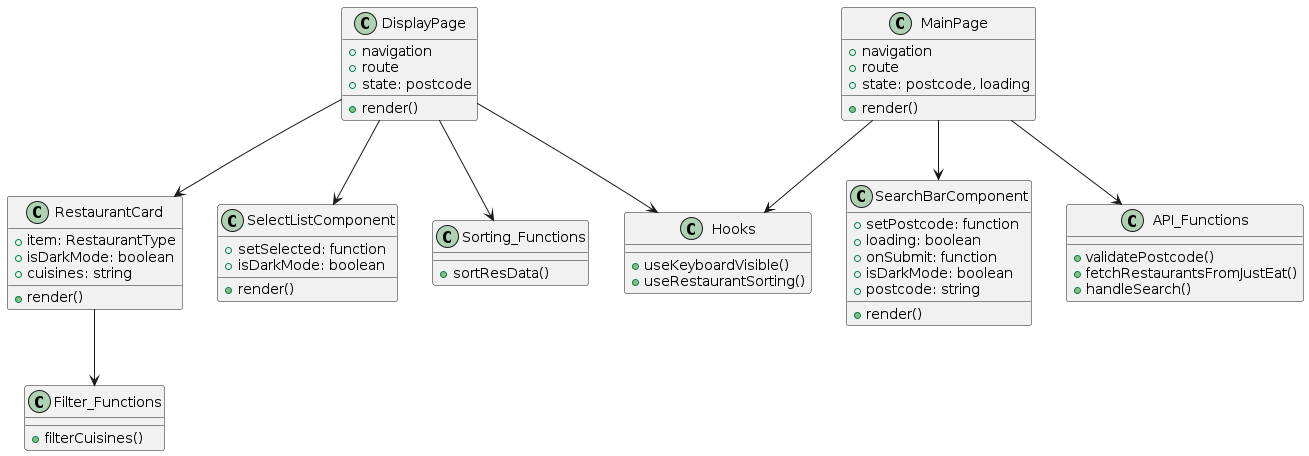
This application includes two pages:
-
MainPage
-
DisplayPage
This application does two things:
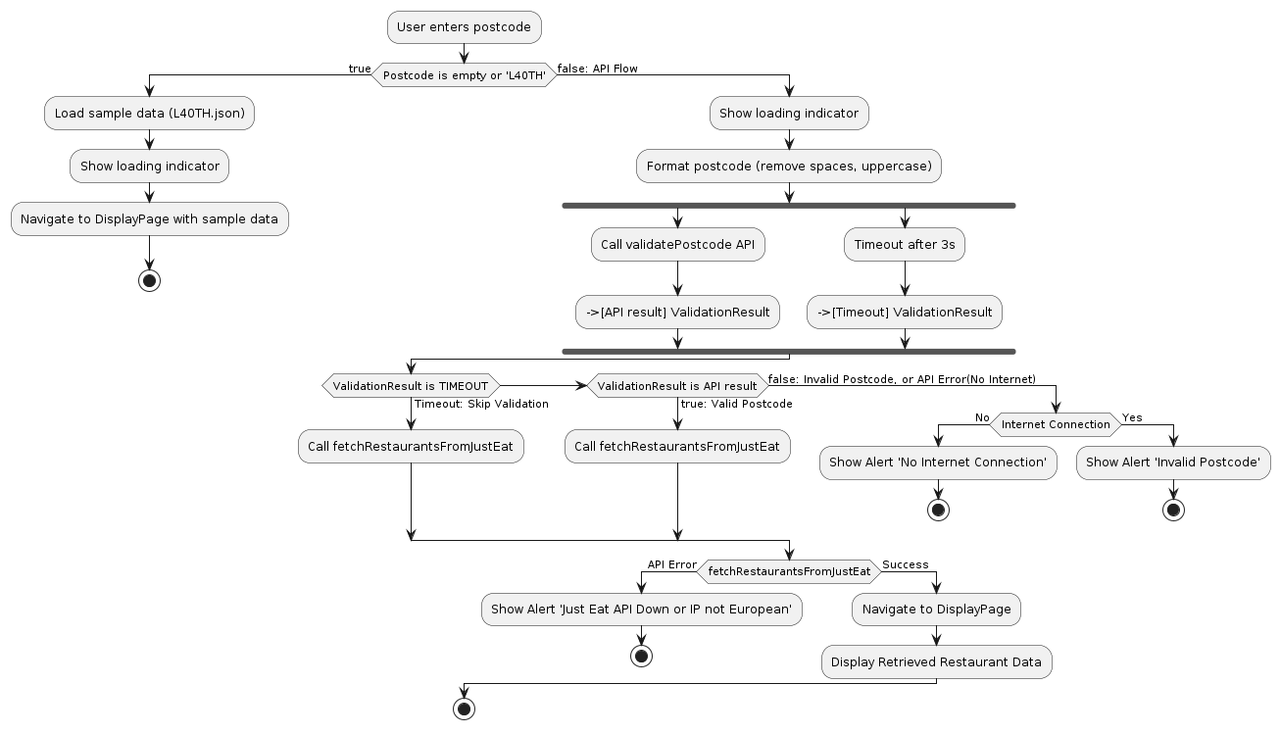
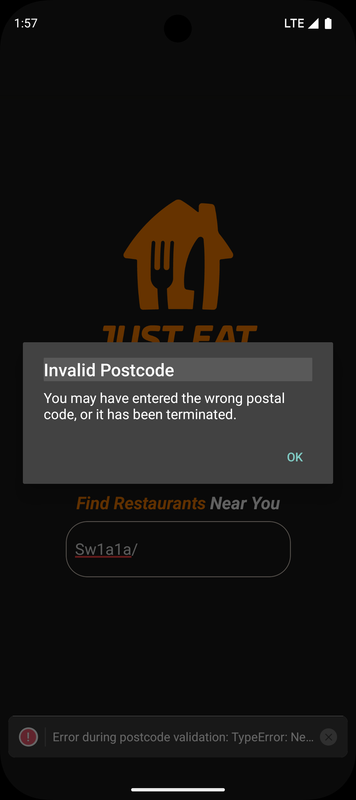
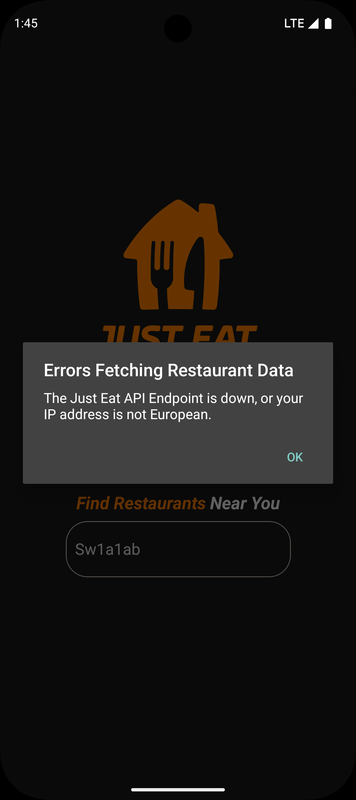
- On MainPage, it validates the postcode, searches it and returns the first 10 restaurants for any valid UK postcode, with error handling (Validation API Fails, Request Timeout, No Internet, Just Eat API Fails). This is done through two APIs:
-
postcode.io validation api: https://postcodes.io/postcodes/${postcode}/validate
-
Just Eat Takeaway Endpoint API:
https://uk.api.just-eat.io/discovery/uk/restaurants/enriched/bypostcode/${postcode}
If searching L4 0TH, or empty string, the local sample data will be used for display purpose
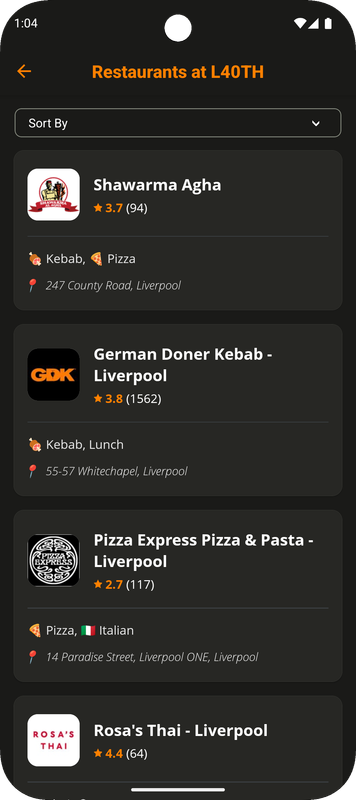
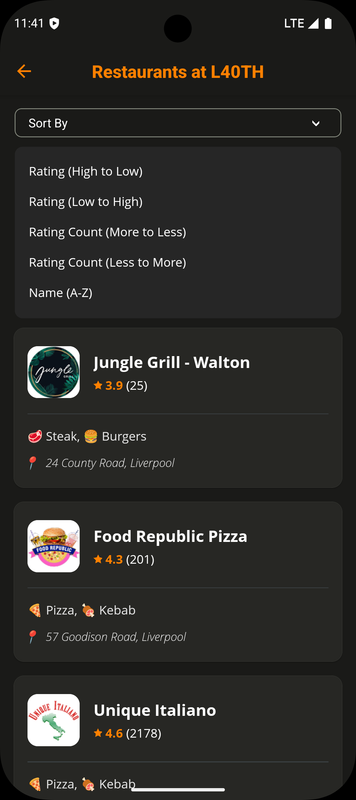
- On DisplayPage, it can display the restaurant in the order of the returning data, or it can display the same restaurants by multiple sorting options: Rating, RatingCount, Alphabetical Order of Restaurant Names. It can refresh the restaurant list by swiping down the screen.
Besides, this application has dark mode design, for the night usage.
├── App.tsx                     # Main application container with navigation setup
└── src/
    ├── pages/                  # Screen components
    │   ├── MainPage.tsx        # Initial screen with search bar and logo
    │   ├── DisplayPage.tsx     # Screen to display the list of restaurants
    │   └── L40TH.json          # Sample restaurant data for display purpose (imported by MainPage)
    │
    ├── components/             # Reusable UI components
    │   ├── restaurantCard.tsx  # Card component to display a single restaurant's details
    │   ├── selectList.tsx      # Dropdown component for sorting options
    │   └── searchBar.tsx       # Search bar component for postcode input
    │
    ├── types/                  # Types for component props and data structures
    │   ├── restaurant_type.d.ts
    │   ├── restaurantCard_type.d.ts
    │   ├── searchBar_type.d.ts
    │   ├── selectList_type.d.ts
    │   └── selectListOptions_type.d.ts
    │
    ├── functions/              # Utility and logic functions
    │   ├── API_Functions/
    │   │   └── apiRequest.ts   # Functions for API calls (validatePostcode, fetchRestaurantsFromJustEat, handleSearch)
    │   │
    │   ├── Filtering_Functions/
    │   │   └── filter.ts       # Function to format cuisine names with emojis (uses cuisine-emoji-match)
    │   │   └── cuisine-emoji-match.ts # Data mapping cuisine keywords/names to emoji strings
    │   │
    │   ├── Sorting_Functions/
    │   │   ├── sortRestaurantData.ts # Function to sort restaurant data based on selected options
    │
    ├── stylesheets/            # Style definitions
    │   ├── Pages/
    │   │   ├── MainPage_StyleSheet.ts   # Styles used by MainPage.tsx
    │   │   └── DisplayPage_StyleSheet.ts # Styles used by DisplayPage.tsx
    │   └── Props/
    │       ├── restaurantCard_StyleSheet.tsx # StyleSheet for restaurantCard component
    │       ├── searchBar_StyleSheet.tsx # StyleSheet for searchBar component
    │       └── selectList_StyleSheet.tsx # StyleSheet for selectList component
    │
    ├── hooks/
    │   ├── useKeyboardVisible.ts  # Hook to track keyboard visibility
    │   └── useRestaurantSorting.ts # Hook to track selected sorting options and to sort restaurants based on those options
    │
    ├── config/                 # Static data files for configuration
    │   ├── api.ts  # URL Constants
    │   ├── sortingOptions.ts  # The sorting options for the sorting dropdown
    │   └── cuisine-emoji-match.ts # Data mapping cuisine keywords/names to emoji strings
    │
    ├── images/                 # Static image assets
    │    ├── just-eat-logo.png
    │    ├── Just-Eat-Star.png
    │    └── downarrow.png
    │
    ├── __tests__/              # test files
    │   ├── MainPage.test.tsx
    │   ├── CustomSorting.test.tsx
    │   └── apiRequest.test.ts
Key settings and values in configuration files.
You can modify key settings without changing the code logic, which improves flexibility and reduces errors.
-
API Configuration (
src/configs/api.ts): All external API URLs and timeout settings are centralized in this file. When API endpoint changes, update it here. -
Sorting Options (
src/configs/sortingOptions.ts): All sorting options in one place. When changing sorting list options, update this file. -
Cuisine Emoji Mapping (
src/configs/cuisine-emoji-match.ts): maps cuisine names to emojis, making it easier to manage visual elements across the app.
-
Functions (
src/functions): Each function focuses on a single, clear responsibility. -
Components (
src/components/): Reusable Visual Components. -
Hooks (
src/hooks/): Custom Hooks for tracking selected sorting options and keyboard visibility. -
Pages (
src/pages/): Separate page files of the app. -
Configuration Files (
src/configs/): All configuration values are in theconfigsdirectory, making them easy to find and update. -
Types (
src/types): Custom types to help define the shape of data. -
StyleSheets (
src/stylesheets): For pages and components.
This app handles problems gracefully.
-
Postcode Validation: The
validatePostcodefunction checks if the user entered a valid UK postcode before making a request. This prevents unnecessary API calls when the input is invalid. -
Validation Timeout: The
handleSearchfunction has a timeout built-in. If postcode validation takes too long (e.g., due to network issues), the app doesn’t hang; it moves on and tries fetching restaurant data from Just Eat. -
Fallback Data: If no postcode is entered (or if the default
L40THpostcode is used), the app loads sample data instead of showing an error. The user can explore the app even if the API isn’t available (useful for demos or testing). -
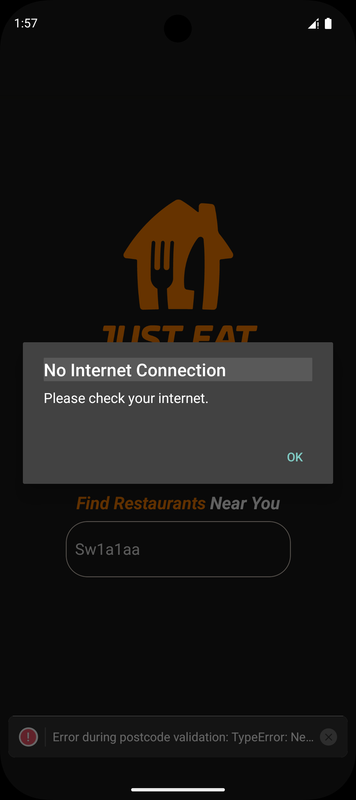
No Internet Error: The application shows "No Internet" error when the user searches postcode with no Internet connection.
-
Restaurant API Error: If the user is not having an European IP address or if the restaurant api endpoint is down.
-
Emoji-Cuisine Match: The
cuisine-emoji-match.tshas a mapping of cuisine names to emojis, which makes the restaurant list appealing.
-
Explicit Types: Functions have clearly defined types for their parameters and return values, which helps prevent bugs.
-
Custom Types: Types like
OptionTypeandRestaurantTypedefine the structure of data, showing exactly what to expect. -
Enums: Enums (like
SortOrderandSortOptionValue) to define constant values for sorting, reducing the risk of typos or mistakes.
If you do not want to set up the project by yourself, you can download the "just-eat.apk" file from src/apk folder and install it on your Android devices.
(I do not have a Mac computer to compile the iOS version)
Note: Make sure you have completed the Set Up Your Environment guide before proceeding.
First, open up your project folder in shell/cmd.
Use this line to install all dependency packages.
npm install
Second, you need to run Metro, the JavaScript build tool for React Native.
To start the Metro dev server, run the following command from the root of your React Native project:
# Using npm


npm  start


# OR using Yarn


yarn  start
With Metro running, open a new terminal window/pane from the root of your React Native project, and use one of the following commands to build and run your Android or iOS app:
If the following commands do not work, it is most likely because in Gradle 9.0 jcenter() is deprecated. You can fix this by removing the jcenter() from any node modules that are using it. Or you can replace it with mavencentral()
# Using npm


npm  run  android


# OR using Yarn


yarn  android
For iOS, remember to install CocoaPods dependencies (this only needs to be run on first clone or after updating native deps).
The first time you create a new project, run the Ruby bundler to install CocoaPods itself:
bundle install
Then, and every time you update your native dependencies, run:
bundle exec pod install
For more information, please visit CocoaPods Getting Started guide.
# Using npm


npm  run  ios


# OR using Yarn


yarn  ios
This is one way to run your app — you can also build it directly from Android Studio or Xcode.
just-eat-app.mp4

Four data points are shown: name and rating on the top, lying horizontally with the logo. cuisines and address on the bottom, lying vertically.

The definition of "restaurant" is not specified. There are non-restaurants in the "restaurants" list, such as pharmacies and convenience stores. I assume that all entries are "restaurant" by definition.
The definition of "cuisine" is not specified. There are names such as "Local Legends" "Deals" "Freebies" in the cuisine list. By observation, in most scenarios the first two names in "cuisines" are truly cuisines.
-
Better Displaying of Cuisine Items & Better Distinguishability of Restaurants / Non-Restaurants.
-
More custom components to increase modularity. ✅
-
Better StyleSheet Design with more dynamic settings. ✅
-
Restaurant Details in a full page when each restaurant card is clicked.
-
Tests for checking the returned data and the correct rendering of elements.
(Can be done by Jest and @testing-library/react-native: e.g. Restaurant card components with various data inputs, Search input component behavior, Sorting controls and their state changes, Navigation between MainPage and DisplayPage, Data passing between screens, Dark/light mode toggle behavior)✅
-
GeoPoint + Map Integration for navigation to the restaurant.
-
More Restaurant Sorting Options. ✅