An AI-powered grant-writing assistant designed to streamline the process of applying for federal funding, specifically for Massachusetts communities pursuing federal funding opportunities.
The application features multiple interactive interfaces including a landing page, requirements gathering page, chatbot interface, and document editor.
-
Smart Grant Matching
AI-powered system that analyzes and matches grants to user needs, providing personalized recommendations based on project requirements.
-
Requirements Analysis
Automatically scans and summarizes Notices of Funding Opportunities (NOFOs), presenting key information about eligibility, required documents, narrative sections, and deadlines.
-
AI-Powered Writing Assistant
Interactive chatbot that assists in drafting grant narratives by prompting for organization details and incorporating information from uploaded documents.
-
Document Editor
Section-based editor for drafting and refining grant narratives with AI assistance, progress tracking, and export capabilities. -
User Management
Administrative dashboard for managing NOFOs, tracking progress across multiple grant applications, and controlling user access.


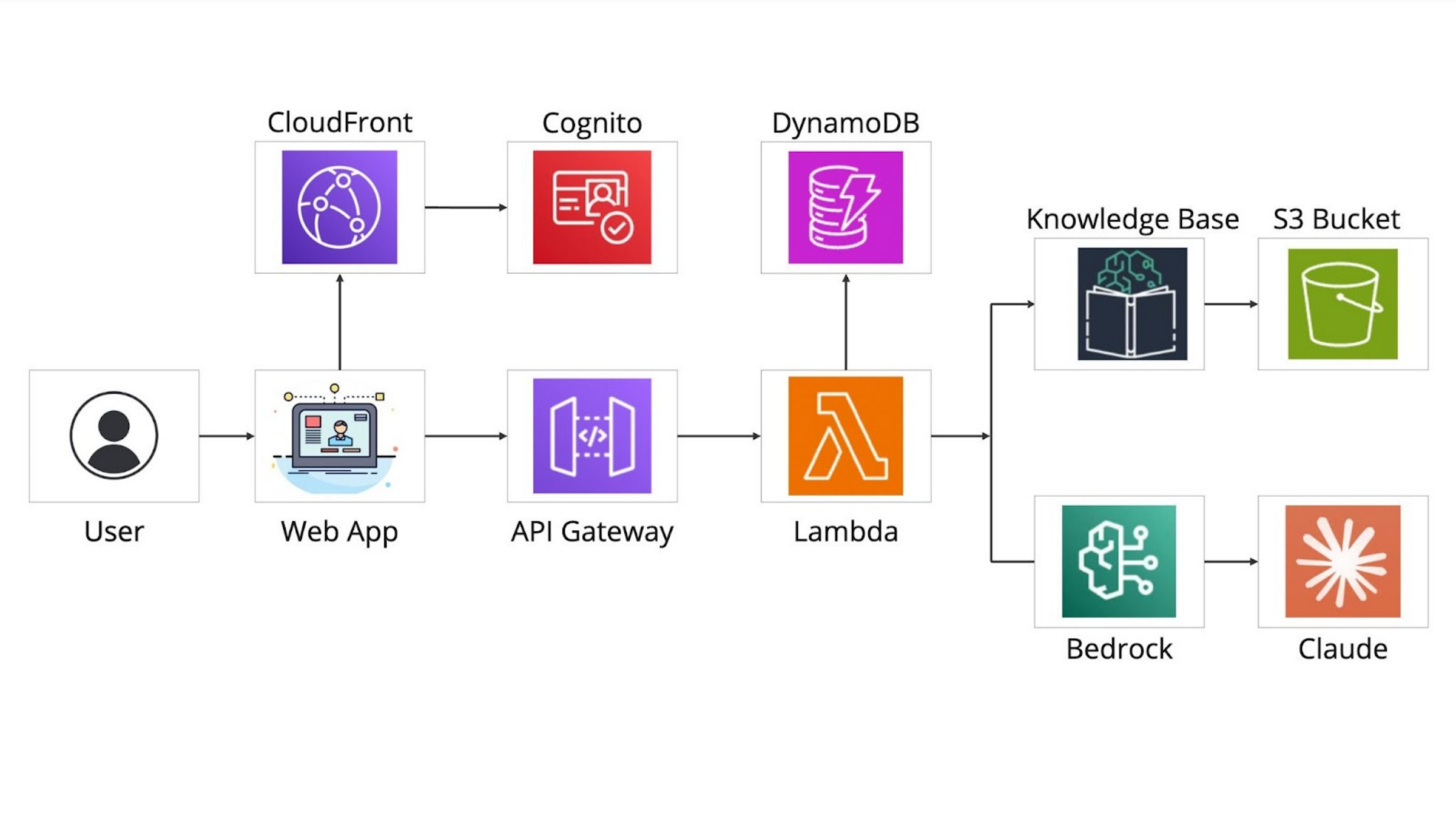
For more information about the architecture, visit the AWS GenAI LLM Chatbot.
| Layer | Tools & Frameworks |
|---|---|
| Frontend | React, TypeScript, AWS Amplify, Cloudscape Design System |
| Backend | AWS Lambda, AWS API Gateway, AWS CDK |
| AI/ML | AWS Bedrock, Mistral, Claude |
| Auth | AWS Cognito |
| Storage | AWS S3, DynamoDB |
| DevOps | AWS CDK for infrastructure as code |
# Clone the repo
git clone https://github.com/The-Burnes-Center/AI4Impact-GrantWell.git
cd AI4Impact-GrantWell

# Install dependencies
npm install

# Run development server
npm run dev
Environment variables and AWS credentials need to be configured for full functionality.
- Node.js (Latest LTS version recommended)
- AWS CLI configured with appropriate credentials
- AWS CDK installed globally (
npm install -g aws-cdk)
| Module | Description |
|---|---|
landing-page |
Browse and select from available NOFOs with smart search capabilities |
requirements |
Review summarized NOFO documents and upload relevant backend files |
chatbot |
AI-powered interface for drafting grant narratives |
document-editor |
Collaborative environment for drafting and finalizing grant narratives |
dashboard |
Administrative interface for managing NOFOs, users, and tracking progress |
- Grant Selection → Browse and select from available NOFOs
- Project Basics → Enter basic project information
- Questionnaire → Complete project-specific questions
- Document Upload → Submit supporting documentation
- Section Editor → Draft and refine narrative sections
- Review → Final review and export of completed application
- AWS Cognito-based authentication
- Self-signup disabled - users must be invited by administrators
- Secure file storage in AWS S3
- Role-based access control with admin privileges
- Encrypted data transmission
- PDFs are preferred for file uploads (ZIP files not supported)
- Enhanced grant matching algorithms
- Collaborative editing features
- Advanced document version control
- Expanded analytics and reporting
This is an internal tool for Massachusetts Federal Funds and Infrastructure (FFIO) staff. Please contact the administrators for access and contribution guidelines.
MIT License – see LICENSE.md for details.
- Built by the GrantWell Team
- In partnership with the Burnes Center for Social Change
- For the Massachusetts Federal Funds and Infrastructure Office
- This tool is functional but has undergone minimal user testing. Please report any issues through the feedback form available in the application.
- Ensure you upload your supplementary data before starting a conversation with the chatbot.
- NOFO documents must be properly named before uploading to GrantWell.
- Always fact-check any information provided by GrantWell that you are uncertain about.
Help us make GrantWell better by sharing your thoughts and suggestions through our feedback form.