You use dmenu and want to build menus in a straight forward way? What about even having sub-menus? tlaunch may help.
To install tlaunch you can edit the Makefile to match your local setup (tlaunch is installed into the /usr/local/bin by default).
Afterwards enter the following command to install tlaunch (if necessary as root).
sudo make installtlaunch always needs a yaml file to express the custom menu structure, like this one:
quick_menu:
  network: x-terminal-emulator -e nmtui
  screenshot:
    selection: scrot -s '/home/user/%Y-%m-%d-%H_%M_%S.jpg'
    fullscreen: scrot '/home/user/%Y-%m-%d-%H_%M_%S.jpg'
  power:
    shutdown: shutdown -h now
    reboot: reboot
    lock: slock
  dotfiles:
    vim: vim $HOME/.vimrc
    bash: vim $HOME/.bashrc
    tlaunchs: vim $HOME/tlaunchs
  another_option: notify-send "you get the idea"
The menu file should be assigned to the TLAUNCH_FILE variable.
It can be used as an environment variable at your .bashrc or .zshrc file.
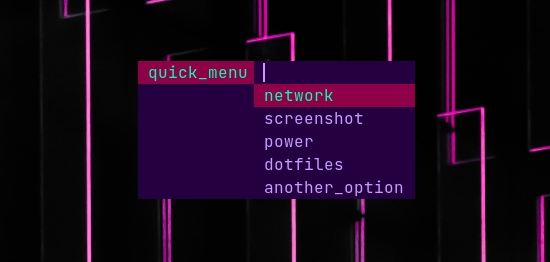
So when you call tlaunch, the menu is opened:
Or TLAUNCH_FILE can be assigned when calling tlaunch:
$ export TLAUNCH_FILE=quick_menu.yaml; tlaunch
$ #or
$ echo "export TLAUNCH_FILE=quick_menu.yaml" >> ~/.bashrc
$ tlaunch
 |
 |
|---|---|
| Edimar Calebe Castanho (Calebe94) | Gabriel Gaboardi (Gabo) |
All software is covered under GNU General Public License v3.0.