Control Systems
- Develop core 'autopilot' for the pod.
- Use communication's API to use sensor data to intelligently control brakes, motors, etc.
- Make Elon proud.
Our goals are to develop a highly distributed, highly fault tolerant, robust system. As part of this, we're using multiple different types of computer boards.
- The master computer
- Provides commands to other boards
- Handles things like network requests, system health monitoring, data logging
- Can handle both C++ and Python and supports running multiple parallel processes
- Slower to boot up, cannot run "failure critical" systems needed to control the pod in an emergency
- Multiple boards distributed through system
- Generally receive commands and data from the communication network and either
- Directly control hardware
- Process data to emit new data.
- Only programmed in C++, one thread, one process.
- More low level, but super lightweight, can reboot basically instantly.
At a high level, we'll be building logic that lets the pod cycle between these states. This should (for now) give it everything it needs to handle startup, accelerating, maintaining state, and braking on a straight sprint.
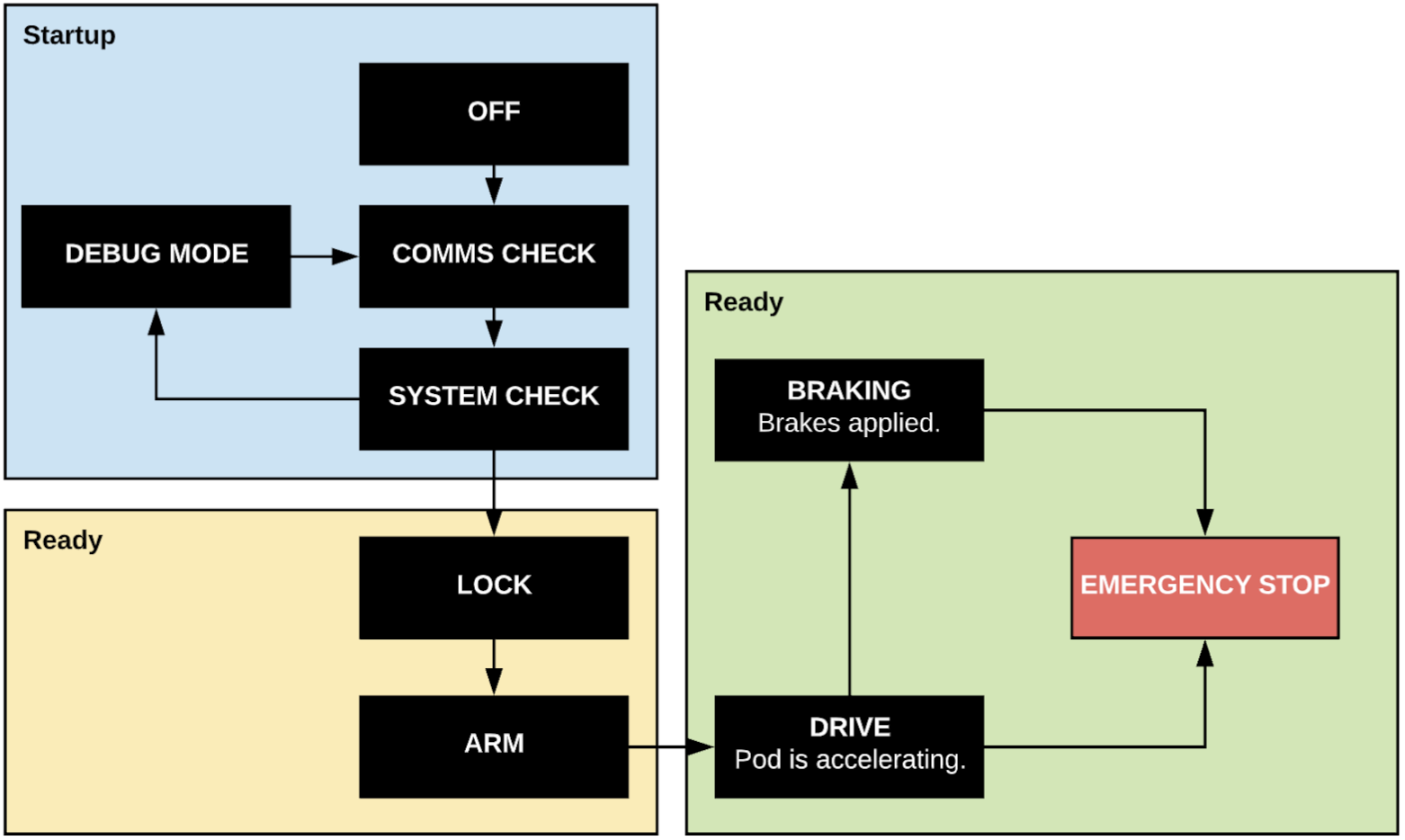
The pod is off. Big surprise.
The pod (probably using communication APIs) checks that all board-board and pod-network communication is working properly. This is important as without it, nothing else is possible (or safe!).
The pod will check that sensors are providing reasonable values. Additionally it will perform any calibration and system initialization necessary.
This mode will be entered automatically if a check fails, or manually by our command. It will give us super-user access to the onboard logs and APIs through a command line tool. This should help us speed of development and debugging.
The pod is ready to go, but is locked, meaning it is not yet listening for a launch command.
The pod is fully ready to go, and is now listening for a launch command.
After receiving a launch command, the pod begins accelerating as fast as possible. Here, we'll use PID controllers and monitor things like
- Motor temperatures
- Vibration
- Wheel slip rates
- IMU readings etc, to determine optimal motor speeds. Additionally, we'll consume position data to figure out when to brake.
We're braking. This is a one way operation, and can only be automatically initiated.
The pod tries to stop as quickly as possible, activated if an unsafe anomaly is detected.