Focus your attention on critical metadata in this configurable form. Mix and match standard and custom metadata fields to show the properties critical to your business.
The Custom Metadata Panel provides Enterprises and individuals with a way to focus their attention on critical metadata in one panel.
The panel is completely customizable and helps end users and DAM managers tune their metadata view for maximum accuracy and efficiency. With many form field types and available metadata presets, it expands the metadata capabilities of Creative Cloud Desktop applications without using XML or special coding. Form fields include:
- Text and Multiple Text
- Language Alternatives for Text Fields
- Numbers and Multiple Numbers
- Tags (like Keywords)
- Dropdown
- Multi-select Dropdown
- Date and Multi-Date
- Checkbox and Checkbox Group
- Switch and Switch Group
- Radio Buttons
- URL and Multiple URL fields that link to external web sites
- Quicktime metadata properties
- Complex structures
- Tables
- Calculation Fields
- Hidden fields
- AEM Tags (special case just for Adobe Experience Manager)
Other features include a read-only entries, synced field values, section dividers, a built-in form editor, form definition file import and export, metadata Preset import and export, and the ability to use a URL as the location for the form. This last feature is ideal for Enterprise or group applications, where a DAM Manager posts the form to a common location and all users get the latest and greatest. For full docuentation, please see our user guide.
See the Table of Contents for help with using and configuring the panel.
Exchange link to panel: https://exchange.adobe.com/creativecloud.details.103752.html
Enterprise Admins can include this and other extensions when they create Managed Packages in the Admin Console. Read the Adobe Help Documentation here. Search for Custom Metadata Panel during step 7 to include it and other Extensions in your Managed Package.
For Enterprise customers who cannot create Managed Packages to deploy Marketplace extensions, we have made it available as a Release. See the Releases section of this repository to get the latest version.
See a video tour at https://youtu.be/48T_xxx_i6Y
Special thanks to the following, who graciously created example Views that you can use when creating a new Tab:
- David Riecks, Michael Steidl and Brendan Quinn from IPTC for their collaboration and amazingly helpful feedback.
- Martin Gersbach for creating a repository of useful config files for common metadata namespaces and properties.
Quality of life improvements including:
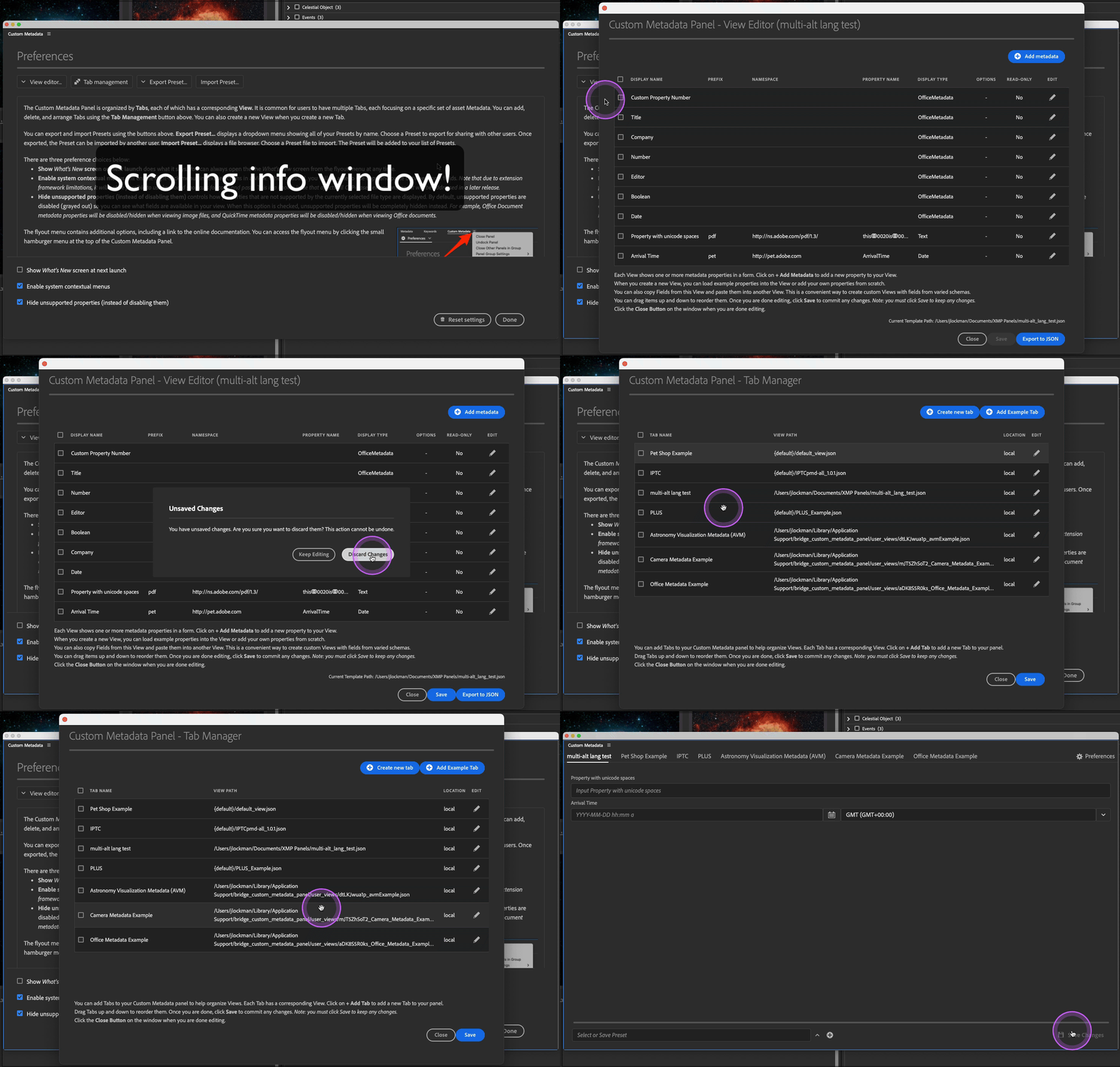
- Close and Save buttons to Tab and View editors. These are contextually aware and will prompt the user if they have unsaved changes
- Redesigned the Tab and View editor tables to include contextual copy, paste and delete
- Preferences layout improvements. Info window now scrolls and bottom buttons/checkboxes are always visible
- Updated font scaling methods
- some bug fixes
- Office Document and Quicktime Metadata Support in InDesign
- Office and media file Integration: Automatically detect Office and media files linked in InDesign layouts
- Linked Text Frame Detection: Select text frames with linked Word documents to view/edit metadata
- Linked Table Detection: Select tables with linked Excel spreadsheets to view/edit metadata
- Seamless Workflow: Read and edit metadata directly from InDesign without switching to Bridge
-
Word, PowerPoint & Excel Integration: Automatically detect Office files in Bridge selections
-
Full metadata access: Read and write all pre-defined and custom Office metadata properties
- Dependencies and Sync to Another Field: You can now configure Dependencies and Sync to another field options for Quicktime Metadata fields, providing the same powerful workflow automation available for XMP fields.
- New Calculation Editor: Introduced a completely redesigned calculation editor that makes it easier to build and manage complex formulas:
- Visual field picker for easy variable insertion
- Function library with categorized functions (Math, Text, Date/Time, Logic, Aggregation)
- Syntax highlighting and error detection
- Real-time formula preview
- Support for cursor positioning and editing
- Quicktime Metadata Support: Calculation fields can now reference Quicktime metadata properties, enabling calculations that combine XMP and Quicktime data.
- Date Field Time Zones: Added comprehensive time zone support for Date and Multi-Date fields:
- View and edit the GMT offset for each date value
- Automatic conversion to user's local timezone (optional)
- Preserves original time zone information
- Compatible with ISO 8601 date format
Problem: Property names containing spaces (encoded as ↂ0020 unicode markers) failed to save when editing InDesign document metadata directly, despite working correctly in Bridge and for InDesign linked assets.
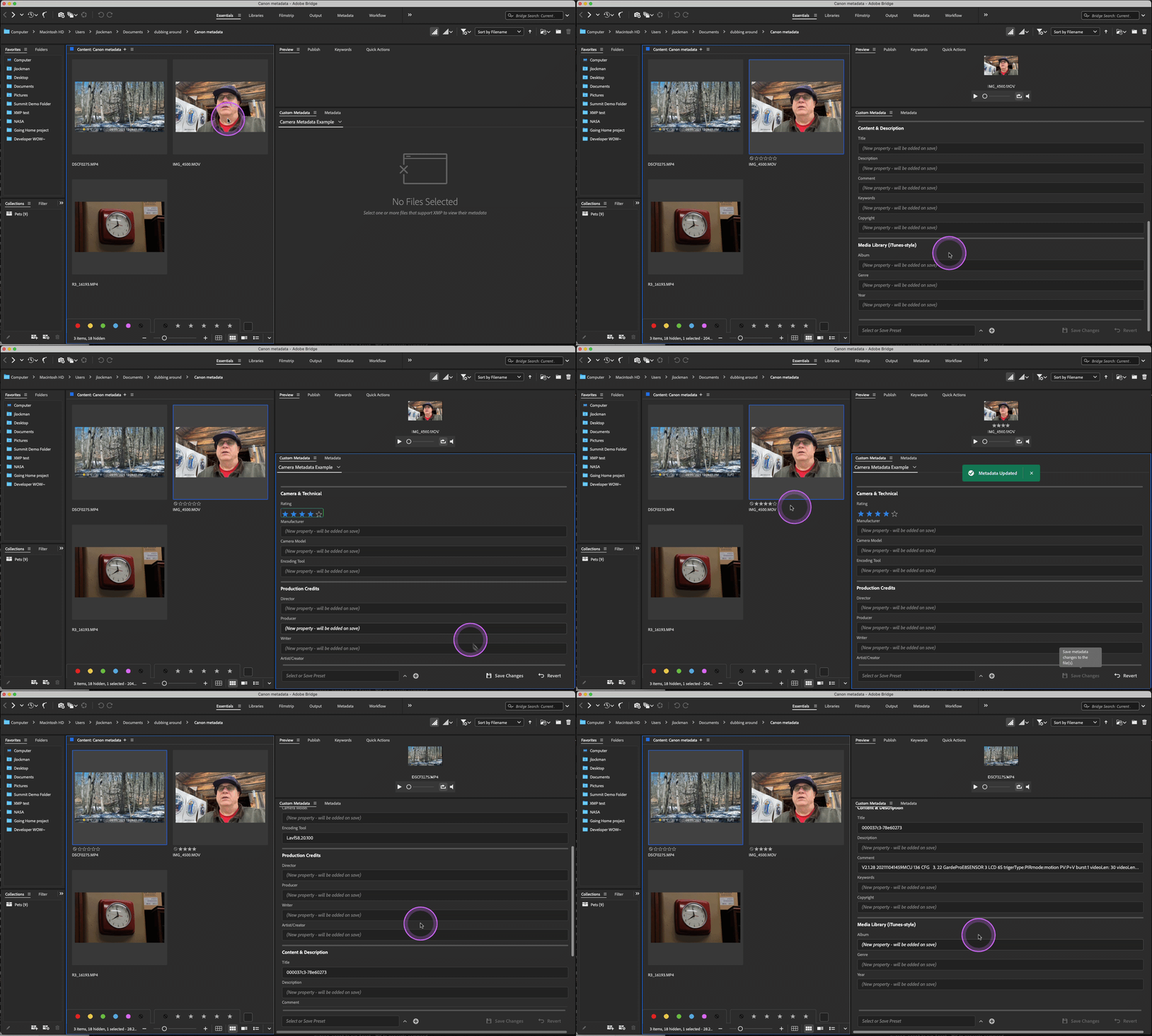
This release introduces a major new field type: Quicktime Metadata. This field type allows users to read and write embedded camera metadata directly in video files (MP4/MOV) without requiring XMP namespace configuration.
-
16 Supported QuickTime Atoms for comprehensive metadata coverage:
- Camera & Technical: Image Rating (
urat), Manufacturer (manu), Camera Model (modl), Encoding Tool (©too) - Production Credits: Director (
©dir), Producer (©prd), Writer (©wrt), Artist (©art) - Content & Description: Title (
©nam), Description (©des), Comment (©cmt), Keywords (keyw), Copyright (©cpy) - Media Library (iTunes-style): Album (
©alb), Genre (©gen), Year (©day)
- Camera & Technical: Image Rating (
-
Interactive Star Rating Display for the Image Rating field
- 5-star rating component (0-5 scale maps to 0-100 internally)
- Users can click to set ratings interactively
-
Optional XMP Synchronization - Write to both QuickTime atoms AND corresponding XMP properties
- User-controlled on a per-property basis via "Sync with XMP" checkbox
- Automatic mapping to standard XMP properties (e.g.,
urat→xmp:Rating,manu→tiff:Make,©nam→dc:title) - Supports all 16 QuickTime atoms with appropriate XMP equivalents
- Handles special cases: alt-lang properties, array types, and value conversions (e.g., rating 0-100 scale converts to 0-5 scale)
- Configurator displays which XMP property will be synced for each atom
-
Camera Metadata Example View included with organized sections:
- Camera & Technical information
- Production Credits
- Content & Description
- Media Library (iTunes-style)
-
Space Support in Property Names - Makes Acrobat custom properties easier to use
- Spaces automatically convert to
ↂ0020unicode character internally - Seamless bidirectional conversion for user-friendly editing
- Type property names naturally with spaces (e.g., "My Custom Property")
- Stored correctly as
Myↂ0020Customↂ0020Propertyfor XMP compliance
- Spaces automatically convert to
-
Enhanced Prefix Validation - Prevents invalid prefixes
- Spaces are now blocked in XMP prefix field
- Clear error messages guide users to XMP-compliant naming
- Quicktime Metadata fields work with MP4 and MOV files that use the QuickTime container format
- The panel safely handles files without existing
udtaatoms by creating the necessary structure - All metadata operations preserve video playback integrity by updating internal file pointers
- Compatible with Bridge, and works alongside existing XMP metadata fields
- Improved unicode character support for property names (spaces and
ↂcharacter) - Enhanced validation messages for property names and prefixes
- Better error handling for unsupported file types
This release significantly expands the panel's capabilities for video professionals, camera operators, and media asset managers who need to work with embedded camera metadata in their video files. The optional XMP sync feature ensures maximum compatibility with other Adobe applications and DAM systems.
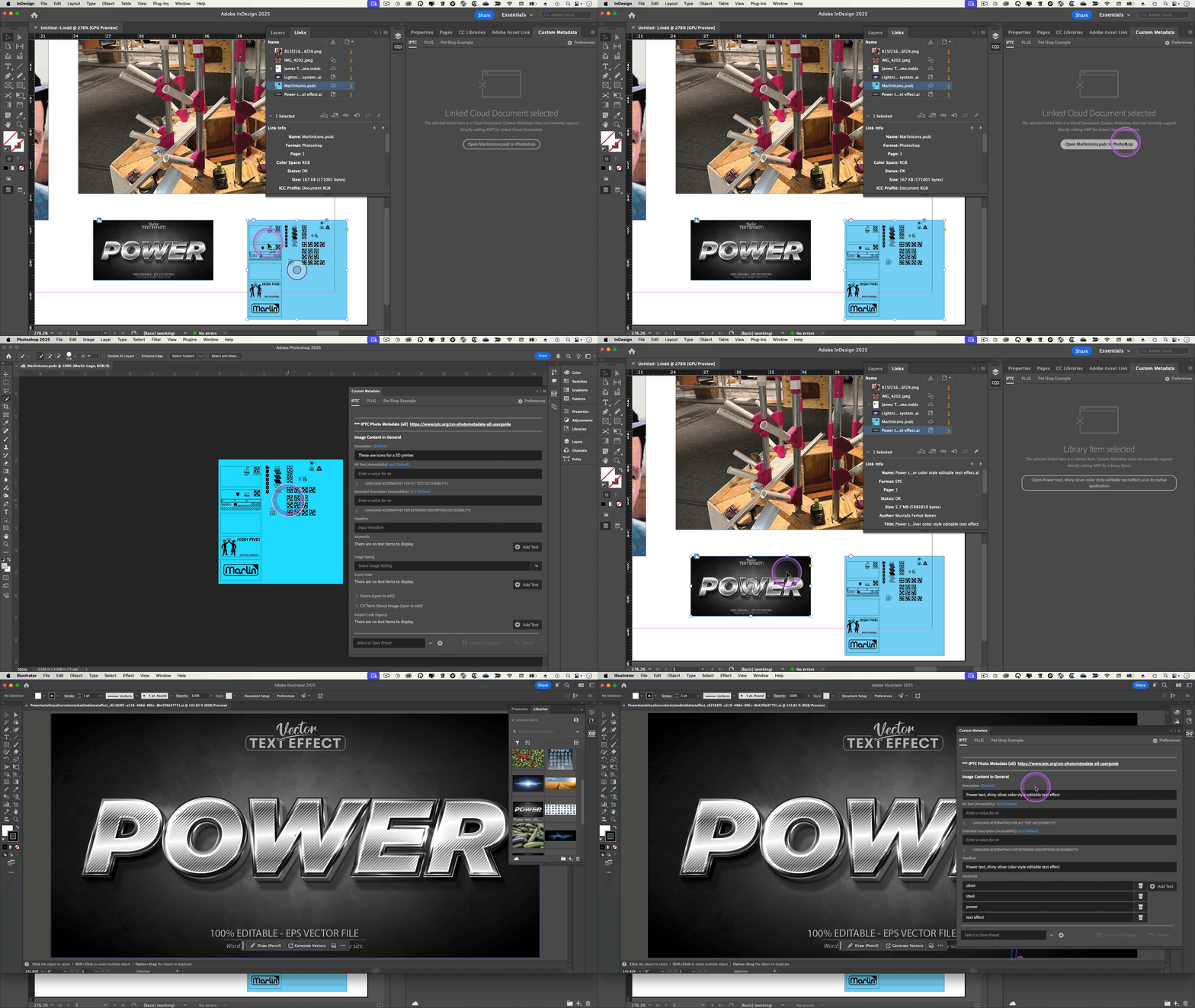
This release improved linked item support for Custom Metadata in InDesign. InDesign documents often include linked Library items, Cloud Documents, and even AEM Assets. While Custom Metadata can directly inspect metadata from traditionally linked assets, Cloud objects don't have the same properties available. To make it easier to inspect metadata for these items, we have introduced round trip workflows.
When you select a linked Library item, its original application may be available to view and edit metadata. If so, Custom metadata will display the option to view metadata in the originating application.
InDesign supports placing Photoshop and InDesign Cloud documents. Custom Metadata will now allow you to open linked Photoshop Cloud Documents directly from Custom Metadata. You will need to open linked Cloud InDesign documents from the Home screen.
When a local copy of a linked AEM Asset is not available to InDesign, Custom Metadata will now present a button to open the asset's Properties page in AEM. You can then view both XMP and AEM metadata. If you check out the linked asset from Asset Link in InDesign, then Custom Metadata will have a local copy and can display the asset's XMP metadata directly.
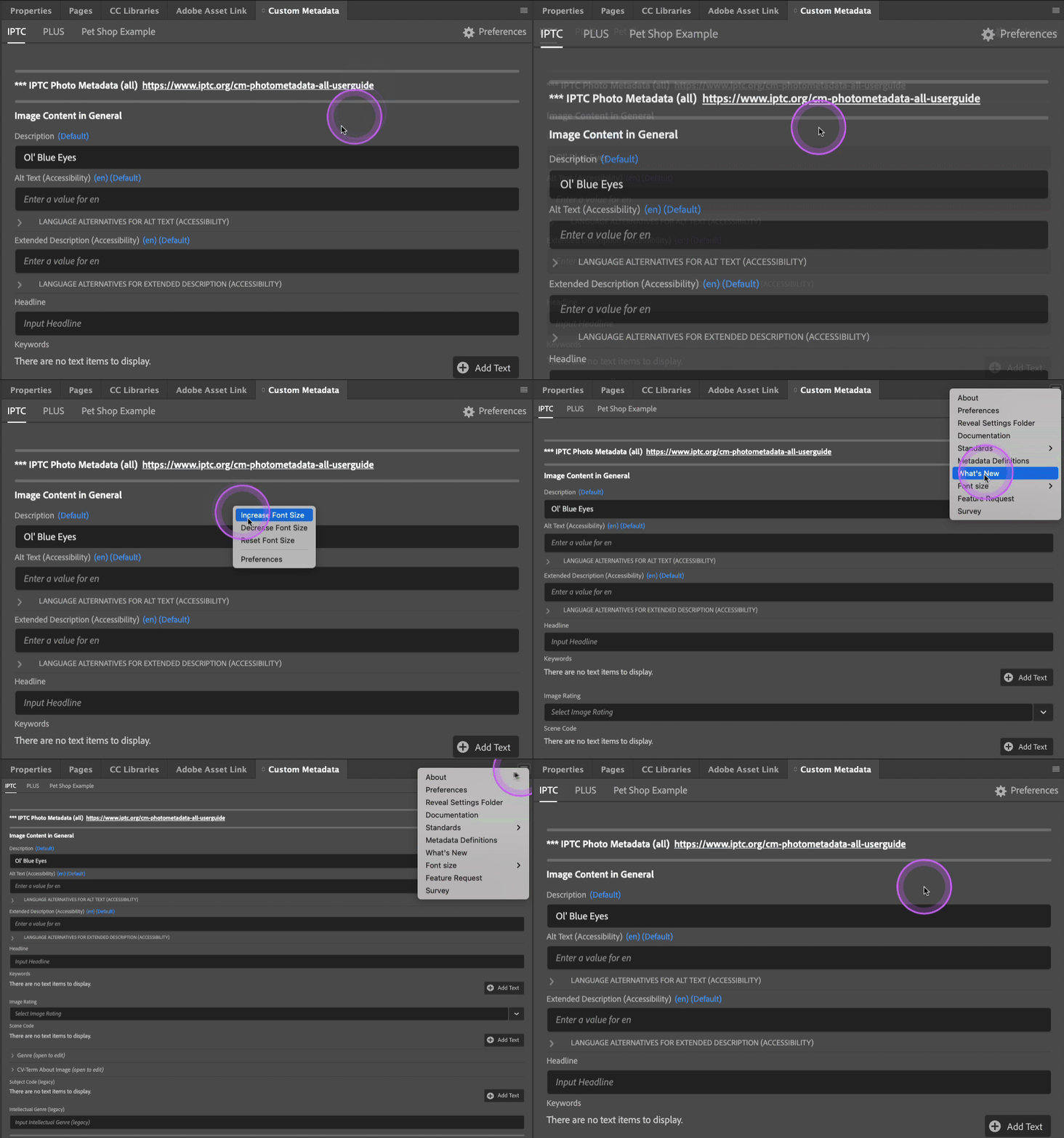
Users can now resize the text in Custom Metadata Panel screens. This control is available from the flyout menu and also from the context menu (right-click). Preferences are also available from the context menu. NOTE: You must enable System Contextual Menus in Settings to see the menu
Users can also view and edit XMP metadata for checked out linked AEM Assets when using AEM Asset Link. Check out is required to access XMP, because check out downloads the full binary to your computer. When you are done editing metadata, you can check the asset back in to send the changes back to AEM.
This clarifies whether a linked asset's XMP metadata can be viewed or edited. Since InDesign does not provide a way to read or write the full XMP packet to and from Library items and linked Cloud Documents, we now tell you that in the UI. We also don't yet support editing metadata for linked AEM Asset Link assets, but we are working on that and should have a solution shortly.
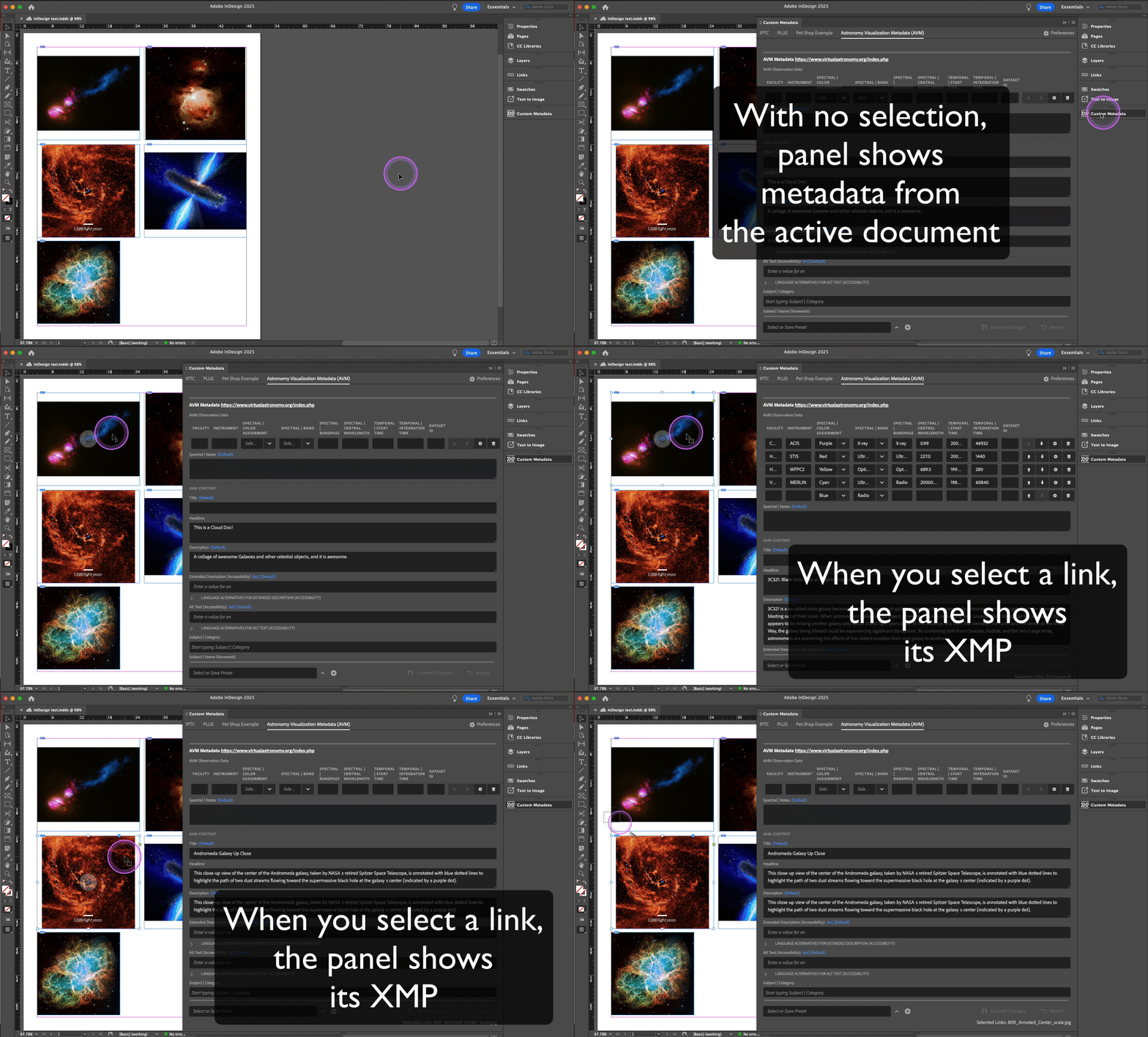
This release brings Custom Metadata to InDesign. You can view and edit XMP metadata for the active InDesign document and also any linked assets that support XMP. InDesign Cloud Documents and multiple selections are also supported.
This release also fixes some irregularities with multiple selections that may have resulted in unexpected values being written to the form when choosing "Merge Values." It also allows merging of Text fields that are Language Alternatives with no defined alternative languages, such as Description in Dublin Core.
This release adds the ability to import and export Metadata Presets from the Settings menu. When an imported preset already exists (by name), the user can choose to replace or merge the presets. When merging, the new preset values replace the existing values, but any existing values not in the new preset will remain.
We also added documentation links in the Flyout menu for XMP, IPTC Photo & Video, PLUS, AVM
It also improves error handling and makes messages more informative and consistent.
Watch a video for the 2.0.5 and 2.0.6 features
Calc fields allow you to combine values from other fields in your view. The field will be read only for the user, but it will change based on the values of the referenced fields. The result can be either a string or a number, and the result will be stored in the XMP.
When calculating a number, it is a best practice to refer to Number fields, however if you need to use special values such as π or e, users can enter those directly.
Enter your calculated value as text. You can reference other fields in your view by using the field's XMP prefix and property name in curly braces, separated by :. For example, if you have a field with the XMP property name myFieldwith the prefix myPrefix and you want to add it to another field, you would enter {myPrefix:myField} in the calculation field to use it in a calculation.
For example, assume you have a form that tracks pets with a custom namespace of prefix pet. If the user enters "dog" for the type of pet, and "dachsund" for the breed, then a calculated field with calculated value of "The {pet:petType} is a {pet:breed}." will be stored in XMP as "The dog is a dachsund."
When calculating a number, it is a best practice to refer to Number fields in your calculated value. Operations include +, -, *, /, ^, !, ln, log, and root. You can use parentheses to ensure calculation precedence. You can use the following trigonometric functions: sin, cos, tan, asin, acos, atan, sinh, cosh, tanh, asinh, acosh, atanh. Constants include e, π or pi. You can use the Combination (C) and Permutation (P) operators, such as 2P2 => 12 and 4C2 => 6. You can also use Sigma or ∑ to calculate sums. for example Sigma(1,100,n) results 5050
Users can use the constants π, pi, or e in calculations. Imaginary numbers are not supported.

We also added a button on the Settings page to reset Custom Metadata to its default state. This will not remove presets, but it will remove any Tabs. The prior Settings file will be backed up in the Settings folder, which now can be revealed via the flyout menu. Additionally, Custom Metadata will warn you if you open the Settings panel when you have unsaved changes.
This release also updates the AVM preset to version 1.1, which includes Tags for Subject:Category. It also updates the PLUS preset to include URL fields and to align shared fields with IPTC.
This release also fixes the following bugs:
- Tags do not render correctly in some circumstances
- Presets may not apply to assets properly in some circumstances
This release introduces a new Field: Tables. Tables display correlated properties in a tabular format, with each column representing a property and each row representing a correlated value across all properties.
- Columns can be Text, Number or Dropdown Fields.
- Rows can be reordered by the user
- Tables can have row legends, for cases where the order of the items in each property corresponds to a specific kind of value. For instance, if item[0] represents the X coordinate of a position and item[1] represents the Y coordinate of a position, then you can have a legend for row 1 "X Coordinate" and a legend for row 2 "Y Coordinate"
- You can limit the minimum and maximum number of rows in a Table's value
- You can use Tables in Presets
We also redesigned the Options editor to remove the JSON Field and replace it with a table-based form for easier editing.
We also added IPTC and PLUS tabs to the first launch experience, and added a button to create new Tabs from the example Views. We also introduced a preset for the Astronomy Visualization Metadata Standard (AVM). We believe these will make it easier for users to get started with Custom Metadata.
This fixes an issue where options were not filtering properly.
We also added the following new features:
- You can now automatically set a field value on a filtered field when the options reduce to one value
- Text fields will now automatically become multi-text when the existing value is an array
Bug fixes.
This release addresses multiple user-reported issues and adds much-requested features. We are updating the public documentation and refreshing videos, but we have updated the in-app help text. Additionally, the What's New screen contains some helpful copy and short videos. While not comprehensive, here's a list of additions, improvements, and bug fixes.
- Added URL and multi-URL form fields
- Added Multi-Number form field
- Added Hidden Fields
- Added Custom Tooltips
- Added Custom Placeholder Text
- Added additional Time and Date formatting controls for Date and MultiDate fields
- You can now Sync values between fields
- Added Language Alternative support for Structures
- Improved Language Alternative configuration
- Improved Language Alternative display to include asset-defined langs
- Fixed issue which prevented update to structure contents
- You can now Copy and Paste properties between Views when editing Views
- Added support for relative path names for Views in Settings.json
- Added click to select JSON file
- Added portability for Presets between Views
- Improved feedback when there are no Fields to display
- Moved Presets to the bottom of the Metadata View window so it's always visible
- Added clickable link to Section and SubSection headers
- Includes updated IPTC metadata starter Views (thanks, IPTC!!!)
- Fixed field update issue when the image selection changed in Bridge
- Fixed issue which prevented Presets from working with Structures
- Added support for displaying Alt Langs with single values when the View expects an array
- Fixed a bug in Dropdowns that prevented users from selection options when using labels in the option array
- Fixed a longstanding bug in Tags which prevented the use of label-value objects
- Squashed other bugs
- Update in-app help documentation for new tools and features
- Update public documentation
- Create updated quick start and feature videos
- Added PLUS License Data Format example View
- Added new field types:
- Numbers
- Changed Multiline text to automatically expand when the text is longer than 3 lines
- Added Complex Structure object support
- You can now create XMP Structures, which can contain other XMP properties as well as Structures
- The PLUS Metadata Example is a great reference for Structures
- See the documentation for more details.
- A few bugs
- Added new field types:
- Switches and Switch Groups
- Radio Buttons
- Checkboxes and Checkbox Groups
- Multiple Date fields
- Subdivision Divider
- Added Autocomplete for XMP Namespace and Prefix definitions
- Added Duplicate field button in View Editor
- See the documentation for more details.
- A few bugs
- Added support for Premiere Pro Clip metadata within Premiere Pro. Users can read and update Clip metadata and optionally sync those values to XMP properties. See the documentation for more details.
- Added a set of reference namespace definitions that you can access from the panel or from our documentation. These have been updated to include Premiere Pro specific metadata properties.
- A few bugs
See the User Guide for more about these new features
- Added Tabbed Interface for Metadata Forms
- Support for independent tabs, each with its own view
- New Settings panel with separate controls for
- Tab Manager
- View Editor
- Visibility of What's New screen
- What's New screen
- Carousel with animations and text to highlight new features
- Metadata Examples for new Forms
- Presets for popular Metadata schemas
- Special thanks to Martin Gersbach and Greg Reser of GLAM for creating a repository of useful config files for common metadata namespaces and properties.
See the User Guide for more about these new features
- Changed name from Custom Metadata from Custom Metadata Panel
- Added support for Language Alternative properties
- Ability to set AltLang value type for Text Fields
- Added Configurator Option for Alternative Language
- Updated Default View to contain AltLang Examples
- Added a link to documentation in the Flyout menu
- Added support for self-entered values for Multiple Dropdown and Tags
- Squashed some UI bugs
- Inconsistent behavior when writing metadata to media files (Bridge specific)
- This is caused by a bug in Bridge. We have implemented a workaround while the Bridge team resolves the bug.
- Several bugs
See the User Guide for more about these new features
- Changed name to Custom Metadata Panel
- Added support for Photoshop and Illustrator
- Added multi-line text fields
- Allow special characters in Configurator
- Squashed some UI bugs
- Several bugs
See the User Guide for more about these new features
- Support for Seq and Bag arrays in Tag, Multi-Text and Multi-Dropdown fields
- Ability to reorder Multi-Text items
- Ability to edit Multi-Text items
- Improved UI for adding Multi-Text items
- New Pending change dialog
- Improved UI for showing which fields will change when user saves changes
- Several bugs
- Removed Configurator from the Window>Extensions menu
- Fixed Tag deletion issue in Multi-Dropdown
- Added validation when saving and exporting View templates
- Help text in Configurator window better reflects the items being edited
See the User Guide for more about these new features
- Field Dependencies for all field types
- Filtering based on another field value in Dropdowns and Multi-Dropdowns
- Auto Group Selection in Multi-Dropdown
- Natural Language Date parsing for Date Field
- Multiple Values resolution workflow and menu for Bulk Selection Mode
- Several bugs
- Updated the About screen