True to its name, SWIFT couples great rapidity with ease of movement. It is your one stop destination for speedy and easy video call and chat connects.
This web application is my submission for the month long challenge to build a video-calling app in Engage'21, a mentorship program conducted by Microsoft.
https://drive.google.com/file/d/1UE6XbprO2dDezIGhHFjJenxesT4sVcAC/view?usp=sharing
-
Clone the given repository into your device
-
Run the command
npm installin your terminal in the root directory of the project to install the various dependencies -
Now run
npm i -g peerto globally install PeerJS -
Install nodemon as a dev dependency by running
npm install --save-dev nodemonin your terminal -
For the mail feature, in the following codes in server.js file:
var transporter = nodemailer.createTransport({ service: 'gmail', auth: { user: process.env.EMAIL_ID, pass: process.env.PASSWORD } });and
const mailOptions = { from: process.env.EMAIL_ID, // sender address to: receiver, // list of receivers subject: 'Meet mail', // Subject line html: output// plain text body };replace "process.env.EMAIL_ID" with a gmail id of your choice and "process.env.PASSWORD" to the password of the gmail id entered. Make this gmail id available to less secure apps while testing the app.
-
Now run
nodemon server.jsin the terminal -
Open another terminal and start the peer server by running
peerjs --port 3001in the terminal -
The app is now up and running on port 3000!
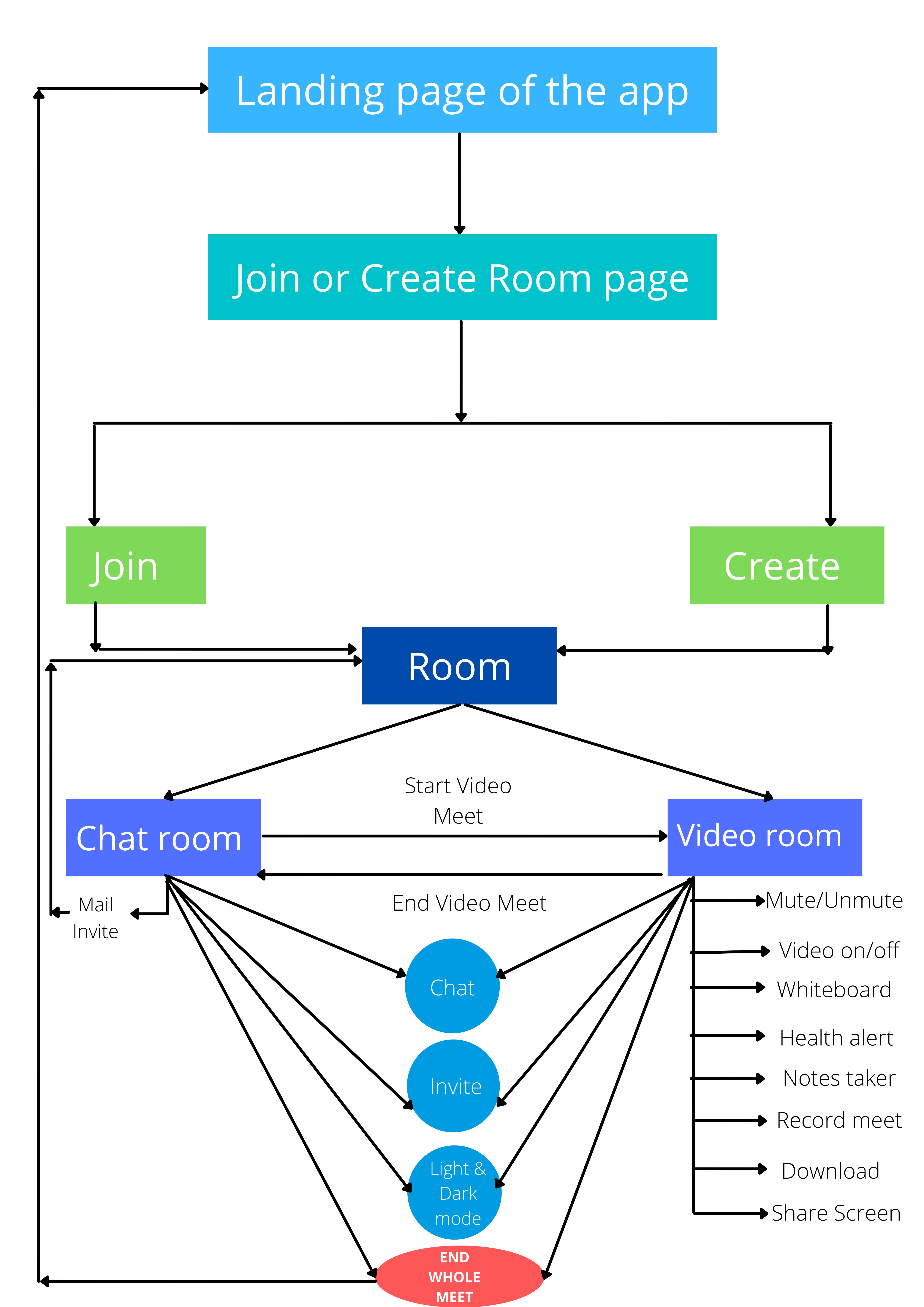
- The uuid library generates unique URLs for every room
- Real-time chatting feature
- Chat and talk and enter as many video meets as you wish in the same room
- Collaborative Whiteboard!!!
- ICEBREAKER: Break the ice with news headlines on a button click!
- A notes taker
- Heath alerts that remind you to drink water, stretch a bit or close your eyes after every half an hour
- Record and download meets
- Share Screen (only the host can)
- Light and Dark mode, but we all know you are going for dark :p
- Basic functionalities of mute,unmute,switch video on or off, end whole meet
- Invite by sharing the room link or send a mail invite just as easily!
- Responsive and easy to the eyes UI
I am letting the interval for health reminder stay 2 mins the code so it is easy to see that feature while testing. If you would like to change that interval:
- Go to the "room.ejs" file
- Go to the bottom script tag for health reminder, and in the setInterval function change the "120000" ms to an interval of your choice.
- Front end languages and technologies: HTML,CSS,Javascript,Axios
- Front-end framework: Bootstrap to design the user interface (UI)
- Templating language: EJS
- Backend: Node.js, Express.js
- uuid Library: To generate a unique URL for each room
- NewsAPI: To get top news headlines on the click of a button and break the ice. Awkward silences are a real problem.Period.
- PeerJS: An intuitive library that acts as a wrapper over WebRTC and makes it easy to establish peer to peer connection.
- Socket.io: To facilitate communication among users in the same room in real-time!
- Nodemailer: To facilitate sending mail invite from the app itself on submitting a form
- Fontawesome and Flaticon: For all the icons in the web app
- Freepik: For all the images in the web app
- Codepen: Reference for the waves in the home page, the clock in the join or create room page, theme mode toggler in the rooms
I had planned my goals in sprints where each sprint was one week long.
- Sprint 0: The main focus was to :
- Get familiar with the technologies and programming languages required for the project especially since this was my first brush with development.
- Develop a rudimentary idea of what features I wanted to include in the application
- Sprint 1: The goal was to make a minimum viable product along with very basic but important features such as mute/unmute, switch video on/off, leave room, copy room link to clipboard and start working on a chat feature
- Sprint 2: On acheiving most targets in the previous sprint I went on to integrate all of them in a good UI, add a dark and light mode feature, and started thinking and implementing more complex features in the app
- Sprint 3: Built in more complex features into the app such as share screen, record and download video, collaborative whiteboard and icebreaker and further improved the UI. The clear whiteboard has not been kept collaborative so that users in the meet do not miss out on something important if a user erases the whole board without warning. An alert is sent to all users instead to wrap up the current discussion and clear the boards from their ends.
- Sprint 4: Added a simple notes taker feature and attempted to incorporate the Adopt feature. Added the health alerts feature into the app, after a talk with my parents and from personal experience on how one loses track of important things while sitting in front of screen for long such as, drinking water or getting up and stretching a bit which are small but very important things for health in the long run.
- I used to log my work in the sheet below Sprint-wise. At the starting of each week we had a group mentor call and one-one sessions as well which served as sprint meets and I used to incorporate the suggestions of my mentors in my work. https://docs.google.com/spreadsheets/d/1QoKGWlqi-IsqC-wLYgVI5jm2G5WYAGnrwI3aXgPOc1Q/edit?usp=sharing
I wanted the UI to be simple and eye pleasing especially since this was a video calling app which meant the user was going to be spending a lot of time in front of the screen. This is why the design has been kept minimalistic throughout and features shades of blue since the colour is very easy on the eyes. The colour blue also connects with the waves in the landing page which in a way represents the working of the app. Fast and smooth.
- Make the health alert feature smart. To not give an alert when the user is presenting or is active.
- Make the app hands free with the help of AI. The app will understand to mute or switch video off from the gesture of the user
- Add a login system and store rooms and meet chats permanently along with the ability to delete rooms
- Send emojis and files via chat
- Find a way of removing local peer stream on disconnect without having to reload page.
- Make further improvements in UI