Andrew Kerekon -- WPI Student Preferences -- Rate Your Favorite Dorm, Dining Hall, and Campus Location Compared To Your Peers!
Glitch: https://a3-andrew-kerekon.glitch.me/ Heroku: https://a3-akerekon.herokuapp.com/
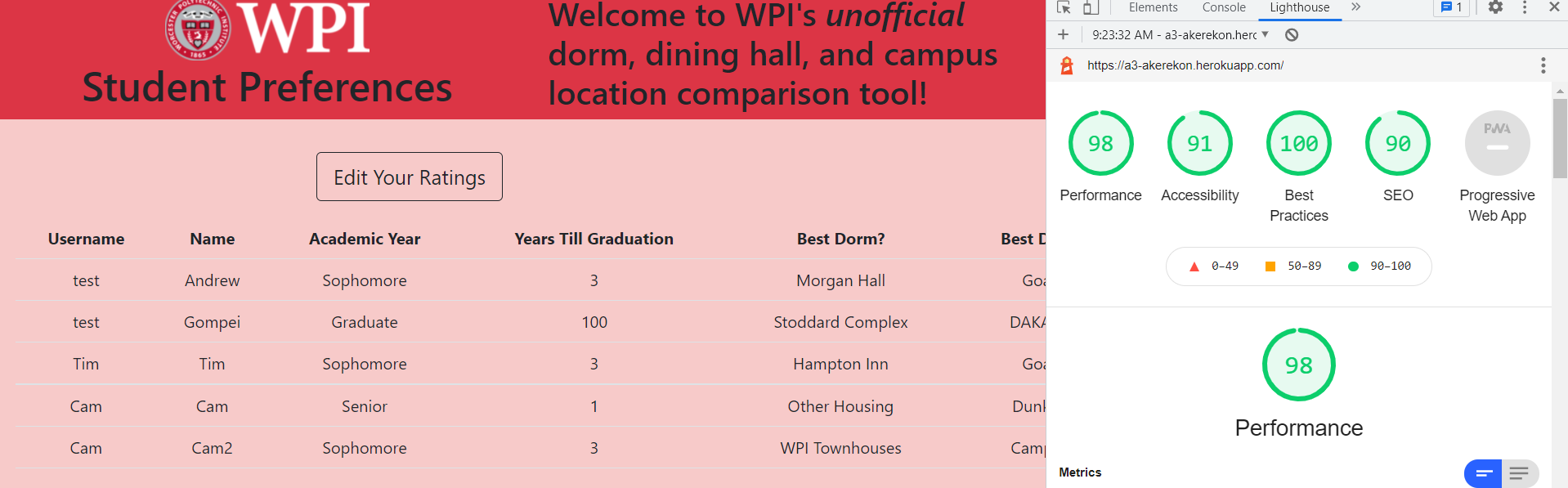
By default, users will arrive at a "response" page where they can see how other students responsed to the survey. By clicking "Edit Your Ratings" at the top left, users can add their own ratings by logging in under their own GitHub or local account, specific to them but also shared with the wider student body. Only students who log in will be able to delete and edit their own responses, safeguarding student data while also making it publicly accessible.
The goal of my application was to create a way for students to share data, especially for incoming first-year students new to WPI and not sure which meal plan to pick or dorm to live in. I faced a number of challenges in realizing the application, particularly with passport.js in an attempt to create OAuth functionality but also with Lighthouse, which seems to fluctuate below and above 90% on accessibility without any additional changes made (attached below are screenshots of all four tests passing on the main "responses" page). It seemed that every time I attempted to fix the specified problem, it would cache the issue and I would never be able to make it back above 90% unless I waited for it to reset. In the end, I chose both a local (database) based authentication system as well as a GitHub OAuth based system in order to provide maximum accomobility for all users, regardless of which platform they feel most comfortable with. For CSS, I used Bootstrap as it is very popular and mobile-friendly.
For middleware, I used...
- serve-static to display my "responses" homepage first, even when other live pages are navigated to
- body-parser, to provide JSON flexibility for my HTTP requests
- mongoose, to provide a handy wrapper for accessing Mongo with a schema
- passport, for authenticating to GitHub
- cookie-session, to make sure a user doesn't have to log in every time they navigate away from the edit page
- Tech Achievement 1 (10 points): I used OAuth authentication via the GitHub strategy, making sure to use passport.js and implement proper callbacks. This was challenging as I needed to debug several "internal server errors" that required downloading Heroko's CDI and looking through logs to spot the issue.
- Tech Achievement 2 (5 points): I deployed my site on both Glitch and Heroku, which was challenging as each platform works very differently and Heroku needs to "build" from Glitch before it can be deployed, in addition to not being able to edit Heroku on their dashboard
- Design Achievement 1 (6 tips, 5 points?): I followed the following tips from the W3C Web Accessibility Initiative, making sure to...
- Write meaningful text alternatives, making sure users could use a screenreader to recognize WPI's quad and seal
- Provide clear instructions, with notes at the bottom and top of each page on how to view all responses and clear links to edit the given data
- Keep content clear and concise, making sure not to become too wordy but rather be straight and to the point with brief phrases rather than paragraphs
- Make link text meaningful, only using links to authenticate GitHub and properly decribing my sources for pictures
- Don't use color alone to convey information, making sure to provide descriptions beneath each textbox when creating accounts and logging in to reinforce their purpose
- Provide clear and conistent navigation options, making sure buttons were always in the same spot throughout each page