Sinapse Recording Software is a Graphical User Interface designed with Qt Creator 4.1.0based on Qt 5.7.0. This software comprises of the following programs:
common:
- A static library created for almost all of the programs listed below.
AMWFlash:
- A program that takes in a setting file in .txt format and flash the AMW004 via FTDI.
Jane:
- Thor's control program (yet to be developed)
Neutrino:
- Neutrino's control program and real-time signal display of up to 10 channels.
Odin:
- Odin's control program designed for Stimulator V4.1.
SylphII & SylphX:
- Sylph's program that display real-time ENG(SylphII) and EMG(SylphX) signals.
Details of the programs are listed below:
Classes included in common:
- Connection Dialog -> Takes in User input of IP address and Port to attempt connection via TCP Socket.
- Filter Dialog -> Takes in User input of Notch Filter freq (None, 50Hz or 60Hz) and High Pass Filter (100-7500Hz) and makes use of Filter Class to execute Digital Signal Processing.
- Filter Class -> Includes methods of Digital Notch Filter and High Pass Filter.
- QCustomPlot -> Custom Plotting graph that is used in mainly Neutrino and Sylph Programs.
- SignalAudio -> Main class that handles all the data to audio conversion.
- SocketAbstract -> Contains all of the abstract socket operations that is general across the different programs.
Classes included in AMWFlash:
- Console -> Terminal-like User Interface extracted from Qt examples that print out all of the necessary outputs for Users.
- SerialPort Dialog -> A Dialog that allows User to choose which serial port prior flashing the AMW004.
Classes included in Neutrino:
- Channel -> A class that holds the channel properties. (Obsolete)
- Command Dialog -> Takes in all the User input for Neutrino setting and sends out the command via Socket or Serial.
- Serial Channel -> The main class that handles all the serial operations of Neutrino.
- Signal Channel -> Unused, obsolete.
- Command -> The main class that handles all of the command to be sent to Neutrino.
- Data Processor -> Inherited from Data in common, includes additional methods unique to Neutrino.
- Measurement Dialog -> Displays measurements such as Min, Max, Average and Peak to Peak for Analog measurement and Bioimpedance measurement.
- Socket Neutrino -> Inherited from Socket Abstract in common, includes additional methods unique to Neutrino.
Classes included in SylphII/SylphX:
- Data Processor -> Inherited from Data in common, includes additional methods unique to Sylph.
- Serial Channel -> The main class that handles all the serial operations of Sylph.
- Socket Sylph -> Inherited from Socket Abstract in common, includes additional methods unique to Sylph. Note Difference in SylphII and SylphX Note
- As SylphII only has 2 Implant Channels and SylphX has 10, the only difference between the two programs can be found in Data Processor and Main Window only.
- Sylph II creates 2 QCustomPlot for the Implant Channels while Sylph X creates 10.
- Sylph II Data Processor extracts 5 bytes at a time while Sylph X extracts 21. Note Difference in SylphII and SylphX Note
Class included in Odin:
- Command Odin -> The main class that handles all of the command to be sent to Odin.
- Looping Thread -> Executes everytime Send button is clicked and runs on a different thread to get precise timing of command sent.
- Pulse Plot -> (Still in development) The main class that creates a graphical display of the pulse Odin is generating.
- Serial Odin -> The main class that handles all the serial operations of Odin.
- Socket Odin -> Inherited from Socket Abstract in common, includes additional methods unique to Odin.
#Compiling on Windows
- Desktop Qt 5.7.0 MinGW 32bit kit should be used to compile Sinapse Recording Software.
- Build directory should be of the same level with src.
- For more information, refer to this link and this link.
- For ease of reference, please refer to the following picture:

- Build Settings should be as follows:

#Compiling on Linux for Windows (Static 64-bit executable)
- Install Ubuntu 16.04 LTS
- Get MXE:
git clone https://github.com/mxe/mxe.git
- Install build dependencies
http://mxe.cc/#requirements
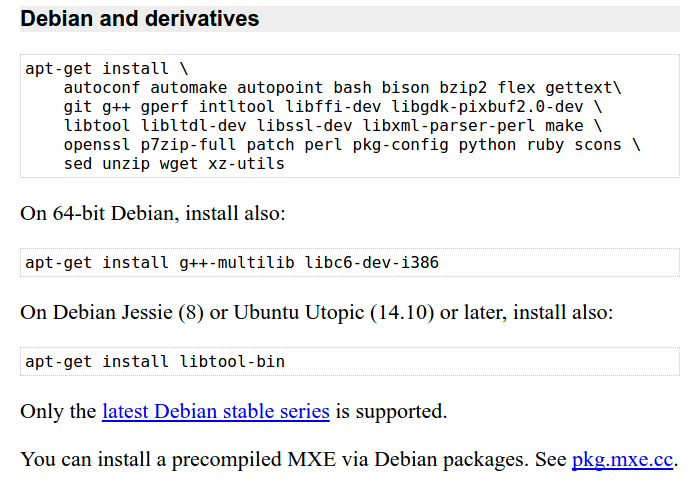
- Build Qt 5 for Windows:
cd mxe && make MXE_TARGETS=x86_64-w64-mingw32.static qt5
- Set path:
PATH = ~/mxe/usr/bin:$PATH
- Althenatively: add this line into ~/.bashrc
export PATH=~/mxe/usr/bin:$PATH
- Get to the directory of your app (where the main .pro file is), and run the Qt Makefile generator tool:
~/mxe/usr/bin/x86_64-w64-ming32.static-qmake-qt5
- Build your project:
make
You should find the binary in the ./release directory