Lightweight crate unboxing system for Minecraft Beta 1.7.3
Configurable weighted rewards, rarity tiers, and Discord integration.



- Players open crates by spending virtual keys
- Weighted reward rolls using integer weights
- Cosmetic rarity tiers:
COMMON,UNCOMMON,RARE,EPIC,LEGENDARY - Adjustable crate open delay (in ticks)
- Paged preview menu to inspect configured rewards
- Optional roulette-style spin animation
- Subtle particle and sound effects during opening
- Audio cues for crate actions and key handling
- Command suite for managing keys and configuration
- View, set, or distribute keys to all online players
- Reload configuration without server restarts
- Optional Discord webhook integration with detailed embeds
- In-game server-wide broadcasts for EPIC and LEGENDARY opened rewards
Contributions, issues, and suggestions are welcome.
Refer to CONTRIBUTING before opening pull requests.
To report bugs or request features, use the GitHub Issues page.
The latest release is available on the Releases page.
For extra assurance, you can verify the .jar file using VirusTotal.
Crates is built against CraftBukkit 1060. It is expected to work on the server software listed below (forks of CB1060), assuming their current stable releases have not modified the APIs or behaviors used for the plugin.
| Plugin | Description |
|---|---|
| WorldGuard | Safeguard against block duplication within regions. |
Note
Soft depend plugins are not required for Crates to function. However, if they are present, Crates will integrate with them to ensure proper functionality.
By default, only server operators have permission.
Use a permissions plugin such as PermissionsEx to grant access to specific groups.
| Command | Permission | Description |
|---|---|---|
/crates |
crates.use |
Displays Crates help/about menu. |
/crates reload |
crates.config |
Reloads the Crates configuration. |
/crates delay <ticks> |
crates.config |
Sets crate open delay (20 ticks = 1 second). |
/crates keys |
crates.keys.view |
Shows your current crate key count. |
/crates keys <player> |
crates.keys.view.other |
View another player's crate key count. |
/crates keys set <player> <amount> |
crates.keys.set |
Set a specific player’s key amount. |
/crates keys giveall <amount> |
crates.keys.giveall |
Give keys to all online players. |
Aliases: /crate, /crs
| Permission | Default | Description |
|---|---|---|
crates.* |
op |
Grants all Crates permissions. |
crates.use |
true |
Allows viewing the main Crates help/about menu. |
crates.open |
true |
Allows opening crates. |
crates.config |
op |
Allows reloading config and setting open delay. |
crates.keys.* |
op |
Grants all key-related permissions. |
crates.keys.view |
true |
Allows viewing your own key count. |
crates.keys.view.other |
op |
Allows viewing another player’s key count. |
crates.keys.set |
op |
Allows setting a player’s key count. |
crates.keys.giveall |
op |
Allows giving keys to all online players. |
The plugin generates a configuration file in the Crates directory on first run.
It defines webhook settings, crate open behavior, and reward data.
Tip
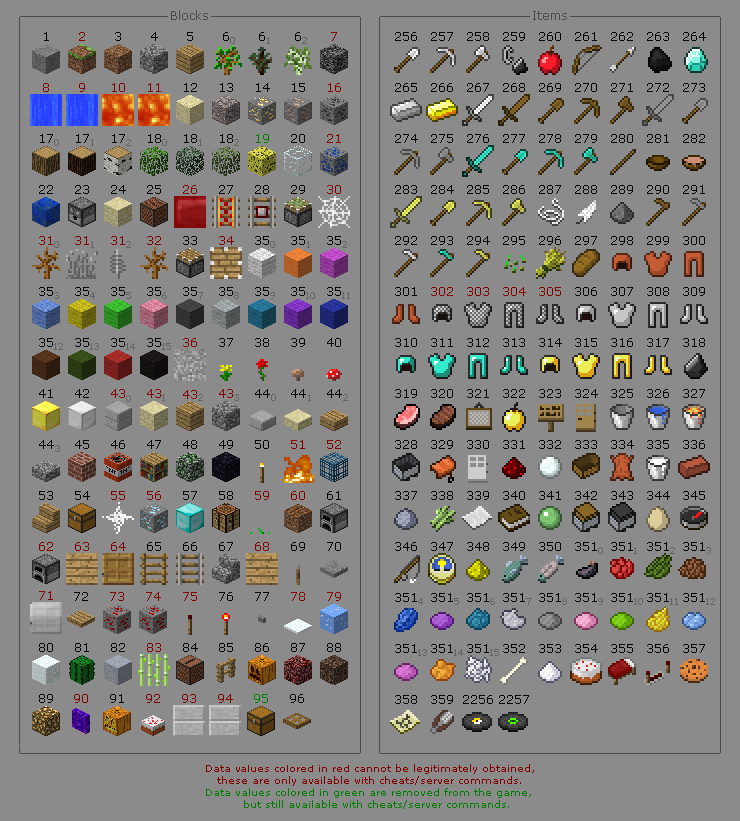
You can find all Minecraft b1.7.3 IDs in the image linked here.
# ==========================================================
# Crates Configuration
# ----------------------------------------------------------
# crate-open-delay:   Delay before opening (20 ticks = 1s)
# roulette-animation: Toggle roulette spin effect
#
# webhook:
#   enabled:     Enable Discord webhook notifications
#   url:         Webhook endpoint (replace with your URL)
#   avatar-api:  Player avatar URL (%player% = username)
#
# Each reward requires:
#   id:      Item ID (e.g. "35:3" = light blue wool)
#   amount:  Quantity of the item
#   weight:  Chance weight (higher = more common)
#   tier:    Cosmetic rarity (COMMON → LEGENDARY)
# ==========================================================

webhook:
  enabled: false
  url: "INSERT_WEBHOOK_URL"
  avatar-api: "https://minotar.net/avatar/%player%.png"

crate-open-delay: 20
roulette-animation: true

rewards:
  - id: "1"
    amount: 5
    weight: 5
    tier: COMMON

  - id: "2"
    amount: 4
    weight: 4
    tier: UNCOMMON

  - id: "3"
    amount: 3
    weight: 3
    tier: RARE

  - id: "4"
    amount: 2
    weight: 2
    tier: EPIC

  - id: "5"
    amount: 1
    weight: 1
    tier: LEGENDARY
Note
Weights: Each reward's weight adds to the total pool; higher values increase selection likelihood.
Tiers: Cosmetic only — probabilities depend solely on weights.