A fast, minimalist terminal app for checking stock prices, crypto, news, and historical charts — without leaving your shell. Built with Textual, powered by yfinance, and made for people who prefer the command line over CNBC.
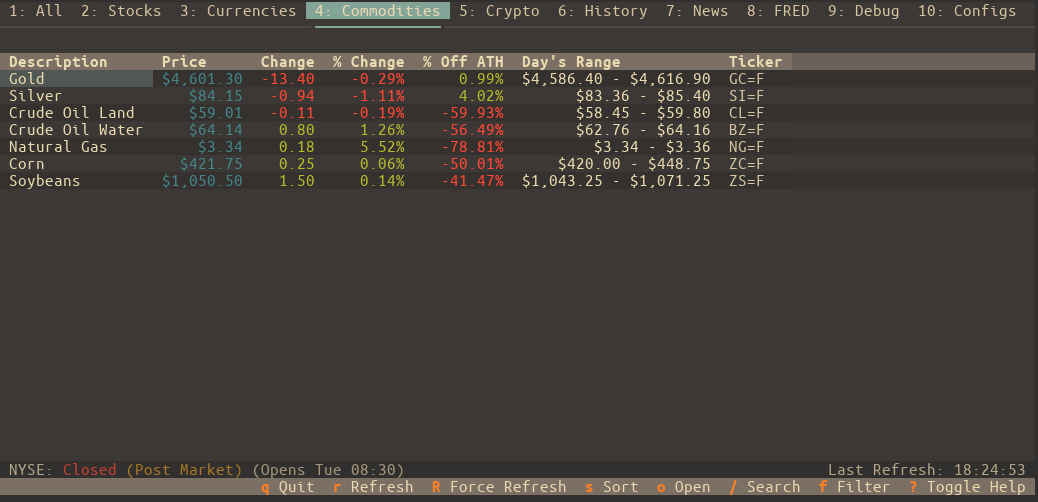
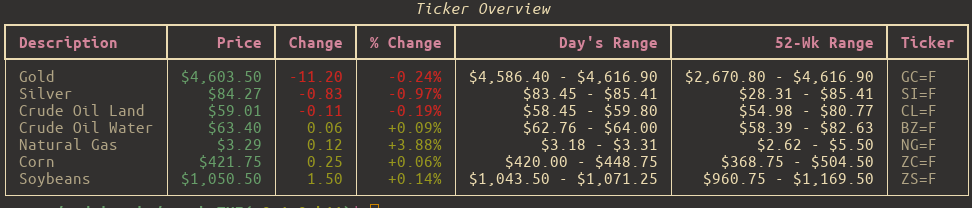
-
Live-ish Price Data Watch your favorite tickers update in near real-time with configurable refresh intervals.
-
Watchlists That Make Sense Organize your assets into lists like "Tech", "Crypto", "Dividend Traps", or "Memes". Manage them entirely from the UI — no need to touch JSON unless you want to.
-
Tag-Based Filtering Assign tags (e.g.,
growth,ev,semiconductor) to your tickers and instantly filter any watchlist to see only what's relevant. -
Charts & Tables, Your Way View historical performance from
1DtoMax, from a table or a chart. -
Options Chain Support View detailed options chains with strike prices, bid/ask spreads, Greeks (Delta, Gamma, Theta, Vega), and open interest visualization. Track your positions with quantity and average cost.
-
News That Matters See the latest headlines per ticker or a combined feed — no ads, no autoplay videos, just info.
-
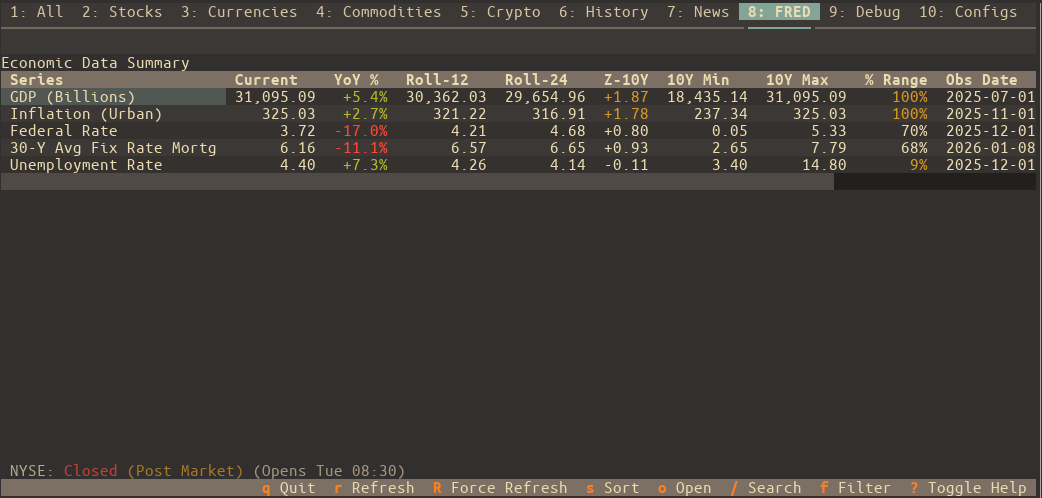
Economic Data (FRED) Monitor key economic indicators directly with integration for St. Louis Fed (FRED) data. Track GDP, Unemployment, CPI, and more with rolling averages and Z-score trend analysis.
-
Deep Market Context View comprehensive asset details including All Time High (ATH), % Off ATH, PE Ratio, Market Cap, and historical performance charts.
-
Quick Actions & Open Mode Instantly edit ticker aliases and notes with
e. Use "Open Mode" (o) to quickly jump to external resources or switch between news, history, and options. -
Keyboard-Friendly, Mouse-Optional Navigate everything with Vim-style keys or arrow keys. Bonus: lots of helpful keybindings, fully documented.
-
Custom Themes & Settings Tweak the look and feel with built-in themes or your own. Set your default tab, hide unused ones, and make it feel like your dashboard.
-
Smart Caching The app remembers what it can. Market-aware caching keeps startup fast and avoids pointless API calls on weekends or holidays.
⚠️ Note: All symbols follow Yahoo Finance format — e.g.,AAPLfor Apple,^GSPCfor S&P 500, andBTC-USDfor Bitcoin.
-
Python 3.10 or newer
-
OS Support:
- Linux / macOS — Fully supported
- Windows — Use Windows Terminal with WSL2. It won’t work in the old
cmd.exe.
The easiest way to install is with pipx:
# Debian/Ubuntu
sudo apt install pipx

# Arch Linux
sudo pacman -S python-pipx

# macOS
brew install pipx

# Or fallback to pip
python3 -m pip install --user pipx
python3 -m pipx ensurepathpipx install stocksTUIDone. You can now run stockstui from anywhere.
Run the app like so:
stockstuiNeed help?
stockstui -h          # Short help
stockstui --man # Full user manualOpen on Tesla's History tab.
stockstui --history TSLAGet combined news for NVIDIA and AMD.
stockstui --news "NVDA,AMD"Open on Apple's Options tab to view the options chain.
stockstui --options AAPLCreate a temporary watchlist for this session only.
stockstui --session-list "EV Stocks=TSLA,RIVN,LCID"Launch a 5-day chart for Tesla.
stockstui --history TSLA --period 5d --chartOpen directly to a specific FRED economic series (e.g., Unemployment Rate).
stockstui --fred UNRATECLI mode: Output "stocks" list, filtered by the "tech" tag.
stockstui -o stocks --tags techTo use the Economic Data (FRED) features, you must provide a free API key from the Federal Reserve Bank of St. Louis.
- Create a free account and request an API key at fred.stlouisfed.org.
- Once you have your key, enter it in the app under Configs > FRED Settings.
- Click Save to enable FRED data fetching.
- Press
?inside the app for a quick keybinding cheat sheet - Run
stockstui --manfor the full breakdown
Want to try the bleeding-edge version or contribute?
git clone https://github.com/andriy-git/stocksTUI.git
cd stocksTUI
./install.sh
This sets up a virtual environment and a global stockstui command so you can test and develop from anywhere.
Licensed under the GNU GPL v3.0.
See LICENSE for the legalese.