To measure the distance of the obstacle using ultrasonic sensor and display the value in serial monitor using Arduino UNO controller.
Arduino IDE
Proteous
Step1:Open the Arduino IDE
Step2: Go to file and select new file option
Step3:Type the program
Step4:Go to file and select save option to save the program
Step5:Go to sketch and select verify or compile options
Step6:If no error Hex file will be generated in the temporary folder
Step7:Open the Proteus software
Step8:Go to file select new design and click ok button
Step9:Select component mode and click pick devices from the library
Step10:Type the component name in the keyword to select the components and click ok button
Step11:Design the circuit as per the diagram
Step12:Double click the Arduino controller and upload the hex file generated by Arduino IDE
Step13:Click start button and check the output
The HC-SR04 is an affordable and easy to use distance measuring sensor which has a range from 2cm to 400cm (about an inch to 13 feet). The sensor is composed of two ultrasonic transducers. One is transmitter which outputs ultrasonic sound pulses and the other is receiver which listens for reflected waves. It’s basically a SONAR which is used in submarines for detecting underwater objects.
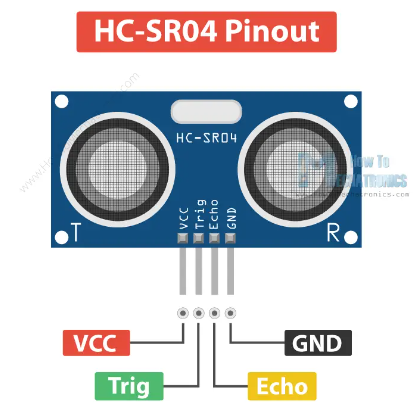
The sensor has 4 pins. VCC and GND go to 5V and GND pins on the Arduino, and the Trig and Echo go to any digital Arduino pin. Using the Trig pin we send the ultrasound wave from the transmitter, and with the Echo pin we listen for the reflected signal.
It emits an ultrasound at 40 000 Hz which travels through the air and if there is an object or obstacle on its path It will bounce back to the module. Considering the travel time and the speed of the sound you can calculate the distance.

In order to generate the ultrasound we need to set the Trig pin on a High State for 10 µs. That will send out an 8 cycle ultrasonic burst which will travel at the speed of sound. The Echo pins goes high right away after that 8 cycle ultrasonic burst is sent, and it starts listening or waiting for that wave to be reflected from an object.If there is no object or reflected pulse, the Echo pin will time-out after 38ms and get back to low state.
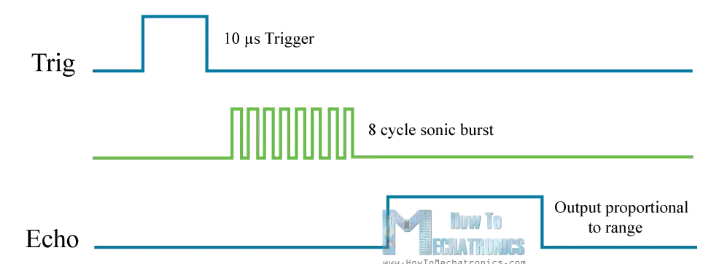
If we receive a reflected pulse, the Echo pin will go down sooner than those 38ms. According to the amount of time the Echo pin was HIGH, we can determine the distance the sound wave traveled, thus the distance from the sensor to the object. For that purpose we are using the following basic formula for calculating distance:
Distance = Speed x Time
We actually know both the speed and the time values. The time is the amount of time the Echo pin was HIGH, and the speed is the speed of sound which is 340m/s. There’s one additional step we need to do, and that’s divide the end result by 2. and that’s because we are measuring the duration the sound wave needs to travel to the object and bounce back.

Let’s say the Echo pin was HIGH for 2ms. If we want the get the distance result in cm, we can convert the speed of sound value from 340m/s to 34cm/ms.
Distance = (Speed x Time) / 2 = (34cm/ms x 1.5ms) / 2 = 25.5cm.
So, if the Echo pin was HIGH for 2ms (which we measure using the pulseIn() function), the distance from the sensor to the object is 34cm.
Thus the distance of the obstacle is measured using ultrasonic sensor and display the value in serial monitor using Arduino UNO controller.