doc(readme): replace Cordova repositories graph with Mermaid #573
Conversation


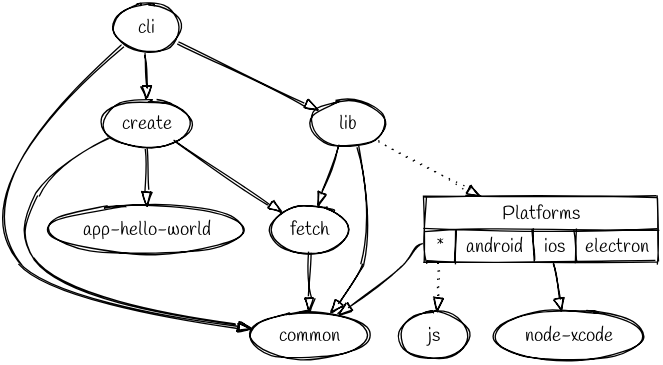
GitHub Markdown has built-in functionality for creating diagrams: https://docs.github.com/en/get-started/writing-on-github/working-with-advanced-formatting/creating-diagrams#creating-mermaid-diagrams. This can be used instead of using a third party solution.

|
Curious to see a screenshot of what mermaid tool produces |

 erisu
changed the title
erisu
changed the title

- Avoid lines overlapping other lines and boxes
- Tidy up code

Co-authored-by: エリス <erisu@users.noreply.github.com>

I didn't find a function for it :/ |

When you're on the “Files changed” tab reviewing the changes, there's a toggle above the file content that lets you switch between "Display the source diff" and "Display the rich diff". Click "Display the rich diff" to render the Markdown page. That will allow you to see the graph. |
I know, but I thought @breautek was asking, how a screenshot is made with Mermaid. Mermaid renders a live diagram which is not a screenshot, i didn't found a function to export it as an image. |
I was just looking for a screen snippet -- but I forgot that github does do rendered markdown diffs so that works too. I see the value of using mermaid, it's always nice to remove requirements of third-party tools. As far as style goes, I don't think it's too bad. I do think old sketchviz tool looks a bit better but not better enough to keep using sketchviz. This is subjective of course. On more of a practical note... if we want to render this outside of github (such as the docs site), I wonder if that will pose a problem. The docs site is powered by jekyll and it might require adding in a dependency to support mermaid rendering. |
You can change the look by: which would result in this: 
So it could be visually become nearly sketchviz.
Is the readme already rendered outside GitHub somewhere? |
|
The
The plugin readmes are (e.g. https://cordova.apache.org/docs/en/13.x-2025.11/reference/cordova-plugin-dialogs/index.html) but I don't think this readme, or the platform readme's are. I don't foresee the Just if we are going to use a diagram software, we should attempt to not lock out the usage in the docs site which is rendered outside of github... that we can keep a consistent styling throughout Cordova pages. |
Ok, good you mention that. I had the thought, that NPM could also be a problem and looked for the mermaid package on NPM if the diagrams get rendered, but they aren't. Maybe as an alternative the image could be attached within a |
I made the diagram look |
If they get rendered on readme on npmsjs.org you mean? Honestly that could also be an issue. |
Correct, I mean npmjs.org. If the readme is rendered there, the diagram get not rendered. Do you think this obsoletes this PR? Currently the diagram code in the readme can only be changed by @raphinesse. Maybe this should be more accessible for the Cordova contributors. |

|
I don't think it's true that I'm the only one who could edit the current diagram. I might be able to edit the current version without even changing the readme. But if I understand correctly any contributor should be able to fork the diagram and link a new version. That being said I have no personal stake in this. |
I think what Tim is trying to say is that the current diagram is saved and served from your gist URL, and we don’t have permission to edit it.
What I think raphinesse is saying is that we can copy the diagram content from the gist and create a new Sketchviz diagram, and update the link in the README. I even created my own Sketchviz of this awhile back to test something. It could even be used if preferred. My graph had removed some things that I found less important in the usual Cordova workflow but could be re-added. Either way, in my opinion, I have no preference between switching to Mermaid or continuing to use Sketchviz. This repository will never be published to the npm registry or displayed on the Apache Cordova website, so there should be no rendering issues if we use Mermaid. There may be issues in other repositories, but I wouldn’t worry about them until the graphs or images become outdated. Or any other issue that required review. While it would be nice to have one tool, that could render in all locations, I think it might not be as simple or easy. If we wanted the diagrams to render correctly in all locations, we would likely need to install Graphviz locally, generate PNGs, and commit them to the repository. We would also need to save the corresponding DOT files. This approach might be less convenient. |

 breautek
left a comment
breautek
left a comment
breautek
left a comment
There was a problem hiding this comment.
I'll +1...
While I do think rendering on site and/or NPM will be an issue in the future, it's not an issue in this particular case where this README is only ever rendered in the context of GitHub.
If we wanted to build another graph that will get displayed outside of GitHub, we can likely just use Mermaid Online Editor to build and export as an image. Allowing us to use the same technology and get consistent styling. But like Erisu said, we can worry about that if we ever cross that bridge.
4 participants


GitHub Markdown has built-in functionality for creating diagrams: https://docs.github.com/en/get-started/writing-on-github/working-with-advanced-formatting/creating-diagrams#creating-mermaid-diagrams. This can be used instead of using a third party solution.
Platforms affected
Motivation and Context
Description
Testing
Checklist
(platform)if this change only applies to one platform (e.g.(android))