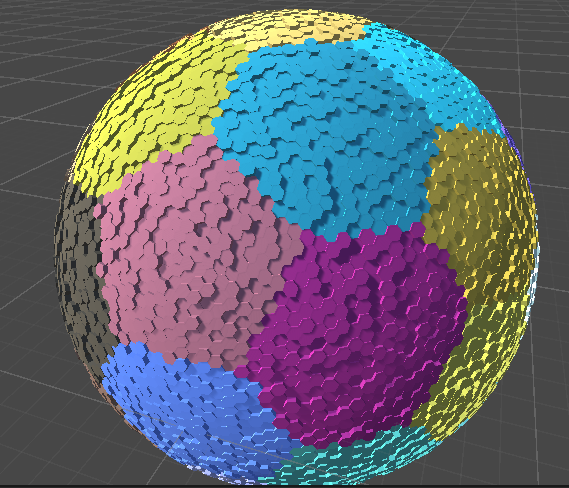
A customizable framework for creating Hex Planets in unity. For performance, the hexagons are seperated into chunks to overcome the overhead of associated with each being it's own object. When a hexagon's height or color changes, the chunk's mesh is automatically recomputed.

This demo also comes with a basic editor which can raise and lower selected tiles and set them to specifc heights.
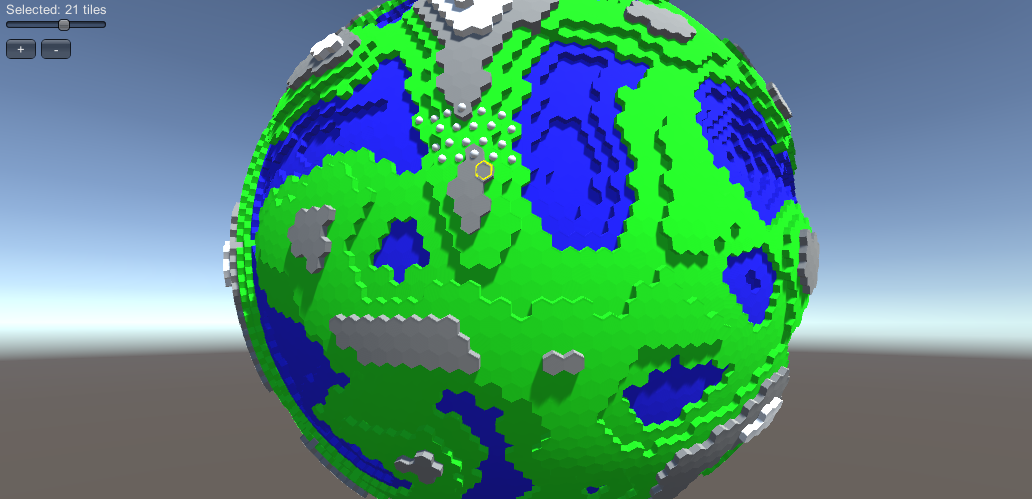
To make a planet, right-click in the Project Explorer > Create > HexPlanet > HexPlanet. Update it's paremeters and generator to your liking.
Subdivisions- Number of times a dodecahedron is subdivided to make the points for the spherical planet. (0 - 12 hexs, 1 - 42 hexs. 2 - 162 hexs, ...)Chunk Subdivisions- Number of times a dodecahedron is subdivided to make the center points for chunks.Chunk Material- The material that will be applied to each of the meshes. The mesh comes with vertex colors so a shader that supports those will render the colors.Generator- An object that defines how each hex tiles should look. (Custom ones can be made, see below)
A GameObject with a HexPlanetManager script should be made. Drop the new planet asset onto the Hex Planet property and click Generate. A planet mesh should be generated.
To make a generator to generate custom terrain based on a custom set of rules, inherit the BaseTerrainGenerator Class
using UnityHexPlanet;

// Ensure the generator can be editable from the inspector
[System.Serializable]
// Add the asset to the create menu
[CreateAssetMenu(menuName = "HexPlanet/MyTerrainGenerator", order = 1)]
public class MyCustomTerrainGenerator : BaseTerrainGenerator
{
    // Properties that can change
    public float minHeight;
    public float maxHeight;

    public Color32 myFavoriteColor = new Color32(100, 149, 237, 255);

    // A method called after each HexTile is created. Height and color can be set here
    public override void AfterTileCreation(HexTile newTile) {
        newTile.height = Random.Range(minHeight, maxHeight);
        newTile.color = myFavoriteColor;
    }
}
To use this new custom Generator, right-click in the Project Explorer > Create > HexPlanet > MyTerrainGenerator. Adjust the settings as desired. Drag this generator onto an instance of a planet. The planet will now be generator as per the custom generator's command.
In this section we show how to make tiles that have smooth transitions in height and color as pictured below. We use a custom generator and a custom HexTile class.

In order make this new complex geometry, we have to override the CreateHexTile method and instead of returning a HexTile object, return a custom CustomSmoothHexTile object.
using UnityHexPlanet;

// Ensure the generator can be editable from the inspector
[System.Serializable]
// Add the asset to the create menu
[CreateAssetMenu(menuName = "HexPlanet/MyTerrainGenerator", order = 1)]
public class MyCustomTerrainGenerator : BaseTerrainGenerator
{
    // Properties that can change
    public float minHeight;
    public float maxHeight;
    [Range(0.0f, 1.0f)]
    public float borderPercent = 0.75f;
    public List<Color32> randomColors;

    public override HexTile CreateHexTile(int id, HexPlanet planet, Vector3 centerPosition, List<Vector3> verts) {
        return new CustomSmoothHexTile(id, planet, centerPosition, verts, borderPercent);
    }

    // A method called after each HexTile is created. Height and color can be set here
    public override void AfterTileCreation(HexTile newTile) {
        newTile.height = Random.Range(minHeight, maxHeight);
        newTile.color = randomColors[Random.Range(0, randomColors.Count)];
    }
}
Here is the implemenation of the CustomSmoothHexTile class. Most of the work is done by the overwritten AppendToMesh method which appends the necessary verticies, triangles, and vertex colors to an in progress mesh. The method is only responsible for adding the necessary geometry of its hexagon.
Another interesting thing to note is that after setting the borderPercent in SetBorderPercent, a call to TriggerMeshRecompute is made. This ensures the chunk that the hexagon is associated with (along with neighboring chunks if the hexagon lies on a border) is rerendered so the chunk mesh can reflect the changes made to the hexagon data.
// Create a custom hex tile to generate the new geometry
public class CustomSmoothHexTile : HexTile {

    private float _borderPercent = 0.5f;

    public void SetBorderPercent(float newBorderPercent) {
        _borderPercent = newBorderPercent;
        // Make sure the chunk gets rerendered if the border percent changes
        TriggerMeshRecompute();
    }

    // Constructor to make a smooth hex tile. The constructor calls the Hex Tile's base tile.
    public CustomSmoothHexTile(int id, HexPlanet planet, Vector3 center, List<Vector3> verts, float borderPercent) : base(id, planet, center, verts) {
        this._borderPercent = borderPercent;
    }

    // Override the functionality of what happens when a hex tile is rendered
    public override void AppendToMesh(List<Vector3> meshVerts, List<int> meshIndicies, List<Color32> meshColors) {
        // Generate hexagon base
        int baseIndex = meshVerts.Count;
        Vector3 elevatedCenter = TransformPoint(center, height);
        meshVerts.Add(elevatedCenter);
        meshColors.Add(color);
        for (int j = 0; j < vertices.Count; j++)
        {
            Vector3 correctPos = TransformPoint(vertices[j], height);

            meshVerts.Add(Vector3.Lerp(elevatedCenter, correctPos, _borderPercent));
            meshColors.Add(color);

            meshIndicies.Add(baseIndex);
            meshIndicies.Add(baseIndex + j + 1);
            meshIndicies.Add(baseIndex + ((j + 1) % vertices.Count) + 1);
        }

        // Generate walls smoothed walls
        List<HexTile> neighbors = GetNeighbors();
        for (int j = 0; j < neighbors.Count; j++)
        {
            // Get neighbors and corresponding heights
            HexTile leftNeighbor = neighbors[(j + (vertices.Count - 1)) % vertices.Count];
            HexTile rightNeighbor = neighbors[(j + 1) % vertices.Count];
            HexTile centerNeighbor = neighbors[j];

            float thisHeight = height;
            float centerNeighborHeight = centerNeighbor.height;
            float rightNeighborHeight = rightNeighbor.height;
            float leftNeighborHeight = leftNeighbor.height;

            // Add verticies
            baseIndex = meshVerts.Count;
            meshVerts.Add(TransformPoint(vertices[(j + 1) % vertices.Count], (thisHeight + centerNeighborHeight + rightNeighborHeight) / 3.0f));
            meshVerts.Add(TransformPoint(vertices[j], (thisHeight + centerNeighborHeight + leftNeighborHeight) / 3.0f));
            meshVerts.Add(Vector3.Lerp(elevatedCenter, TransformPoint(vertices[(j + 1) % vertices.Count], thisHeight), _borderPercent));
            meshVerts.Add(Vector3.Lerp(elevatedCenter, TransformPoint(vertices[j], thisHeight), _borderPercent));

            // Add Colors
            meshColors.Add(new Color32((byte)((centerNeighbor.color.r + rightNeighbor.color.r + this.color.r) / 3), (byte)((centerNeighbor.color.g + rightNeighbor.color.g + this.color.g) / 3), (byte)((centerNeighbor.color.b + rightNeighbor.color.b + this.color.b) / 3), 255));
            meshColors.Add(new Color32((byte)((centerNeighbor.color.r + leftNeighbor.color.r + this.color.r) / 3), (byte)((centerNeighbor.color.g + leftNeighbor.color.g + this.color.g) / 3), (byte)((centerNeighbor.color.b + leftNeighbor.color.b + this.color.b) / 3), 255));
            meshColors.Add(color);
            meshColors.Add(color);

            // Add two triangles
            meshIndicies.Add(baseIndex);
            meshIndicies.Add(baseIndex + 2);
            meshIndicies.Add(baseIndex + 1);

            meshIndicies.Add(baseIndex + 2);
            meshIndicies.Add(baseIndex + 3);
            meshIndicies.Add(baseIndex + 1);
        }
    }

    // Helper method to calculate final point of a vertex given a height above the surface.
    private Vector3 TransformPoint(Vector3 input, float height) {
        return input * (1 + (height / planet.radius));
    }
}