This application aims to explore games using rawg.io API. You can view the detailed information of the game you want, leave a note on the games or add them to your favourites.
You can pull the project yourself and run it directly. Token information is embedded in the code, so you just need to download and run the application to use it.
- MVVM Design Pattern
- rawg.io API
- Kingfisher
- Storyboard
- UIKit
- UISearchController
- UIAlertController
- UITableView
- Custom UITableViewCells
- UIActivityIndicatorView
- UICollectionView
- Custom UICollectionViewCells
- NavigationController
- UITabBarController
- CoreData
- Localization (🇹🇷🇬🇧🇩🇪)
- Local Notification
- Protocols
- IQKeyboardManager
- PinterestLayout
- Viewing popular and latest games with pagination structure.
- Detailed information about the games.
- Search for games by name, release date, and popularity. If you wish, you can search in favourites.
- Adding, deleting and viewing games to favorites. If you wish, you can search in notes.
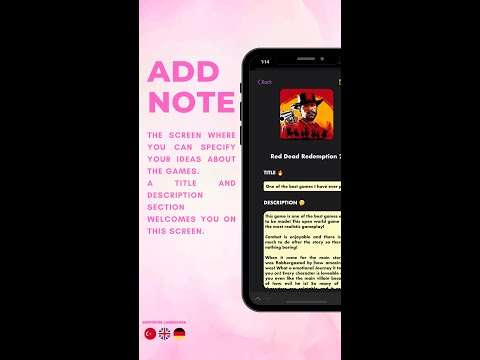
- Adding, deleting, editing and viewing games to notes.
- Quick and easily accessible screens.⚡️
1-How do I add games to favorites?
You can add the game to your favorites by clicking the heart button on the top right of the screen where you view the game details. If you click the heart button again, you can remove it from your favorites.
2-How can I write a note about the game?
To add a note, you must first open the game's detail screen. You can add a note about the game by pressing the note button on the top right of the detail screen.
3-How do I update the note I added?
For this, you must first open the notes screen and then click on the note you want to edit. When you click on the note, you can see that the name of the button on the top right has changed to 'Edit'. When you make your changes and click edit button, your changes will be updated.
4-How do I delete the note I added?
To delete a note, you must press and hold the note you want to delete on the notes screen. Then you have to click the delete button.
5-How do I delete the game from favorites?
There are 2 ways to remove the game from favorites. 1-Swipe the game you want to delete on the favorites screen to the right and press the delete button. 2-Open the detail screen of the game you want to remove from your favourites, and press the heart button at the top right.
6-How do I view the different language options?
The application supports 3 languages. These are Turkish, English and German. To view the application with these languages, you must change the language option of the phone you are using. If you are running hands-on on XCode, you must change the Simulator's language.