BudgetBuddy is a modern personal finance tracker designed to help you master your financial life. Built with Next.js 15, it combines powerful analytics with a seamless, stunning user experience to make money management effortless.
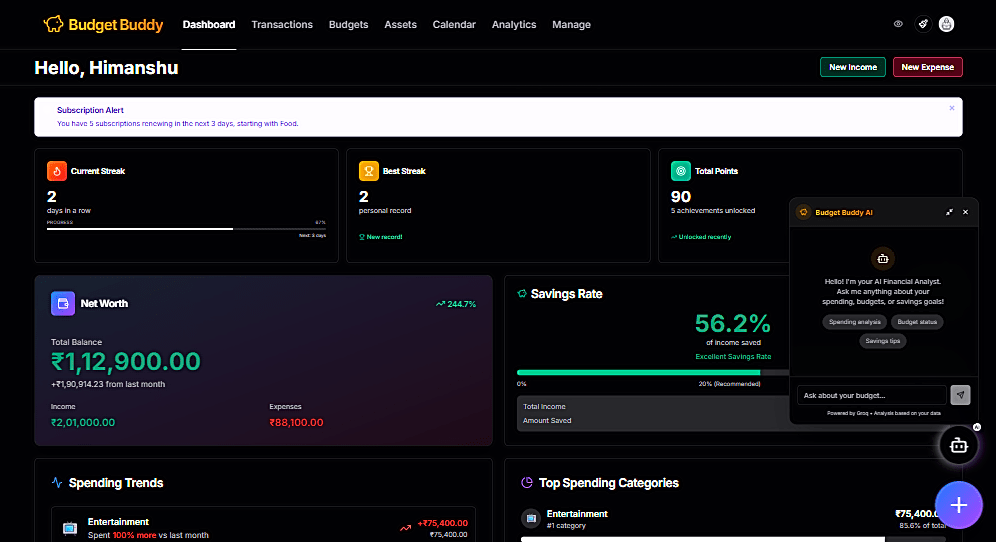
Unlock personalized financial insights with our AI Assistant.
- Context-Aware: Understands your transactions, budgets, and savings goals.
- Interactive Chat: Ask questions like "How much did I spend on food this month?" or "Can I afford a vacation?".
- Draggable Interface: A floating, draggable chat window that stays with you but never gets in the way.
- Draggable Quick Actions: A floating "Quick Add" widget that you can move anywhere on the screen for easy access on mobile or desktop.
- Command Palette (
Cmd+K): Navigate the entire app or trigger actions (like "New Expense" or "Open AI Chat") instantly with your keyboard. - Visual Finance Calendar: View your spending habits day-by-day in an intuitive calendar view.
- Transaction Tracking: Log income and expenses with smart categorization.
- Budgeting: Create monthly budgets for specific categories and get alerted when you're close to limits.
- Savings Goals: specific financial milestones (e.g., "New Car") and track contribution progress.
- Asset Tracking: Monitor your net worth by tracking assets alongside your cash flow.
- Real-time Dashboard: Interactive charts showing cash flow, spending trends, and category breakdowns.
- Comparative History: Analyze period-over-period performance (Weekly, Monthly, Yearly).
- Multi-Currency: Full support for global currencies with user-selectable display formats.
- Data Export: Download your complete financial history in CSV or PDF formats.
- Glassmorphism UI: A sleek, modern interface built with Shadcn UI and translucency effects.
- Theme Customization: Switch between light/dark modes and customize primary colors.
- Fully Responsive: Optimized experience for phones, tablets, and large desktop screens.
- Offline Mode: Visual indicators and safe-guards for when you lose connectivity.
- Framework: Next.js 15 (App Router)
- Core: React 19, TypeScript
- Styling: Tailwind CSS, Shadcn UI
- Motion: Framer Motion (Animations & Drag-and-Drop)
- State/Fetching: TanStack Query
- Visualization: Recharts
- Icons: Lucide React
- Utilities: date-fns, React CountUp
- UI Components: cmdk, Sonner, Vaul, Emoji Mart
- Effects: Canvas Confetti
- Database: PostgreSQL (via Prisma ORM)
- Auth: Clerk (Secure User Management)
- File Uploads: UploadThing
- Data Export: jspdf, export-to-csv
- Validation: Zod
- Node.js (v18+)
- PostgreSQL Database URL (Local or Cloud e.g., Neon, Supabase)
- Clerk Account (Public/Secret Keys)
-
Clone the repository:
git clone https://github.com/devhimanshuu/BudgetBuddy.git cd BudgetBuddy -
Install dependencies:
npm install
-
Set up Environment Variables: Create a
.envfile in the root directory:# Database DATABASE_URL="postgresql://user:pass@localhost:5432/budgetbuddy" # Authentication (Clerk) NEXT_PUBLIC_CLERK_PUBLISHABLE_KEY=pk_test_... CLERK_SECRET_KEY=sk_test_... NEXT_PUBLIC_CLERK_SIGN_IN_URL=/sign-in NEXT_PUBLIC_CLERK_SIGN_UP_URL=/sign-up
-
Initialize Database:
npx prisma generate
npx prisma db push
-
Run the Development Server:
npm run dev
Open http://localhost:3000 to view the app.
Contributions are welcome! Please follow these steps:
- Fork the repo.
- Create a feature branch (
git checkout -b feature/NewThing). - Commit your changes.
- Push to the branch.
- Open a Pull Request.
Created by Himanshu Gupta.
- Twitter: @devhimanshuu
- Email: devhimanshuu@gmail.com