
manyclangs is a project enabling you to run any commit of clang within a few seconds, without having to build it.
It provides elfshaker pack files, each containing ~2000 builds of LLVM packed into ~100MiB. Running any particular build takes about 4s.
Requirements: Ubuntu 20.04, elfshaker, wget, git, lld-12, clang-12
Replace YYYYMM below with the month and year for which you wish to fetch builds.
mkdir -p manyclangs/elfshaker_data/packs manyclangs/bin
cd ./manyclangs
YYYYMM=202109
wget https://github.com/elfshaker/manyclangs/releases/download/v0.9.0/aarch64-ubuntu2004-manyclangs-$YYYYMM.pack{,.idx} -P elfshaker_data/packs
elfshaker find ''
You will see a list of all available snapshots in the pack. Run any one of them using:
elfshaker extract $SNAPSHOT
bash ./link.sh --and-run clang --versionRequirements: elfshaker, wget, git, docker, binfmt-support, qemu-user-static
Please note, that so far, packs are only published for aarch64 binaries. However, these binaries can run under QEMU with some performance impact. For small code fragments, or some use cases, the impact may be tolerable.
Replace YYYYMM below with the month and year for which you wish to fetch builds.
mkdir -p manyclangs/elfshaker_data/packs manyclangs/bin
cd ./manyclangs
YYYYMM=202109
wget https://github.com/elfshaker/manyclangs/releases/download/v0.9.0/aarch64-ubuntu2004-manyclangs-$YYYYMM.pack{,.idx} -P elfshaker_data/packs
wget https://raw.githubusercontent.com/elfshaker/manyclangs/main/docker-qemu-aarch64/Dockerfile
docker build -t manyclangs-qemu-aarch64 .
elfshaker find ''
You will see a list of all available snapshots in the pack. Run any one of them using:
elfshaker extract $SNAPSHOT # e. g. 20210930-02593T202653-2df2b27d94f9268
docker run --rm -it  --mount type=bind,source="$(pwd)",target=/elfshaker manyclangs-qemu-aarch64  bash -c 'bash ./link.sh --and-run clang --version'
If you get an error similar to /usr/bin/clang++-12: cannot execute binary file: Exec format error, be sure you've installed the packages binfmt-support and qemu-user-static and try again.
- 1. Create a repository for manyclangs
- 2. Install manyclangs pack files
- 3. Run LLVM tools
- More on linking
- Running manyclangs on other platforms
- Our build configuration
- See also
You need an elfshaker repository to extract the binaries into. An elfshaker repository is simply a directory with an elfshaker_data subdirectory.
You can grab the .pack and .pack.idx files for the releases of interest and put them in the elfshaker_data/packs directory.
You can create all directories you need like so:
mkdir -p manyclangs/elfshaker_data/packsPut the .pack and .pack.idx files in manyclangs/elfshaker_data/packs. Verify that elfshaker can see them by running the following command in manyclangs/:
elfshaker listNow try extracting a snapshot by running:
elfshaker list
# Pick a pack file, e.g. aarch64-ubuntu2004-manyclangs-202005.pack
elfshaker list aarch64-ubuntu2004-manyclangs-202005
# Pick a snapshot, e.g. 20200531-02712T150722-dfbfdc96f9e15be
elfshaker extract 20200531-02712T150722-dfbfdc96f9e15be
The extraction should only take 1-2s. You will then notice that the manyclangs/ directory contains a number of other files and directories, including link.sh, COMMIT_SHA and lib/ among others.
The elfshaker extract step extracted the pre-built .o files for commit dfbfdc96f9e15be of the LLVM repo. You now need to run link.sh to link these into an executable.
bash ./link.sh --and-run clang --versionAs of writing this, ./link.sh can link 99 separate executables. To link everything, use:
bash ./link.sh./link.sh can also link several dynamic libraries.
List of executables shipped in manyclangs
- FileCheck
- arcmt-test
- bugpoint
- c-arcmt-test
- c-index-test
- clang
- clang++
- clang-$VER
- clang-check
- clang-cl
- clang-cpp
- clang-diff
- clang-extdef-mapping
- clang-format
- clang-import-test
- clang-offload-bundler
- clang-offload-wrapper
- clang-refactor
- clang-rename
- clang-scan-deps
- clang-tblgen
- count
- diagtool
- dsymutil
- llc
- lli
- lli-child-target
- llvm-PerfectShuffle
- llvm-addr2line
- llvm-ar
- llvm-as
- llvm-bcanalyzer
- llvm-c-test
- llvm-cat
- llvm-cfi-verify
- llvm-config
- llvm-cov
- llvm-cvtres
- llvm-cxxdump
- llvm-cxxfilt
- llvm-cxxmap
- llvm-diff
- llvm-dis
- llvm-dlltool
- llvm-dwarfdump
- llvm-dwp
- llvm-elfabi
- llvm-exegesis
- llvm-extract
- llvm-gsymutil
- llvm-ifs
- llvm-install-name-tool
- llvm-isel-fuzzer
- llvm-itanium-demangle-fuzzer
- llvm-jitlink
- llvm-lib
- llvm-link
- llvm-lipo
- llvm-lto
- llvm-lto2
- llvm-mc
- llvm-mca
- llvm-microsoft-demangle-fuzzer
- llvm-ml
- llvm-modextract
- llvm-mt
- llvm-nm
- llvm-objcopy
- llvm-objdump
- llvm-opt-fuzzer
- llvm-opt-report
- llvm-pdbutil
- llvm-profdata
- llvm-ranlib
- llvm-rc
- llvm-readelf
- llvm-readobj
- llvm-reduce
- llvm-rtdyld
- llvm-size
- llvm-special-case-list-fuzzer
- llvm-split
- llvm-stress
- llvm-strings
- llvm-strip
- llvm-symbolizer
- llvm-tblgen
- llvm-undname
- llvm-xray
- llvm-yaml-numeric-parser-fuzzer
- not
- obj2yaml
- opt
- sancov
- sanstats
- verify-uselistorder
- yaml-bench
- yaml2obj
List of dynamic libraries shipped in manyclangs
- libLTO.so
- libLTO.so.$VERgit
- libRemarks.so
- libRemarks.so.$VERgit
- libclang-cpp.so
- libclang-cpp.so.$VERgit
- libclang.so
- libclang.so.$VER
- libclang.so.$VERgit
The manyclangs-qemu-aarch64 docker image allows you to run the AArch64 packs on x86-64 platforms via QEMU.
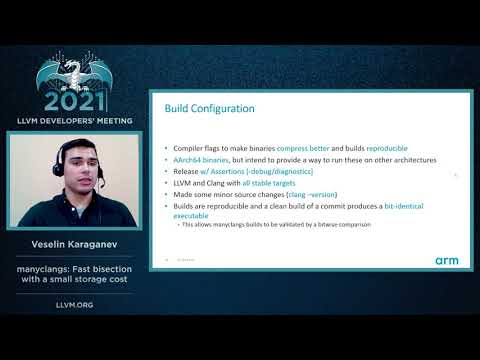
We use the manyclangs-cmake script to configure our LLVM builds.
Important highlghts:
- Release w/ Assertions
- All stable targets are included
-
manyclangs-run can be used to seamlessly run any commit of LLVM from your source code repo.
-
Talk from the 2021 LLVM Developers' Meeting
The best way to reach us to join the elfshaker/community on Gitter. The original authors of elfshaker are Peter Waller (@peterwaller-arm) <peter.waller@arm.com> and Veselin Karaganev (@veselink1) <veselin.karaganev@arm.com> and you may also contact us via email.
Refer to our Security policy.
manyclangs is licensed under the Apache License 2.0.