Twitter is an android app that allows a user to view their Twitter timeline and post a new tweet. The app utilizes Twitter REST API.
Time spent: 20 hours spent in total
The following required functionality is completed:
- User can sign in to Twitter using OAuth login
- User can view tweets from their home timeline
- User is displayed the username, name, and body for each tweet
- User is displayed the relative timestamp for each tweet "8m", "7h"
- User can *log out of the application by tapping on a logout button
- User can compose and post a new tweet
- User can click a “Compose” icon in the Action Bar on the top right
- User can then enter a new tweet and post this to Twitter
- User is taken back to home timeline with new tweet visible in timeline
- Newly created tweet should be manually inserted into the timeline and not rely on a full refresh
- User can see a counter that displays the total number of characters remaining for tweet that also updates the count as the user types input on the Compose tweet page
- User can pull down to refresh tweets timeline
- User can see embedded image media within a tweet on list or detail view.
The following optional features are implemented:
- User is using "Twitter branded" colors and styles
- User can select "reply" from home timeline to respond to a tweet
- User that wrote the original tweet is automatically "@" replied in compose
- User can tap a tweet to open a detailed tweet view
- User can take favorite (and unfavorite) or retweet actions on a tweet
- User can view more tweets as they scroll with infinite pagination
- User can click a link within a tweet body on tweet details view. The click will launch the web browser with relevant page opened.
- Replace all icon drawables and other static image assets with vector drawables where appropriate.
- User can view following / followers list through any profile they view.
- On the Twitter timeline, apply scrolling effects such as hiding/showing the toolbar by implementing CoordinatorLayout.
- User can open the twitter app offline and see last loaded tweets. Persisted in SQLite tweets are refreshed on every application launch. While "live data" is displayed when app can get it from Twitter API, it is also saved for use in offline mode.
The following additional features are implemented:
- Rounded Corners to Profile Pictures and URL Images
- created clickable hyperlinks
Here's a walkthrough of implemented user stories:
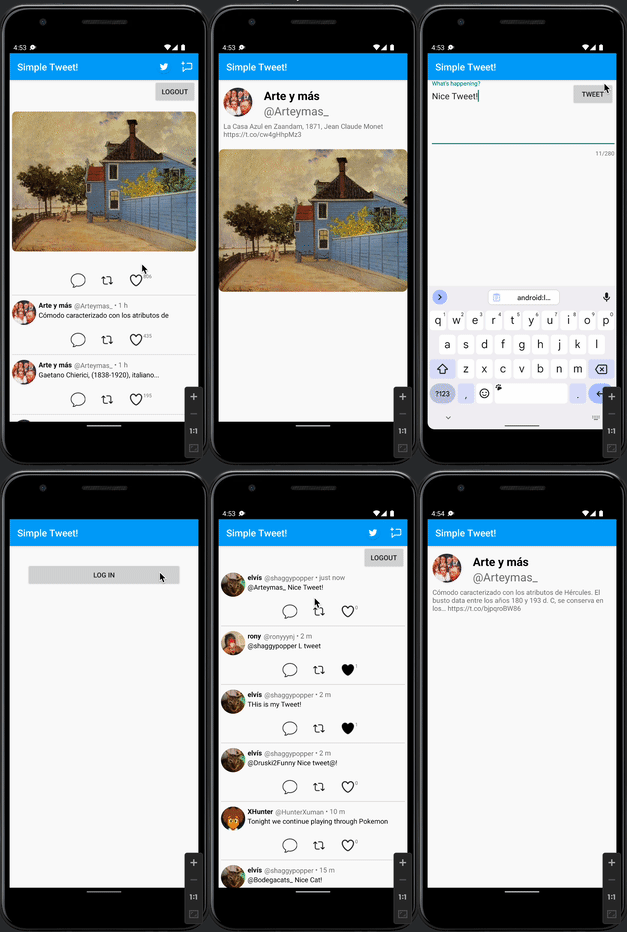
GIF created with Kap.
Some challenges encountered were the images that would need to be transfered from the Twitter scroll screen to the Detail view screen, which required using Parcels and Glide to put the images in their respective orientation. Also, rounding the corners of the images was difficult because afterwards I would have to autoresize the height of each image dependent on the images height to width ratio, which I derived from the raw JSON data.
- Android Async HTTP - Simple asynchronous HTTP requests with JSON parsing
- Glide - Image loading and caching library for Android
Copyright [yyyy] [name of copyright owner]

Licensed under the Apache License, Version 2.0 (the "License");
you may not use this file except in compliance with the License.
You may obtain a copy of the License at

    http://www.apache.org/licenses/LICENSE-2.0

Unless required by applicable law or agreed to in writing, software
distributed under the License is distributed on an "AS IS" BASIS,
WITHOUT WARRANTIES OR CONDITIONS OF ANY KIND, either express or implied.
See the License for the specific language governing permissions and
limitations under the License.