dwm statusbar heavily inspired by dwmblocks.
- Each segment of the statusbar has an individual update interval
- Segments can also get manually updated by sending a signal to the process
- The statusbar is configurable through a configuration file
- You can also implement custom segments for the statusbar (example)
- Color support (with the statuscolor patch)
# default separator that all segments use
left_separator: " "
# scripts are expected to be in this folder
script_dir: "~/.status_scripts"
# signal that updates all the segments at once
update_all_signal: 0
# a mapping of the colors used in the config
# see section 'Colors' below
colors:
green: 10
red: 11
# default colors
# other options are left_separator_color, right_separator_color, icon_color
text_color: green
segments:
# scripts are run with sh
- script: "volume"
# this segments updates once per minute
update_interval: 60
# or when the signal SIGRTMIN+1 comes
# bind `pkill -RTMIN+1 dwmblocksrs` to your volume shortcuts
signals: [1]
- script: "battery"
update_interval: 10
# this segment is hidden when the script returns an empty string
hide_if_empty: true
- program: "date"
args: ["+%a. %d. %B %Y"]
update_interval: 60
# icons are displayed to the left of the output
icon: " "
- program: "date"
args: ["+%H:%M"]
update_interval: 60
icon: " "
# the default left separator gets overwritten
left_separator: " "
# as well as the default colors
text_color: red
icon_color: red
Run the statusbar with dwmblocksrs -c example_config.yaml or move the config file to ~/.config/dwmblocksrs/dwmblocksrs.yaml.
The above config file produces the following statusbar in dwm:
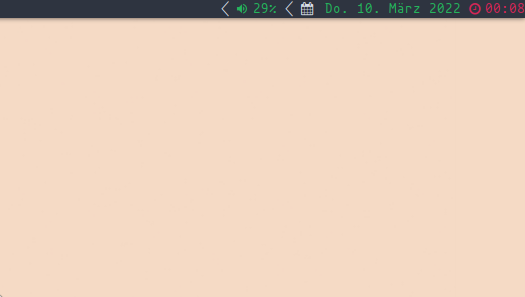
(the battery segment is hidden because the script outputs an empty string)
In the example above, two colors are defined. The values these numbers are mapped to are defined in the dwm config.h file. See statuscolor for better explanation.
Colors are completly optional, and dwmblocksrs also works without the statuscolor patch in dwm. Besides that, the color-bytes explained in the statuscolor patch can also be manually generated from the script of a segment.