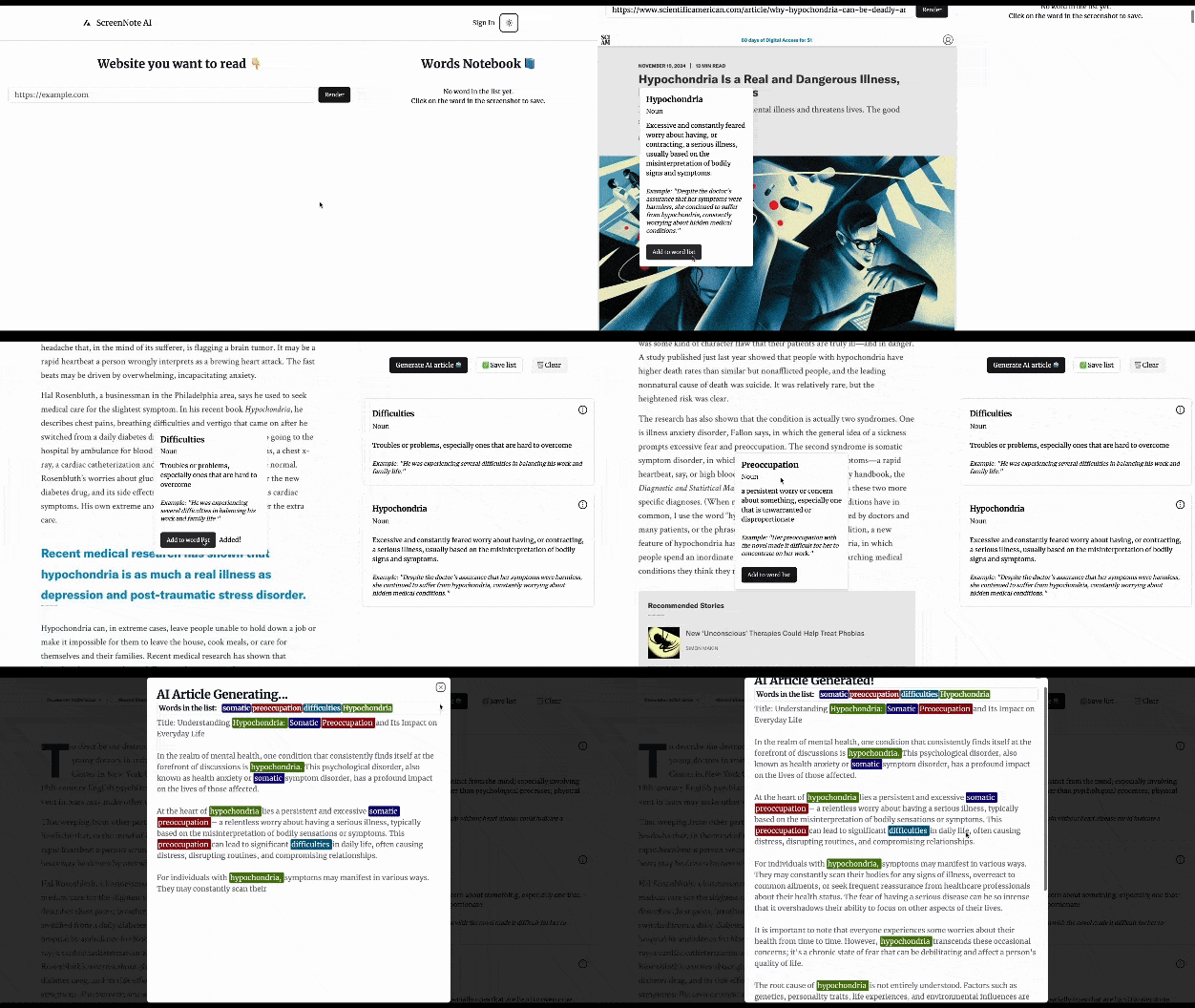
The Dynamic Learning App is here to change how you learn from online articles. With advanced Optical Character Recognition (OCR) and AI, the app makes it easy to capture text from websites and interact with it in real-time.
You can click on any word in the text to see a definition tailored to its context, helping you learn more effectively. Plus, the vocabulary builder lets you save words you want to remember, and you can easily add or remove them as you go.
To top it off, the app can create personalized articles using the words you’ve saved, turning your learning into something practical and creative. Whether you’re a student, a professional, or just love exploring new content, this app turns reading into an interactive learning experience that boosts your language skills and sparks your creativity.
- Text Extraction with OCR: Effortlessly capture text from online articles by simply pasting the URL. The app automatically takes a screenshot and extracts the text using cutting-edge Optical Character Recognition (OCR) technology.
- Contextual AI-Powered Word Definitions: Click on any word within the extracted text, and get an instant, AI-generated definition that’s tailored to the context of the article, providing deeper understanding and nuanced meanings.
- Personalized Vocabulary Builder: Easily save new words to your personal word list for future reference. Track and manage your vocabulary to facilitate long-term retention and mastery.
- AI-Generated Content Creation: Utilize your saved word list to generate high-quality AI-written articles. Let the app create meaningful content that integrates the vocabulary you’ve learned for practice and application.
- AI Technologies: Hugging Face, MistralAI
- OCR Processing: Tesseract.js
- Web Frameworks: Next.js (Frontend), FastAPI (Backend)
- Authentication: Supabase for authentication
- Database: PostgreSQL relational database for storing user data
- Hosting: Vercel for deployment and hosting
- Data Compression: LZ-string for compressing OCR data in localStorage for faster retrieval
- Web Scraping: Puppeteer for taking screenshots of articles
- State Management: Zustand for managing application state
- Educational Tool: Enhance learning with contextual vocabulary and AI article creation.
- Language Learners: Simplify vocabulary building by seamlessly saving and analyzing new words.
- Content Creators: Generate drafts for blog posts or essays with minimal effort.
-
Clone the repository:
git clone https://github.com/Giayychan/screen-note-ai your-repo-name cd your-repo-name -
Install dependencies:
-
Backend:
python3.12 -m venv .venv && source venv/bin/activate && pip3 install -r requirements.txt
-
Frontend:
pnpm install
-
-
Set up environment variables (create
.envfile and configure as needed). -
Run the backend:
pnpm run fastapi-dev
-
Run the frontend:
pnpm run next-dev
-
Run the database locally:
pnpm run supabase:start
-
Access the app at
http://localhost:3000.
Live Demo: https://screen-note-ai.vercel.app/
If you find Screen Note AI helpful and would like to support the development of this project, feel free to donate:
- Buy Me A Coffee: Buy Me A Coffee
Your support will help keep this project alive and improve its features!
We’re always looking to improve the app! If you have any ideas or suggestions for new features, feel free to open an issue on GitHub or drop me a message:
- Submit Feature Request: Feature Request Link
We value your feedback and are always happy to explore ways to make the app more useful!