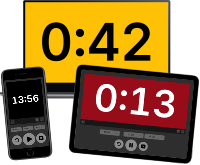
webtimer.cc is a simple, free, web-based presentation timer with remote control.
Visit webtimer.cc.
- Use the timer to show the remaining time to presenters at a single presentation, a workshop, or a small conference.
- Control the timer from your phone. Or use any other device with a web browser.
- Easy to set up. Works anywhere with wifi.
-
Start a new timer:
- Go to webtimer.cc in any web browser.
- Choose a unique session ID to identify your timer.
-
Open the timer on another device. Connect as many devices as you like:
- Scan the QR code to open the timer.
- Or go to webtimer.cc and enter your session ID.
-
Control the timer from any connected device:
- Set a countdown timer with the allotted time.
- Start or stop the timer at any moment.
- Add or subtract to adjust the time.
- Switch to a black screen to hide the clock.
If you wish, you can run your own webtimer server locally.
-
Download the precompiled binary for your computer:
Linux Windows macOS Linux (AMD64) Windows (AMD64) mac OS (AMD64) Linux (ARM64) Windows (ARM64) mac OS (ARM64) On Linux, you can also install the snap package with
snap install webtimer
-
Start the server.
-
Open the webtimer in your browser by accessing http://localhost:8000/.
Note: If you want to control the timer from another device, you might need to find the IP address of your computer. The server will list the addresses on which it is listening. You might also need to adjust your firewall settings to make the server accessible from other devices. By default, the app will listen to port 8000 on any IP address. Run with
webtimer --addr <IP>:<PORT>to choose something else.
A Docker container is available at ghcr.io/gvtulder/webtimer.
docker pull ghcr.io/gvtulder/webtimer:latestWith Docker Compose you might use:
services:
  web:
    image: ghcr.io/gvtulder/webtimer:latest
    container_name: webtimer
    ports:
      - "8000:8000"
restart: unless-stopped| Parameter | Description |
|---|---|
--addr <IP>:<PORT> |
Run the server on a specific IP address and port. (Default: :8000) |
--web <DIR> |
Load HTML, JS and CSS from this directory. (Default: use the files included in the binary.) |
webtimer is built using Go and TypeScript.
Installing requirements:
go get
npm ci
Building client and server:
npx webpack
go build .webtimer.cc is produced and hosted by Gijs van Tulder in the Netherlands.
The webtimer sources are licensed under the GPL-3.0 license.
Copyright (C) 2025 Gijs van Tulder
This program is free software: you can redistribute it and/or modify it under the terms of the GNU General Public License as published by the Free Software Foundation, either version 3 of the License, or (at your option) any later version.
This program is distributed in the hope that it will be useful, but WITHOUT ANY WARRANTY; without even the implied warranty of MERCHANTABILITY or FITNESS FOR A PARTICULAR PURPOSE. See the GNU General Public License for more details.
You should have received a copy of the GNU General Public License along with this program. If not, see https://www.gnu.org/licenses/.