

Bidirectionally convert and sync Custom Slash Commands and Skills between Claude Code, Gemini CLI, Codex CLI, OpenCode, GitHub Copilot, and Cursor with intuitive visual feedback. Features a Chimera virtual agent as a lossless conversion hub.
npm install -g agent-command-sync# Direct conversion between agents
acs sync -s claude -d gemini
acs sync -s gemini -d claude
# Import into Chimera hub (lossless)
acs import claude
acs import gemini
# Apply from Chimera hub to an agent
acs apply gemini
acs apply claude
# Preview changes (dry run)
acs drift claude # Preview import
acs plan gemini # Preview apply
# Convert Skills or Commands only
acs sync -s claude -d gemini -t skills
acs sync -s claude -d gemini -t commands
# Preview direct conversion
acs sync -n -s claude -d gemini
# Force user-level (global) directories instead of project-level
acs sync -s claude -d gemini -g
# Download a skill from GitHub
acs download https://github.com/owner/repo/tree/main/.claude/skills/my-skill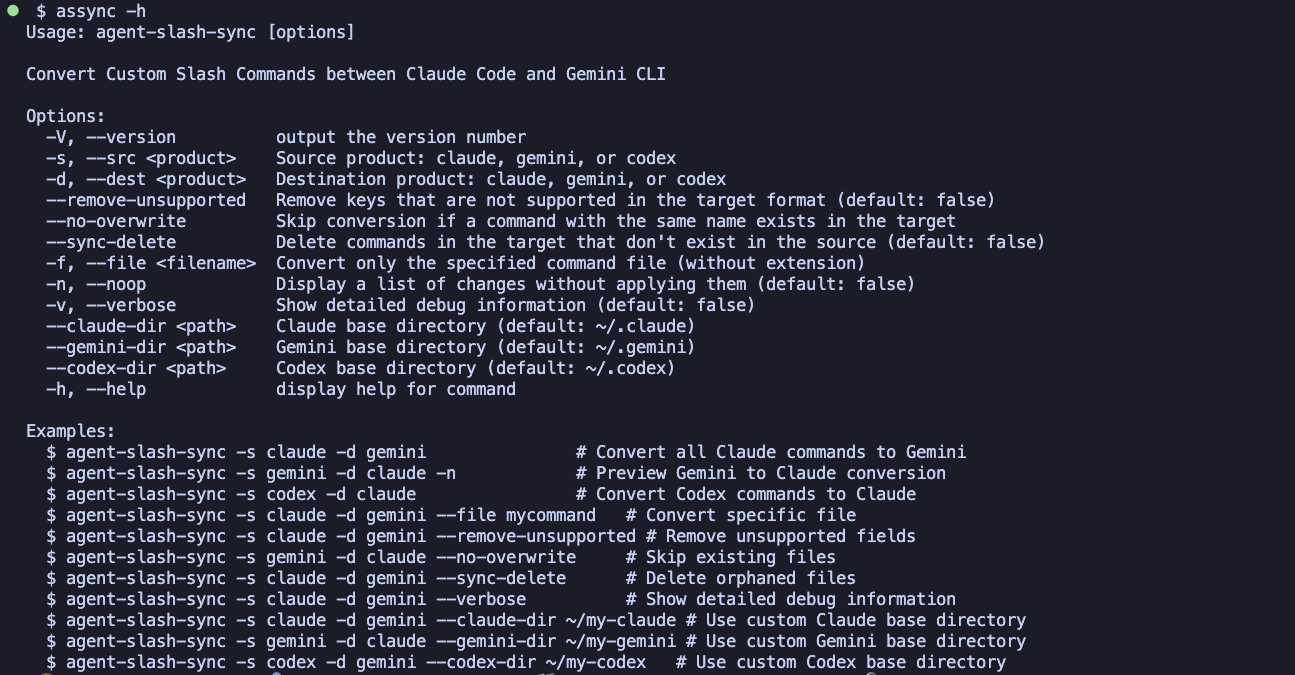
- Project-level by Default - Automatically uses project-level directories (e.g.,
<repo>/.claude) when running inside a Git repository - Colorful Output - Clear visual feedback with color-coded status indicators
- Fast Conversion - Efficiently sync commands between Claude Code, Gemini CLI, Codex CLI, OpenCode, GitHub Copilot, and Cursor
- Bidirectional - Convert in any direction (Claude ↔ Gemini ↔ Codex ↔ OpenCode ↔ Copilot ↔ Cursor)
- Safe by Default - Preview changes with dry-run mode before applying
- Chimera Hub - Lossless conversion via virtual agent that preserves all agent-specific settings (details)
- Subcommands -
import,apply,drift,planfor Chimera hub workflow;syncfor direct conversion - Download - Fetch skills directly from GitHub repositories with
acs download - Provenance Tracking -
_fromfrontmatter property records where commands/skills were copied from - Short Command - Use
acsinstead ofagent-command-sync - Selective Sync - Convert specific files or all commands at once
Upgrading from v3? v4.0.0 changes the default directory scope. See CHANGELOG.txt for breaking changes.
Upgrading from v2? See the Migration Guide.
acs sync -s <source> -d <dest> [options]acs import claude # Import all from Claude
acs import gemini -t commands # Import commands onlyacs drift claude # Preview import changesacs apply gemini # Apply to Gemini
acs apply claude --remove-unsupported # Remove unsupported fieldsacs plan gemini # Preview apply changesacs download https://github.com/owner/repo/tree/main/.claude/skills/my-skill
acs download <url> -d gemini # Place in Gemini skill directory
acs download <url> -d claude -g # Place in global Claude directory
acs download <url> -n # Preview without downloading| Option | Description |
|---|---|
-s, --src <product> |
Required. Source product: claude, gemini, codex, opencode, copilot, cursor, or chimera |
-d, --dest <product> |
Required. Destination product: claude, gemini, codex, opencode, copilot, cursor, or chimera |
-t, --type <type> |
Content type: commands, skills, or both (default: both) |
-f, --file <filename> |
Convert specific file only (supports .md, .toml extensions) |
-g, --global |
Use user-level (global) directories instead of project-level |
-n, --noop |
Preview changes without applying them |
-v, --verbose |
Show detailed debug information |
--claude-dir <path> |
Claude base directory (default: ~/.claude) |
--gemini-dir <path> |
Gemini base directory (default: ~/.gemini) |
--codex-dir <path> |
Codex base directory (default: ~/.codex) |
--opencode-dir <path> |
OpenCode base directory (default: ~/.config/opencode) |
--copilot-dir <path> |
Copilot base directory (default: ~/.copilot) |
--cursor-dir <path> |
Cursor base directory (default: ~/.cursor) |
--chimera-dir <path> |
Chimera base directory (default: ~/.config/chimera-agent) |
--no-overwrite |
Skip existing files in target directory |
--sync-delete |
Delete orphaned files in target directory |
--remove-unsupported |
Remove fields not supported by target format |
# Direct conversion with preview
acs sync -n -s claude -d gemini

# Convert specific file
acs sync -s gemini -d claude -f analyze-code

# Chimera hub workflow
acs import claude                          # Import Claude → Chimera
acs import gemini                          # Import Gemini → Chimera (merges)
acs apply claude                           # Apply Chimera → Claude (with Claude extras)
acs apply gemini                           # Apply Chimera → Gemini (with Gemini extras)

# Full sync with cleanup
acs sync -s claude -d gemini --sync-delete --remove-unsupported

# Use custom directories
acs sync -s claude -d gemini --claude-dir ~/my-claude --gemini-dir ~/my-gemini

# Show verbose output for debugging
acs sync -s claude -d gemini -vWhen running inside a Git repository, acs defaults to project-level directories (e.g., <repo>/.claude, <repo>/.gemini). Use -g/--global to use user-level directories instead.
Priority order:
--{agent}-dir(custom directory) — always takes precedence- Project-level — default when inside a Git repository
- User-level — default when outside a Git repository, or when
-gis specified
| Agent | Commands | Skills |
|---|---|---|
| Claude Code | <repo>/.claude/commands/*.md |
<repo>/.claude/skills/<name>/SKILL.md |
| Gemini CLI | <repo>/.gemini/commands/*.toml |
<repo>/.gemini/skills/<name>/SKILL.md |
| Codex CLI | <repo>/.codex/prompts/*.md |
<repo>/.codex/skills/<name>/SKILL.md |
| OpenCode | <repo>/.config/opencode/commands/*.md |
<repo>/.config/opencode/skills/<name>/SKILL.md |
| GitHub Copilot | <repo>/.copilot/prompts/*.prompt.md |
<repo>/.copilot/skills/<name>/SKILL.md |
| Cursor | <repo>/.cursor/commands/*.md |
<repo>/.cursor/skills/<name>/SKILL.md |
| Chimera | <repo>/.chimera-agent/commands/*.md |
<repo>/.chimera-agent/skills/<name>/SKILL.md |
| Agent | Commands | Skills |
|---|---|---|
| Claude Code | ~/.claude/commands/*.md |
~/.claude/skills/<name>/SKILL.md |
| Gemini CLI | ~/.gemini/commands/*.toml |
~/.gemini/skills/<name>/SKILL.md |
| Codex CLI | ~/.codex/prompts/*.md |
~/.codex/skills/<name>/SKILL.md |
| OpenCode | ~/.config/opencode/commands/*.md |
~/.config/opencode/skills/<name>/SKILL.md |
| GitHub Copilot | ~/.copilot/prompts/*.prompt.md |
~/.copilot/skills/<name>/SKILL.md |
| Cursor | ~/.cursor/commands/*.md |
~/.cursor/skills/<name>/SKILL.md |
| Chimera | ~/.config/chimera-agent/commands/*.md |
~/.config/chimera-agent/skills/<name>/SKILL.md |
| Aspect | Commands | Skills |
|---|---|---|
| Structure | Single file (.md, .toml) |
Directory (SKILL.md + support files) |
| Location | {base}/{tool}/commands/ |
{base}/{tool}/skills/<name>/ |
| Use Case | Simple prompts | Complex tasks with multiple files |
| Feature | Claude Code | Gemini CLI | Codex CLI | OpenCode | Copilot | Cursor | Conversion Notes |
|---|---|---|---|---|---|---|---|
| File format | Markdown | TOML | Markdown | Markdown | Markdown (.prompt.md) |
Markdown | Automatically converted |
| Content field | Body content | prompt |
Body content | Body content | Body content | Body content | Main command content |
| Description metadata | description |
description |
description |
description |
description |
- | Lost when converting to Cursor (no frontmatter) |
model |
Supported | - | - | Supported | Supported | - | Preserved for Claude/OpenCode/Copilot |
tools (YAML array) |
- | - | - | - | Supported | - | Copilot-specific (passthrough via extras) |
allowed-tools, argument-hint |
Supported | - | - | - | - | - | Claude-specific (use --remove-unsupported) |
| Feature | Claude Code | Gemini CLI | Codex CLI | OpenCode | Copilot | Cursor | Conversion Behavior |
|---|---|---|---|---|---|---|---|
| All arguments | $ARGUMENTS |
{{args}} |
$ARGUMENTS |
$ARGUMENTS |
- | - | Converted between formats |
| Individual arguments | $1 ... $9 |
- | $1 ... $9 |
$1 ... $9 |
- | - | Preserved (not supported in Gemini/Copilot/Cursor) |
| Shell command | !`command` |
!{command} |
- | !`command` |
- | - | Converted between formats |
| File reference | @path/to/file |
@{path/to/file} |
- | @path/to/file |
- | - | Converted between formats |
The placeholders $1 through $9 allow referencing individual command arguments. For example, $1 refers to the first argument, $2 to the second, and so on. This feature is supported in Claude Code, Codex CLI, and OpenCode, but not in Gemini CLI. During conversion, these placeholders are preserved as-is.
File references allow embedding file contents inline within the command. The syntax differs between tools:
- Claude Code / OpenCode uses
@path/to/file.txt - Gemini CLI uses
@{path/to/file.txt} - Codex CLI does not support this feature
During conversion, the syntax is automatically converted between formats. When converting to/from Codex, the file reference syntax is preserved unchanged.
Skills follow the Agent Skills open standard adopted by Claude Code, Gemini CLI, Codex CLI, OpenCode, and Cursor.
Each skill is a directory containing SKILL.md and optional support files:
~/.claude/skills/
└── my-skill/
    ├── SKILL.md           # Main skill definition (required)
    ├── helper.sh          # Support file (optional)
    └── config.json        # Support file (optional)
All tools use the same SKILL.md format with YAML frontmatter:
---
name: my-skill
description: A helpful skill description
---

Skill instructions go here.

Use $ARGUMENTS for user input.| Field | Claude Code | Gemini CLI | Codex CLI | OpenCode | Copilot | Cursor | Conversion Notes |
|---|---|---|---|---|---|---|---|
name |
✓ | ✓ | ✓ | ✓ | ✓ | ✓ | Required |
description |
✓ | ✓ | ✓ | ✓ | ✓ | ✓ | Preserved |
argument-hint |
✓ | - | - | - | ✓ | - | Claude/Copilot |
allowed-tools |
✓ | - | - | - | - | ✓ | Claude/Cursor (agentskills.io) |
model |
✓ | - | - | - | - | - | Claude-specific |
context |
✓ | - | - | - | - | - | Claude-specific (e.g., "fork") |
agent |
✓ | - | - | - | - | - | Claude-specific |
hooks |
✓ | - | - | - | - | - | Claude-specific (before/after/on_error) |
disable-model-invocation |
✓ | - | ✓* | ✓** | ✓ | ✓ | Converted (see below) |
user-invocable / user-invokable |
✓ | - | - | - | ✓*** | ✓ | Converted with spelling normalization |
* Codex uses policy.allow_implicit_invocation in agents/openai.yaml (inverted logic)
** OpenCode uses disable-model-invocation directly in SKILL.md frontmatter
*** Copilot uses user-invokable (with 'k') instead of Claude's user-invocable (with 'c'); automatically normalized during conversion
Codex CLI supports an optional agents/openai.yaml configuration file:
~/.codex/skills/
└── my-skill/
    ├── SKILL.md
    └── agents/
        └── openai.yaml    # Codex-specific configuration
Example openai.yaml:
interface:
  display_name: "My Skill"
  short_description: "A skill description"
policy:
allow_implicit_invocation: trueThe policy.allow_implicit_invocation field in Codex is converted to/from Claude's disable-model-invocation with inverted logic:
| Claude Code | Codex CLI (openai.yaml) |
|---|---|
disable-model-invocation: true |
policy.allow_implicit_invocation: false |
disable-model-invocation: false |
policy.allow_implicit_invocation: true |
When converting Claude → Codex with disable-model-invocation set, an agents/openai.yaml file is automatically generated.
Other openai.yaml fields (interface.display_name, interface.short_description) are Codex-specific and not converted.
Support files (scripts, configs, images, etc.) are copied as-is during conversion:
| File Type | Examples | Handling |
|---|---|---|
| Text | .sh, .py, .json, .yaml |
Copied as-is |
| Binary | .png, .jpg, .pdf |
Copied as-is |
| Config | openai.yaml |
Codex-specific, ignored for other targets |
Same as Commands:
| Feature | Claude Code / Codex CLI / OpenCode | Gemini CLI | Copilot | Cursor |
|---|---|---|---|---|
| All arguments | $ARGUMENTS |
{{args}} |
Not supported | Not supported |
| Individual arguments | $1 ... $9 |
Not supported | Not supported | Not supported |
| Shell command | !`command` |
!{command} |
Not supported | Not supported |
| File reference | @path/to/file |
@{path/to/file} |
Not supported | Not supported |
- Slash commands - Claude Docs
- gemini-cli/docs/cli/custom-commands.md at main · google-gemini/gemini-cli
- codex/docs/prompts.md at main · openai/codex
- OpenCode
- Custom instructions for GitHub Copilot
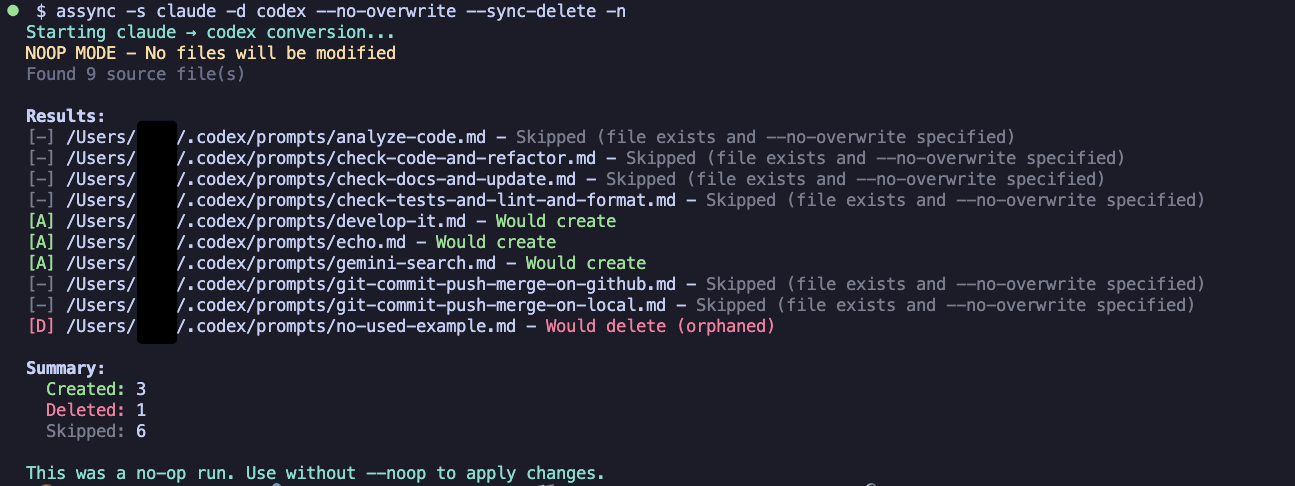
[A]Created (Green) - New files created in target directory[M]Modified (Yellow) - Existing files updated[=]Unchanged (Blue) - File exists and converted content is identical[D]Deleted (Red) - Files removed with--sync-delete[-]Skipped (Gray) - Files skipped with--no-overwrite
- Node.js >= 18.0.0
- npm or compatible package manager
All conversions go through a hub-and-spoke Semantic IR, eliminating the need for pairwise converters between every agent combination:
Source Format → Parser → toIR() → SemanticIR → fromIR() → Target Format
Each agent has a single class implementing all interfaces (AgentConfig, BodyParser, CommandParser, CommandConverter, SkillParser, SkillConverter). Adding a new agent requires only one agent class — not N converters for N existing agents.
interface SemanticIR {
  contentType: "command" | "skill";
  body: BodySegment[];                  // Tokenized body content
  semantic: SemanticProperties;         // Shared properties (description, name, from, etc.)
  extras: Record<string, unknown>;      // Agent-specific passthrough properties
  meta: SemanticMeta;                   // Conversion context (source path, type, etc.)
}semantic— Properties with shared meaning across agents (e.g.,description). Agent classes map between agent-specific field names and semantic properties.extras— All other properties pass through unchanged. Agent-specific fields (e.g., Claude'sallowed-tools) are preserved for round-trip fidelity and can be stripped with--remove-unsupported.body— Tokenized asBodySegment[](an array of plain strings and semantic placeholders), so placeholder syntax conversion (e.g.,$ARGUMENTS↔{{args}}) happens automatically within each agent'scommandToIR()/commandFromIR().
Body content is parsed into an array of BodySegment elements — plain strings interleaved with typed ContentPlaceholder objects:
type ContentPlaceholder =
  | { type: "arguments" }                // $ARGUMENTS / {{args}}
  | { type: "individual-argument"; index: 1-9 }  // $1-$9
  | { type: "shell-command"; command: string }    // !`cmd` / !{cmd}
  | { type: "file-reference"; path: string };     // @path / @{path}
Each agent defines its own body patterns and serializers colocated within its agent class file (src/agents/claude.ts, src/agents/gemini.ts, etc.). Claude, Codex, and OpenCode share the same placeholder syntax via a common module (src/agents/_claude-syntax-body-patterns.ts), while Codex marks unsupported placeholder types (shell-command, file-reference) for best-effort output. A type-driven serializer registry (PlaceholderSerializers) ensures compile-time exhaustiveness — adding a new placeholder type causes a type error until every agent implements it.
src/
├── agents/             # Agent classes (one file per agent: parsing, conversion, body handling)
├── types/              # Type definitions (SemanticIR, BodySegment, agent formats)
├── utils/              # Shared utilities (file ops, validation, body parsing engine)
└── cli/                # CLI entry point and sync orchestration
# Install dependencies
npm install

# Build the project
npm run build

# Run tests
npm test

# Run tests with coverage
npm run test:coverage

# Lint and format code
npm run lint
npm run format

# Type check
npm run lint:tsc

# Development mode (watch)
npm run dev# Check package contents
npm pack --dry-run
# Update patch version (1.0.0 → 1.0.1)
npm version patch
# Update minor version (1.0.0 → 1.1.0)
npm version minor
# Update major version (1.0.0 → 2.0.0)
npm version major
# Publish a package
npm publishMIT