A lightweight Windows program that uses low-level keyboard hooks to enable German umlaut shortcuts.
You can type umlauts while keeping your QWERTY layout unchanged.
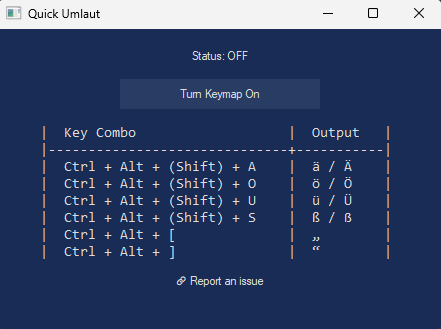
Download the latest release from the Releases page.
| Key Combo | Output |
|---|---|
| Ctrl + Alt + (Shift) + A | ä / Ä |
| Ctrl + Alt + (Shift) + O | ö / Ö |
| Ctrl + Alt + (Shift) + U | ü / Ü |
| Ctrl + Alt + (Shift) + S | ß / ẞ |
| Ctrl + Alt + [ | „ |
| Ctrl + Alt + ] | “ |
Once the app is running, press the key combinations listed above to insert umlaut characters.
In any text editor (e.g., Notepad), press:
Ctrl + Alt + U → ü
Ctrl + Alt + Shift + A → Ä
No need to change your keyboard layout or language settings.
Requires GCC (MinGW) and gdi32:
windres src/resource.rc -O coff -o build/resource.o
gcc src/main.c src/gui.c src/keymap.c build/resource.o -o build/app.exe -lgdi32 -municode -mwindows
Or use the included VS Code tasks.json for building and running.
- OS: Windows only (due to use of Windows API and keyboard hooks)
- Tested on: Windows 10, Windows 11