
SICA = Structure Investigation and Condition Assessment.
sica-bridge is a Python package that uses a vision-capable LLM to perform post-earthquake visual inspection from photos and to support rapid decision-making for bridge safety assessment.
It outputs an R-state (R1–R4) and a short reason per photo, then aggregates results to component-level and event-level summaries that can be used to prioritize inspections, closures, and follow-up actions.
Current scope: 4 component categories (approaches, columns, joints/hinges, abutments/wingwalls/shear keys).
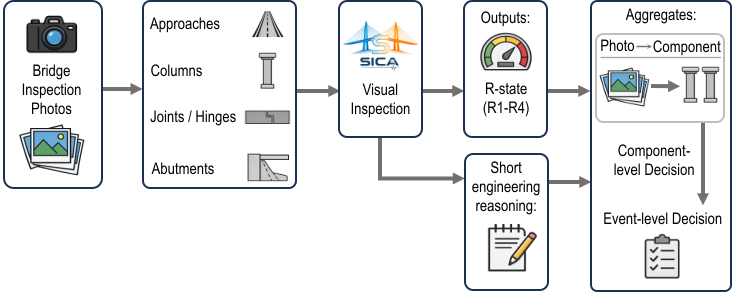
- R1 — Open
- R2 — Open but inspection needed
- R3 — Close but inspection needed
- R4 — Close immediately
.
SICA/
├─ pyproject.toml
├─ README.md
├─ src/
│  └─ sica_bridge/
│     ├─ __init__.py
│     ├─ assess/                  # photo-level assessment + aggregation helpers
│     ├─ llm/                     # LLM client interface + prompt builder
│     ├─ registry/                # component registry (ids, display names, filenames)
│     ├─ resources/               # loaders for prompts/rubrics/reference images
│     ├─ schemas/                 # Pydantic output schemas (RState, ComponentAssessment, EventAssessment)
│     ├─ utils/                   # helpers (e.g., robust JSON extraction)
│     ├─ prompts/
│     │  ├─ system.md
│     │  └─ components/           # per-component prompt templates (.md)
│     ├─ rubrics/                 # per-component rubrics (.yaml)
│     └─ assets/
│        └─ damage_examples/      # optional reference images used in prompts
│           └─ <component_id>/
│              ├─ meta.yaml       # optional captions & ordering
│              └─ *.jpg|*.png
└─ tests/                         # pytest unit tests
- Python >= 3.10
pip install sica-bridgepip install -e .pip install -e ".[dev]"The repo includes a default UI and you can have a quick local deployment for research or testing:
python gui/webserver.pyFirst install the dependencies:
python -m pip install -e ".[gui]"Then open the local server URL and upload one or more photos for each component category. Please don't forget to set up the OpenAI or other LLM API key for the testing. If you are planning to use your own computer vision models, please set up the GPU server for testing. Go to Adding a new LLM provider for further information.
For each uploaded image:
- Load reference images (optional, preset) for the component from:
assets/damage_examples/<component_id>/
- Build a prompt:
prompts/system.mdprompts/components/<component_id>.mdrubrics/<component_id>.yaml(parsed into JSON and embedded)- Pydantic JSON schema for
ComponentAssessment(the output contract)
- Call a
VisionLLMClientto produce JSON-only output. - Parse and validate the JSON into
ComponentAssessment. - Aggregate:
- component-level: worst-case (max severity) across that component’s photos
- event-level: worst-case (max severity) across all component assessments
from sica_bridge.schemas import RState, ComponentAssessment, EventAssessmentRState: Enum ofR1,R2,R3,R4ComponentAssessment:component_id: strr_state: RStatereason: strnotes: Optional[str]
EventAssessment:overall_r_state: RStatecomponents: list[ComponentAssessment]
from sica_bridge.assess import assess_component, assess_component_many, aggregate_component, aggregate_event
from sica_bridge.llm.openai_client import OpenAIVisionClient
Assess one photo
client = OpenAIVisionClient()
out = assess_component(
    component_id="columns",
    image_bytes=open("my_photo.jpg", "rb").read(),
    mime_type="image/jpeg",
    filename="my_photo.jpg",
    client=client,
)
print(out.r_state, out.reason)
Assess many photos for one component
photos = [
    (open("a.jpg","rb").read(), "a.jpg", "image/jpeg"),
    (open("b.jpg","rb").read(), "b.jpg", "image/jpeg"),
]
results = assess_component_many(component_id="columns", photos=photos, client=client)
Aggregate component and event states
overall_component = aggregate_component(results)  # -> RState
event = aggregate_event(results) # -> EventAssessment (worst-case across provided items)Implement this provider-agnostic interface:
from sica_bridge.llm.client import VisionLLMClient, VisionInputVisionLLMClient.complete_json(prompt: str, images: list[VisionInput]) -> str
should return a JSON object as plain text (no markdown), matching the schema.
from sica_bridge.llm.openai_client import OpenAIVisionClient
client = OpenAIVisionClient(model="gpt-5.2")
In case you want to use your own computer vision models or other LLMs, please also check Adding a new LLM provider
Component categories are defined in:
src/sica_bridge/registry/components.py
Each component has:
id(stable key used across prompts, rubrics, schemas, GUI)rubric_filenameinrubrics/prompt_filenameinprompts/
To add a new component, add a new ComponentSpec entry and create:
rubrics/<new_id>.yamlprompts/components/<new_id>.md- (optional)
assets/damage_examples/<new_id>/...