A Chrome extension that clips web pages and YouTube transcripts to create Linear issues with AI-powered summarization.


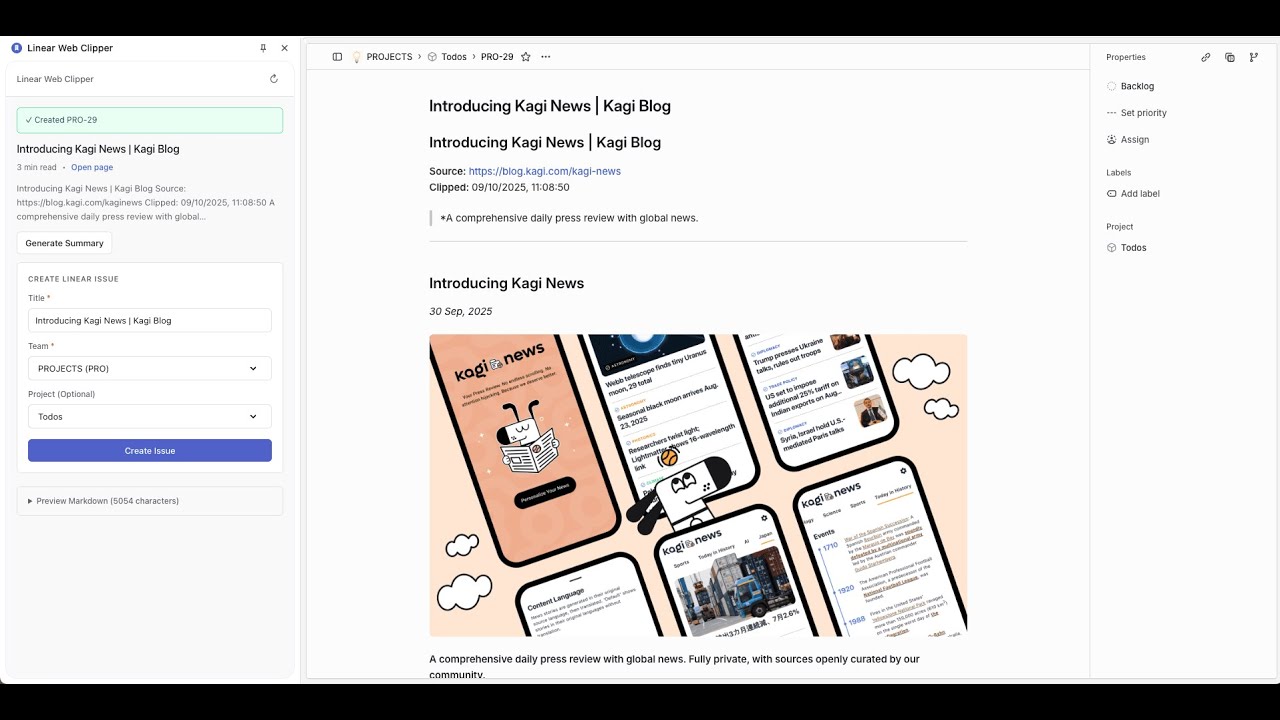
- 📄 Web Page Clipping - Extract clean content using Mozilla Readability, convert to Markdown
- 🎥 YouTube Transcripts - Auto-extract and reformat video transcripts into readable articles
- 🤖 AI-Powered - Summarize content and reformat transcripts with 8 providers (OpenAI, Anthropic, Gemini, DeepSeek, Grok, Groq, Mistral, OpenRouter)
- 🔄 Multi-Provider Fallback - Configure multiple AI providers in priority order; if one fails, the next is tried automatically
- 📋 Linear Integration - Create issues directly in your workspace with full Markdown support
- ⚙️ Customizable - Dedicated settings page with drag-and-drop provider ordering, connection testing, default teams/projects, and auto-summarization
git clone https://github.com/jingsu96/linear-web-clipper.git
cd linear-web-clipper
pnpm install
pnpm build
Load in Chrome:
- Navigate to
chrome://extensions/ - Enable "Developer mode"
- Click "Load unpacked" and select the
distfolder
- Get a Linear API key from linear.app/settings/api
- Click the extension icon and enter your API key in settings
- Navigate to any page or YouTube video and open the sidepanel
- Review extracted content, optionally generate a summary
- Select team/project and click "Create Issue"
Add one or more AI providers in the settings page (AI tab) for summarization and transcript reformatting. Providers are tried in the order you set — if one fails, the next takes over automatically.
| Provider | API Key |
|---|---|
| OpenAI | platform.openai.com |
| Anthropic | console.anthropic.com |
| Google Gemini | aistudio.google.com |
| DeepSeek | platform.deepseek.com |
| Grok (xAI) | console.x.ai |
| Groq | console.groq.com |
| Mistral AI | console.mistral.ai |
| OpenRouter | openrouter.ai (supports custom model IDs) |
| Provider | Models | API Key |
|---|---|---|
| OpenAI | GPT-4o, GPT-4o-mini, o1, o1-mini, o3-mini | platform.openai.com |
| Anthropic | Claude 3.5 Sonnet, Claude 3.5 Haiku, Claude 3 Opus | console.anthropic.com |
| Google Gemini | Gemini 2.0 Flash, Gemini 1.5 Pro, Gemini 1.5 Flash | aistudio.google.com |
| DeepSeek | DeepSeek V3, DeepSeek Reasoner | platform.deepseek.com |
| Grok (xAI) | Grok 2, Grok 2 Vision, Grok Beta | console.x.ai |
| Category | Technology |
|---|---|
| Frontend | React 19, TypeScript |
| Build | Vite 7, CRXJS (Chrome Extension MV3) |
| Content Extraction | Mozilla Readability |
| Markdown Conversion | Turndown with GFM plugin |
| AI Integration | Vercel AI SDK v6 |
| API | Linear GraphQL API (@linear/sdk) |
# Start dev server with HMR
pnpm dev

# Build for production
pnpm build

# Preview build
pnpm previewsrc/
background/ Service worker (content extraction, API calls)
sidepanel/ Main clipper UI
popup/ Settings page
content/ Content script
components/ Shared React components
lib/
storage.ts Settings and local storage
messages.ts Chrome message passing
content-extractor.ts HTML to Markdown conversion
| Permission | Purpose |
|---|---|
sidePanel |
Display clipper UI |
activeTab |
Read page content |
storage |
Store settings locally |
scripting |
Extract content from pages |
<all_urls> |
Clip from any website |
- No data collection or analytics
- All settings stored locally (encrypted by Chrome)
- Direct API calls to Linear and AI providers only
- No intermediate servers
- Open source and fully auditable
Extension not loading?
- Run
pnpm buildand verifydist/folder exists - Reload the extension in
chrome://extensions/
YouTube transcript extraction fails?
- Not all videos have transcripts available
- Verify the "Show transcript" button is visible on the video page
- Private or restricted videos may not provide transcripts
AI summarization not working?
- Verify your API key is correct in settings
- Check that you have API credits remaining with your provider
- Long content may take 30-60 seconds to process
AI processing not working?
- Use the "Test Connection" button in settings to verify each provider
- Check you have API credits remaining
- If using multiple providers, ensure at least one is enabled with a valid key
- Long transcripts may take 30-60 seconds
Contributions are welcome. Please open an issue or submit a pull request.
- Fork the repository
- Create a feature branch (
git checkout -b feature/your-feature) - Commit your changes (
git commit -m 'Add your feature') - Push to the branch (
git push origin feature/your-feature) - Open a pull request
MIT License - see LICENSE for details.
Built with:
Created by Jinghuang Su