Terminal streaming server - Run multiple commands concurrently and view their output in a beautiful web interface.




View the docs: https://lucidlines.jujiplay.com
LucidLines is a CLI tool that runs multiple terminal commands concurrently and streams their output to a modern web interface. Perfect for development workflows, monitoring multiple services, or any scenario where you need to watch multiple command outputs simultaneously.
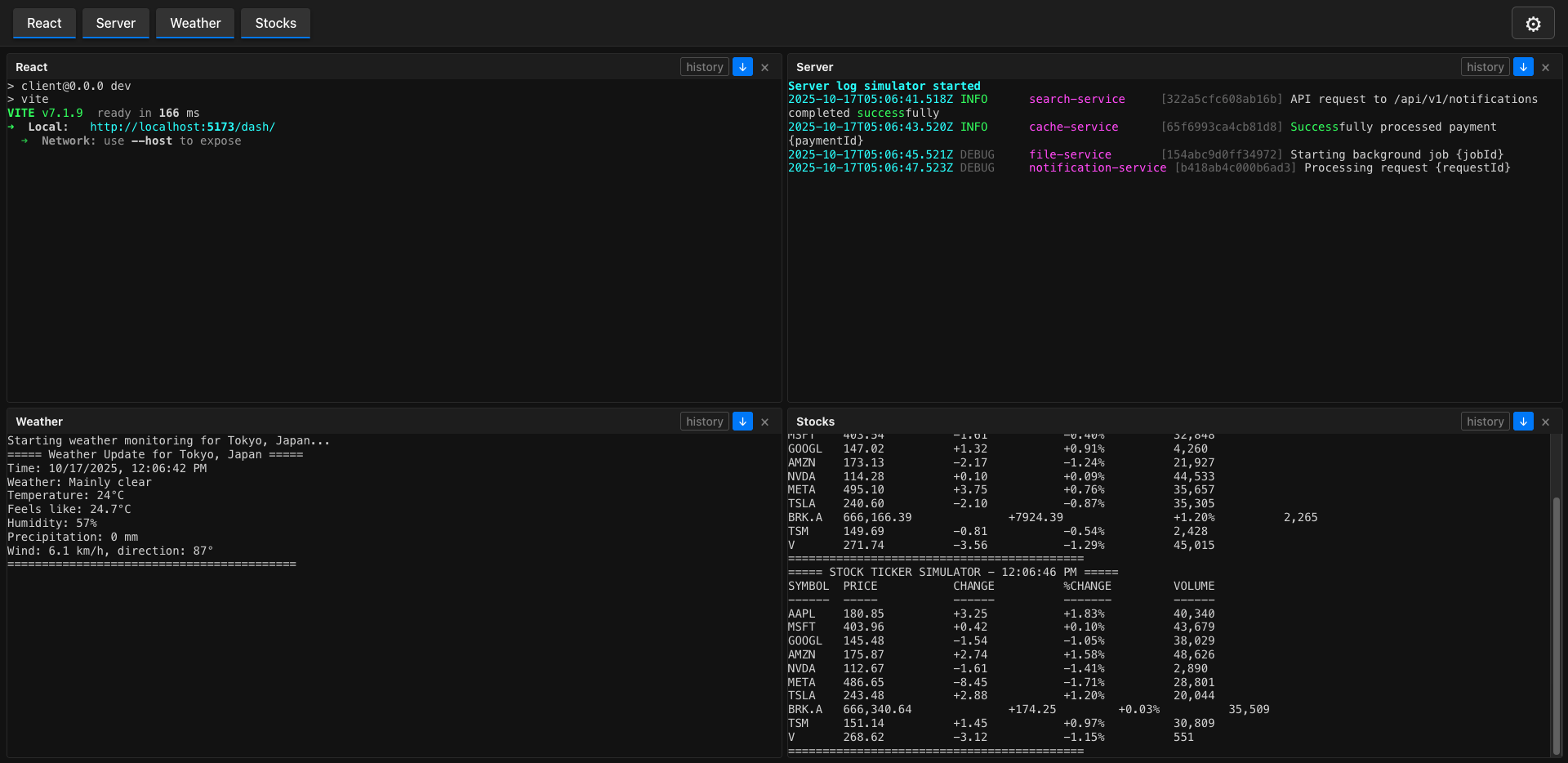
- 🚀 Concurrent Command Execution - Run multiple commands simultaneously
- 🌐 Web Interface - Beautiful, real-time terminal output in your browser
- ⚙️ Flexible Configuration - JSON5 config files for easy setup
- 🎨 Modern UI - Clean, responsive web interface with command tabs
- 🔧 CLI Options - Command-line overrides and custom config files
- 📱 Real-time Streaming - Live output updates via WebSocket
- 🛠️ Development Mode - Enhanced logging for debugging
npm install --dev lucidlineslucidlines initThis creates a .lucidlines.json5 configuration file in your current directory.
# Run with default configuration
lucidlines

# Run on custom port
lucidlines --port 3000

# Run specific commands
lucidlines --command "server:npm run dev" --command "logs:tail -f app.log"LucidLines uses JSON5 format for configuration files, allowing comments and a more human-readable syntax.
{
  // Server configuration
  port: 8080,

  // Commands to run concurrently
  commands: [
    {
      // Display name for this command
      name: "Frontend",
      // Shell command to execute
      command: "cd ./client && npm run dev"
    },
    {
      name: "Backend",
      command: "cd ./server && npm run start"
    },
    {
      name: "Database",
      command: "docker-compose up db"
    }
  ],

  // Enable development mode for enhanced logging
  dev: false
}port(number): Server port (default: 8080)commands(array): List of commands to runname(string): Display name for the commandcommand(string): Shell command to execute
dev(boolean): Enable development mode with verbose logging
lucidlines [subcommand] [options]init- Create a.lucidlines.json5configuration file
| Option | Short | Description | Default |
|---|---|---|---|
--port <port> |
-p |
Server port | 8080 |
--command <name:cmd> |
-c |
Add command (can be used multiple times) | - |
--config <file> |
-C |
Path to JSON5 config file | .lucidlines.json5 |
--dev |
-d |
Enable development mode | false |
--help |
-h |
Show help message | - |
# Initialize configuration
lucidlines init

# Run with custom config file
lucidlines --config my-config.json5

# Run specific commands with custom port
lucidlines --port 3000 \
  --command "api:cd api && npm run dev" \
  --command "web:cd web && npm run start" \
  --command "logs:tail -f combined.log"

# Development mode with verbose logging
lucidlines --dev --config dev.json5Once LucidLines is running, open your browser to the displayed URL (e.g., http://localhost:8080). The interface provides:
- Real-time Output: Live streaming of command output
- Command Tabs: Switch between different command outputs
- Clean UI: Modern, responsive design
- Auto-scroll: Automatically follows new output
- History: View previous output with manual history loading
For programmatic integration and advanced usage, LucidLines provides a comprehensive API. This allows you to:
- Control processes programmatically
- Stream output to custom applications
- Integrate with monitoring systems
- Build custom dashboards
API Documentation: https://lucidlines.jujiplay.com/core.html
- Node.js >= 22.0.0 or Bun >= 1.0.0
- npm, yarn, or bun
# Clone the repository
git clone https://github.com/juji/lucidlines.git
cd lucidlines

# Install dependencies
npm install

# Build the project
npm run build

# Run in development mode
npm run devContributions are welcome! Please feel free to submit a Pull Request.
- Fork the repository
- Create your feature branch (
git checkout -b feature/amazing-feature) - Commit your changes (
git commit -m 'Add some amazing feature') - Push to the branch (
git push origin feature/amazing-feature) - Open a Pull Request
This project is licensed under the MIT License - see the LICENSE file for details.
- Built with TypeScript
- Web client powered by React and Vite
- Configuration parsing with JSON5
- CLI built with Node.js or Bun
Happy coding! 🎉