InputPrompt
This page is deprecated, documentation moved to: https://inquirerpy.readthedocs.io/
An input prompt to ask user for some text values. Use ctrl-space to force auto-completion popup if the completer is present.
class InputPrompt(BaseSimplePrompt):
    def __init__(
        self,
        message: Union[str, Callable[[SessionResult], str]],
        style: InquirerPyStyle = None,
        vi_mode: bool = False,
        default: Union[str, Callable[[SessionResult], str]] = "",
        qmark: str = "?",
        completer: Union[Dict[str, Optional[str]], Completer] = None,
        multicolumn_complete: bool = False,
        multiline: bool = False,
        validate: Union[Callable[[str], bool], Validator] = None,
        invalid_message: str = "Invalid input",
        transformer: Callable[[str], Any] = None,
        filter: Callable[[str], Any] = None,
        **kwargs,
    ) -> None: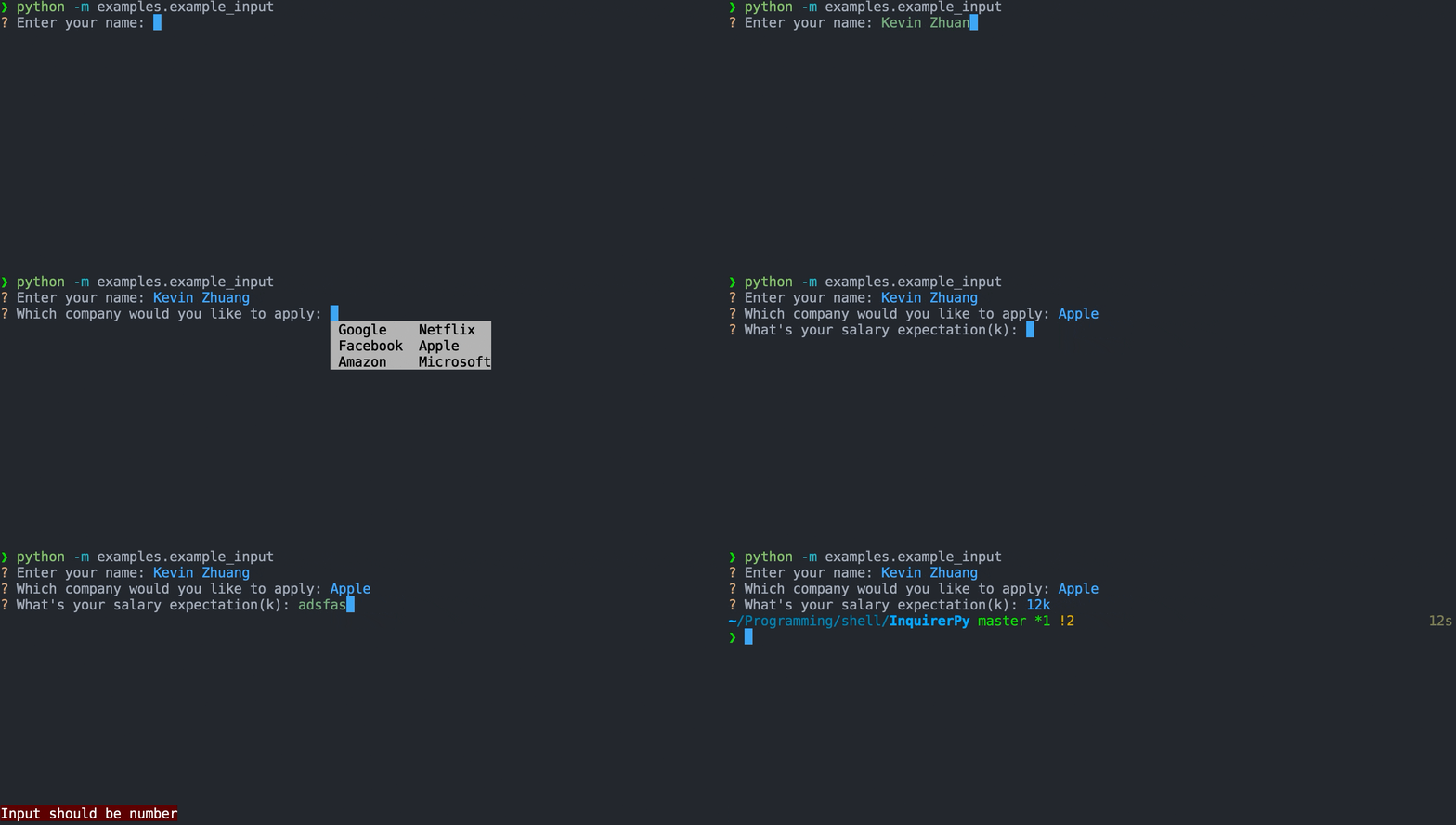
Classic Syntax (PyInquirer)
from InquirerPy.resolver import prompt
from InquirerPy.validator import NumberValidator

questions = [
    {"type": "input", "message": "Enter your name:"},
    {
        "type": "input",
        "message": "Which company would you like to apply:",
        "completer": {
            "Google": None,
            "Facebook": None,
            "Amazon": None,
            "Netflix": None,
            "Apple": None,
            "Microsoft": None,
        },
        "multicolumn_complete": True,
    },
    {
        "type": "input",
        "message": "What's your salary expectation(k):",
        "transformer": lambda result: "%sk" % result,
        "filter": lambda result: int(result) * 1000,
        "validate": NumberValidator(),
    },
]

result = prompt(questions)
Alternate Syntax
from InquirerPy import inquirer
from InquirerPy.validator import NumberValidator

name = inquirer.text(message="Enter your name:").execute()
company = inquirer.text(
    message="Which company would you like to apply:",
    completer={
        "Google": None,
        "Facebook": None,
        "Amazon": None,
        "Netflix": None,
        "Apple": None,
        "Microsoft": None,
    },
    multicolumn_complete=True,
).execute()
salary = inquirer.text(
    message="What's your salary expectation(k):",
    transformer=lambda result: "%sk" % result,
    filter=lambda result: int(result) * 1000,
    validate=NumberValidator(),
).execute()REQUIRED
The question message to display/ask the user.
When providing as a function, the current prompt session result will be provided as a parameter. If you are using the alternate syntax (i.e. inquirer), put a dummy parameter (_) in your function.
from InquirerPy import inquirer

def get_message(_) -> str:
    message = "Name:"
    # logic ...
    return message

result = inquirer.text(message=get_message)An InquirerPyStyle instance. Use get_style to retrieve an instance, reference Style documentation for more information.
If you are suing classic syntax (i.e.
style), there's no need to provide this value sincepromptalready sets the style, unless you would like to apply different style for different question.
Enable vim keybindings for the input prompt. Its exactly the same as if you enable vi_mode
in bash/readline. Checkout Keybindings documentation for more information.
If you are suing classic syntax (i.e.
prompt), there's no need to provide this value sincepromptalready sets sets this value, unless you would like to applyvi_modeto specific questions.
Set the default value of the input prompt.
When providing as a function, the current prompt session result will be provided as a parameter. If you are using the alternate syntax (i.e. inquirer), put a dummy parameter (_) in your function.
The question mark symbol to display in front of the question.
Provide a Completer class or a dictionary of words to enable auto-completion of the prompt. Use ctrl-space to force auto-completion popup.
Below is a simple word dictionary completer.
completer = {
    "hello": {
        "world": None
    },
    "foo": {
        "boo": None
    },
    "fizz": {
        "bazz": None
    }
}
For documentation of creating a complex Completer class, reference prompt_toolkit documentation
and also checkout this filepath completion as a reference.
Change the auto-completion UI to a multi column display, checkout the gif demo in this page.
Enable multiline edit. During this mode, pressing Enter won't finish the answer, it will only
create a new line. Use ESC+Enter to finish answering the question.
Provide the validator for this question. Checkout Validator documentation for full details.
Configure the error message to display to the user when input does not meet compliance.
If the validate parameter is a Validator instance, then skip this parameter.
A callable to transform the result. This is visual effect only, meaning it doesn't affect the returned result, it only changes the result displayed in the prompt.
Note: filter function won't affect the answer passed into transformer, transformer actually run before the filter function.
result = inquirer.text(message="Name:", default="Kevin Zhuang")  # UI -> ? Name: Kevin Zhuang
result = inquirer.text(
    message="Name:",
    default="Kevin Zhuang",
    transformer=lambda result: result.replace(" ", ""),
) # UI -> ? Name: KevinZhuangA callable to filter the result. Different than the transformer, this affects the actual
returned result but doesn't affect the visible prompt content.
result = inquirer.text(message="Name:", default="Kevin Zhuang")  # result = "Kevin Zhuang"
result = inquirer.text(
    message="Name:",
    default="Kevin Zhuang",
    filter=lambda result: result.replace(" ", ""),
)  # result = "KevinZhuang"