

Nightscout Clock (or NSClock) is an open-source product aimed at helping caregivers of people with type 1 diabetes have peace of mind by being able to better monitor their loved ones' blood glucose values.

- 6 colorful clockfaces
- Can get glucose data from Dexcom Share, Nightscout, LibreLink Up or Medtrum EasyFollow
- Supports mg/dl and mmol/l
- 10 minutes setup through web browser
- Configurable low/high limits
- Audible alarms in case the blood sugar is too low or too high
- Automatic brightness adjustment
- Notifies of stall data
- ...and more
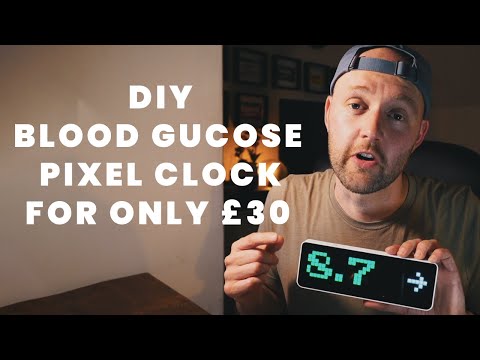
Thanks @CallumMcK
- Buy Ulanzi TC001, it is about $50, so you don't have to sell a kidney, it is available both in US and Europe (Aliexpress sells it as well, for the same price)
- Wait a few days for the delivery
- Unpack, turn on (press on
<and>buttons for a few seconds) - Connect the USB-C cable (comes with the clock) to your computer
- Go to the installation page
- Follow the instructions
- Once the clock installed, take out your phone and join
nsclockwi-fi network. Then go tohttp://192.168.4.1/ - Set up your device, provide the Wi-Fi network details, your Dexcom, Nightscout, LibreLink Up or Medtrum EasyFollow credentials, glucose warning limits and other parameters
- You're all set, enjoy!
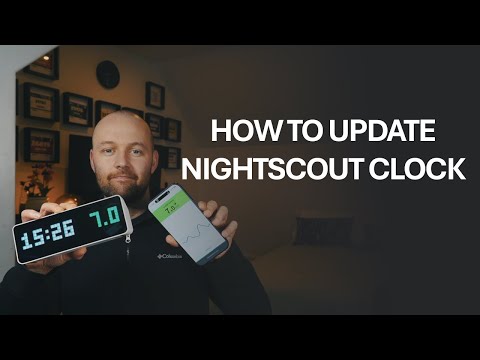
Thanks @CallumMcK
Nightscout Clock is a custom firmware for Ulanzi TC001. It can also run (with minor changes) on AWTRIX-Light custom hardware, so if you need a bigger display, feel free to research.
| Name | Look | Comment |
|---|---|---|
| Simple |  |
Horizontal bars in the bottom of the display indicate the time since the last reading No bars: less than one minute 1..5 green bars: 1..5 minutes 5 yellow bars: 6..20 minutes gray-colored value and vars: 20+ minutes |
| BIG DIGITS |  |
|
| 3-hours graph |  |
|
| Graph and value |  |
The dots on the right side replace the trend arrow. 2 white dots = horizontal arrow. 2 colored dots (white + green) = 45° arrow. 3 dots = vertical arrow. 4 dots = double arrow. Colored dots above = upward trend. Colored dots below = downward trend. Dots under the value are the same as horizontal bars on the other faces. See "Simple" face for details |
| Delta | |
|
| Time and value |  |
The dots on the right side replace the trend arrow. 2 white dots = horizontal arrow. 2 colored dots (white + green) = 45° arrow. 3 dots = vertical arrow. 4 dots = double arrow. Colored dots above = upward trend. Colored dots below = downward trend. For the bottom-side bars see "Simple" face for details |

- Web-based installation (no need to install flashing tools, you just need the clock and a web browser). The clock hosts a website where the user can configure all the parameters (data source, limits, alarms, display)
- Access-Point mode to set the initial configuration
- Support for a secondary WiFi (e.g. if you want to take the clock in your car for a long trip)
- Support for WPA-Enterprise
- Ability to set a custom hostname in case you have multiple NSClocks on the same network
- Simple glucose value display with trend arrow
- Changing color based on limits
- Nightscout data source, the clock gets units type and value boundaries from Nightscout (see how to set up using Nightscout.pro as data source)
- Juggluco data source (support for HTTP Nightscout endpoints)
- Improve WiFi compatibility (setting up WiFi during the installation)
- Gluroo data source (API_SECRET within the URL parameters) (see how to setup video)
- Simplified Nightscout API like xDrip+ Open Web Service support. When adding it as a data source, choose Nightscout and check the
Simplified APIcheckbox. Make sure your source device (e.g. your phone running xDrip) has a static IP address and is on the same WiFi network. Also don't forget to check the port setting; for xDrip it is usually17580 - Dexcom Share data source
- LibreLinkUp (libreview) data source
- Medtrum EasyFollow data source
- Brightness adjustment
- Brightness can be adjusted within the Web UI
- Automatic brightness adjustment based on the ambient light
- Double-click on the middle button on the clock turns the display on and off
- Multiple clock faces support
- Default clock face can be selected in the Web UI
- Clock faces can be changed using arrow buttons on the clock
- Simple clock face (value and trend arrow)
- Full-width glucose graph
- Graph, value and trend indicator
- BIG DIGITS
- Value, trend and delta
- Clock and BG value (timezone is set in the clock's web interface)
- Changes color to gray if the data is too old
- Smart data and screen update timings: read data once it appears, refresh screen when needed
- API data source. The clock has a simple Nightscout-like API which can receive glucose values from an external source. The main purpose of this feature is the ability to test the clock during the clockfaces development. In order to activate this feature, select the API data source within the clock's Web UI. Here are the endpoints:
- /api/v1/entries POST endpoint receives an array of Nightscout-like entries. The only significant fields are
sgv,dateandtrendordirection. Due to the limited memory the API is stable when sent less than 10 recotds - /api/v1/entries DELETE endpoint deletes all entries regardless of the payload
- /api/v1/entries POST endpoint receives an array of Nightscout-like entries. The only significant fields are
- Firmware versioning
- Alarms with configurable Thresholds, snooze times and silence intervals
- To turn the device on or off press both arrow buttons for 3 seconds
- To reset the device to factory defaults (hard reset) during boot sequence (when version number is displayed) keep the center (select) button pressed.
- Add more clock faces
- Battery, humidity and temperature
- Smooth color change (rainbow) based on the value and boundaries
- Add more data sources
- Medtronic
- ...more... (if you are the author of a CGM data collecting app/service and you want your data to be displayed on the Nightscout Clock, please contact me)
- Fixed email parsing Medtrum credentials input, thanks @logicafuzzy, merged #127
- Added support for xDrip+ Open Web Service as an extension of the Nightscout data source, resolving #86
- Medtrum EasyFollow data source support (discussion), inspired by @pachi81's work
- Fixed Open WiFi networks validation
- Moved trend indicator to the right in the "Time and value" clockface
- Implemented LibreLink Up patient selection for multi-patient accounts. Fixed #65
- Fixed a typo in the WebUI javascript
- Added trend indicator to the clock-and-value clock face. #49
- Added manual brightness control from the device itself. When the brightness is in manual mode, pressing
<or>for more than a second increases or decreases brightness. Setting persists over restarts. #74
- Fixed support for Dexcom Japan
- Added custom alarm melodies, which can be set through RTTTL strings in alarm settings
- Implemented Alarm Intensive Mode, addressing #61
- Fixed WiFi password validation for Open WiFi networks
- Added possibility of factory resetting the device on start-up (when version string is displaying press the select button)
- Better AP mode handling
- Implemented open WiFi connectivity, closing #105
- Changed age bars colors so that they do not disappear when the brightness is minimal. #101
- Increased version presented to LibreLinkUp servers, closing #88
- Added "dark rooms" brightness mode and changed curve for the manual brightness. Thanks @unxmaal for #67
- Fixed trend arrow display on the Big Text clockface when brightness is not in auto mode. #47
- Adjusted version display on start-up
- Added version number, update check and link to the updating page to the WebUI. #10
- Added development environment setup instructions. #26
- Fixed LibreLink Up Server label. #50
- Fixed delta for LibreLinkUp source
- Now I can consider LibreLinkUp as being functioning. So closing #9 and #27
- Yet another attempt to fix LibreLinkUp
- Another attempt to get values from LibreLinkUp
- Added custom "Data is old" threshold, (thanks @TheBeardedTechGuy for #43)
- Added glucose age display as bars in the bottom part of most of the clockfaces (thanks @TheBeardedTechGuy for #41)
- Fixed Nightscout domain name validation, closed #39
- Added API endpoint to switch display power on and off as in the example below
curl -X POST http://nsclock.lan/api/displaypower \
  -H "Content-Type: application/json" \
  -d '{"power": "off"}'
- Fixed delta showing 0 when there are multiple sources uploading data to Nightscout. #25
- Implemented WPA-Enterprise connectivity (Wifi type selector available for additional WiFi network). #23
- Fixed project dependencies divergence. #30
- Implemented possibility of setting custom hostname. #18
- Implementing possibility of having additional WiFi network. #7
- Updated README to be more customer-friendly
- Started preparing for LibreLink Up data source integration, #9)
- Improved memory management to avoid NOMEMORY issues and unplanned restarts, #19
- Improved WiFi SSID validation, #16
- Fixed typos in Web UI (thanks @motinis)
- Finished alarms feature
- Improved WiFi reconnection handling #15
- Migrated development environment to Linux
- Removed boot sound
Please read the Contriburing instructions
The code is heavily inspired by (has a lot of copy-pasted code from :D ) AWTRIX Light project.


![@github-advanced-security[bot]](https://avatars.githubusercontent.com/in/57789?s=64&v=4)