Retrieves the temperature and humidity measurements from a DHT11 sensor, and renders them in a Java FX chart.


The following command will download the ardw-sensor-fx program to the current folder and start it.
git clone https://github.com/llschall/ardw-sensor-fx;
./ardw-sensor-fx/gradlew -p ardw-sensor-fx run;
- Connect the DHT ground (pin -) to the Arduino gnd. Picture: black cable
- Connect the DHT power (pin +) to the Arduino 5V. Picture: red cable
- Connect the DHT signal (pin out) to the Arduino pin 4. Picture: green cable


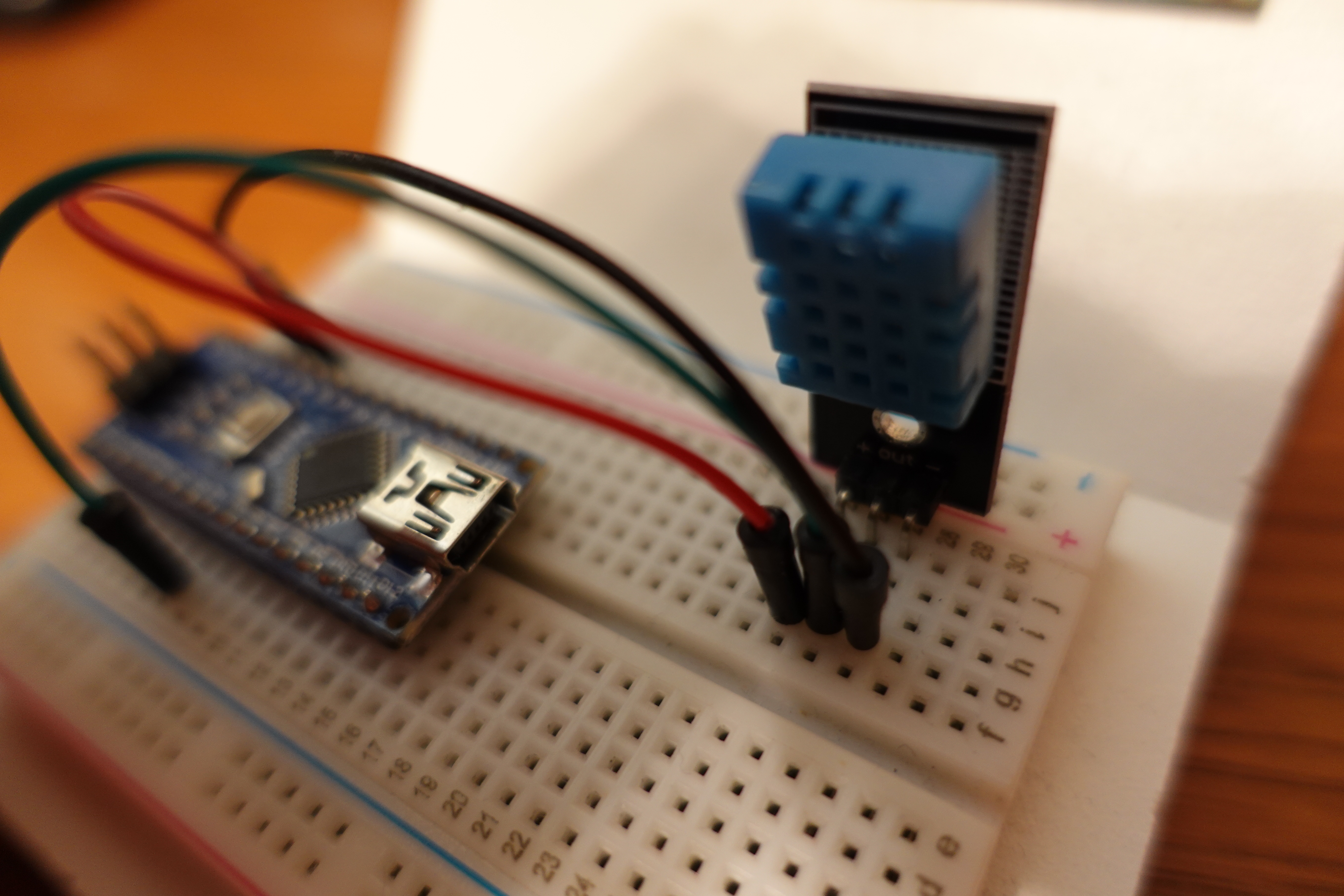
And of course connect you Arduino board to your PC using any USB cable.
Bluetooth connection might work as well but has not been tested so far.
Upload the ino file content hereafter to your Arduino board, using for instance the official Arduino IDE: https://github.com/llschall/ardw-sensor-fx/blob/main/ino/ardw-sensor-fx/ardw-sensor-fx.ino
It might be necessary to firstly import the Ardwloop and DHT libraries to your Arduino IDE to make the compilation successful.
